Carmen J. Moore

Are you a beginner in the world of photography and wondering how digital cameras actually work? Digital cameras have become an essential tool for capturing moments and creating memories. Understanding the basics of how a digital camera functions can help you improve your photography skills and take better pictures.
A digital camera works by capturing light through a lens and converting it into an electronic signal that can be stored as a digital image. Unlike traditional film cameras, digital cameras do not use film to record images. Instead, they use an image sensor, typically a CCD (charge-coupled device) or CMOS (complementary metal-oxide-semiconductor) sensor, to capture light and create digital images.
When you press the shutter button on a digital camera, the camera’s image sensor captures the light that enters through the lens and converts it into digital data. This data is then processed by the camera’s internal processor and stored on a memory card as a digital image file. Understanding this process can help you make informed decisions about settings such as ISO, aperture, and shutter speed to achieve the best results in your photography.




Understanding the Basics of Digital Cameras
Before diving into the world of digital photography, it’s important to understand the basic components and functions of a digital camera. A digital camera captures and stores images electronically, unlike traditional film cameras that use photographic film.
Key components of a digital camera include the image sensor, which converts light into electrical signals, and the lens, which focuses light onto the sensor. The sensor is a crucial part of the camera as it determines the image quality and resolution.
When you press the shutter button on a digital camera, the sensor captures the light entering through the lens and converts it into a digital image file. This file is then stored on a memory card inside the camera for later retrieval and viewing.
Understanding these basic functions will help you make informed decisions when selecting a digital camera and adjusting settings to capture the best possible photos. Experimenting with different settings and techniques will enhance your photography skills and creativity.
Components of a Digital Camera
Image Sensor: The image sensor is the heart of a digital camera. It captures light and converts it into digital signals.

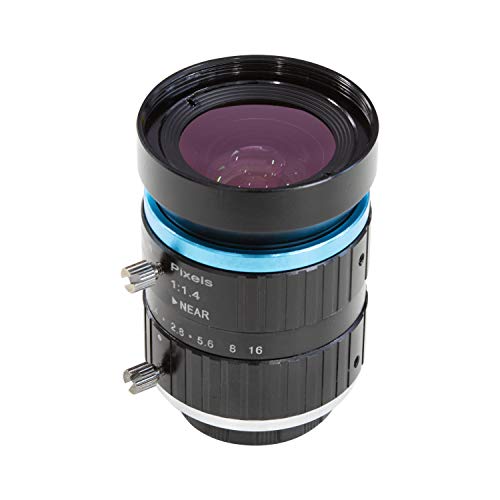
Lens: The lens focuses light onto the image sensor, determining the clarity and quality of the image.
Processor: The processor processes the digital signals from the image sensor and converts them into a viewable image.
Memory Card: The memory card stores the captured images and videos for later retrieval.
Display Screen: The display screen shows the preview of the image or video being captured.
Shutter Button: The shutter button is used to capture the image by activating the image sensor.
Battery: The battery provides power to the camera to operate its functions.
How Digital Cameras Capture Images
When you press the shutter button on a digital camera, several processes take place to capture an image. Here’s an overview of how digital cameras work:
- Light enters the camera: Light from the scene you are photographing enters the camera through the lens.
- Image sensor: The light then hits the image sensor, which is made up of millions of tiny light-sensitive cells called pixels.
- Pixel conversion: Each pixel converts the light it receives into an electrical signal.
- Signal processing: The camera’s processor processes these electrical signals to create a digital image.
- Storage: The digital image is then stored on a memory card in the camera.
- Display: You can preview the image on the camera’s screen or transfer it to a computer for further editing and sharing.
Memory Cards and Storage Options
One of the key components of a digital camera is the memory card, where all your photos and videos are stored. Memory cards come in various formats and sizes, such as SD, microSD, CF, and more. It’s essential to choose a memory card that is compatible with your camera and offers enough storage capacity for your needs.
Types of Memory Cards:
- SD cards: These are the most common type of memory cards used in digital cameras. They are compact and offer different storage capacities.
- microSD cards: Smaller in size, microSD cards are commonly used in action cameras and smartphones that have a camera function.
- CF cards: CompactFlash cards are larger in size and are often used in professional-grade cameras that require high-speed data transfer.
When selecting a memory card for your camera, consider factors such as storage capacity, speed class, and compatibility with your device. It’s recommended to choose a reputable brand and avoid purchasing counterfeit or low-quality memory cards to prevent data loss.
Understanding Camera Settings
One key aspect of using a digital camera is understanding the various settings and options available to you. Here are some common camera settings that beginners should familiarize themselves with:

1. ISO
ISO determines the sensitivity of your camera’s sensor to light. A lower ISO value (e.g., 100) is ideal for bright conditions, while a higher ISO value (e.g., 1600) is better for low-light situations. However, higher ISO settings can introduce noise or graininess to your photos.
2. Aperture
Aperture controls the amount of light that enters the camera through the lens. A lower f-number (e.g., f/2.8) means a larger aperture and more light, while a higher f-number (e.g., f/16) means a smaller aperture and less light. Aperture also affects depth of field, with lower f-numbers creating a shallower depth of field for blurred backgrounds.
Editing and Enhancing Digital Photos
Once you have taken photos with your digital camera, you can enhance and edit them to make them even better. There are many software programs available for editing digital photos, such as Adobe Photoshop, Lightroom, and GIMP. These programs allow you to adjust the brightness, contrast, color balance, and other aspects of your photos.
In addition to basic editing tools, you can also use special effects and filters to give your photos a unique look. You can crop your photos to remove unwanted elements, straighten them, and resize them for printing or sharing online. Some software programs also offer advanced features like noise reduction, sharpening, and selective editing.
Editing and enhancing your digital photos can help you create stunning images that showcase your creativity and vision. Experiment with different editing techniques to find the style that best suits your photos and personal aesthetic.

Sharing Your Digital Images
Once you have taken some amazing photos with your digital camera, you’ll likely want to share them with friends and family. One of the easiest ways to do this is by transferring the images from your camera to your computer. You can then upload them to social media platforms like Facebook, Instagram, or Twitter.
If you prefer a more personal touch, you can also email the photos to individual recipients or create a digital photo album to share with a larger group. Some digital cameras even have built-in Wi-Fi capabilities, allowing you to transfer images wirelessly to your computer or smartphone.
Remember to respect copyright laws and permissions when sharing your digital images online. Always give credit to the photographer if you are not the original creator of the image.
Tips for Beginner Photographers
Photography can be a fun and rewarding hobby, but it can also be overwhelming for beginners. Here are some tips to help you get started:
1. Learn the basics
Before you start taking photos, it’s important to understand the basics of photography. Learn about composition, lighting, and camera settings to improve your skills.
2. Practice regularly
The more you practice, the better you’ll become. Take your camera with you everywhere and experiment with different subjects and settings to improve your photography skills.
Remember: Practice makes perfect!
FAQ
How does a digital camera capture photos?
A digital camera captures photos by using a sensor to convert light into electrical signals. When you press the shutter button, the camera’s lens focuses the light onto the sensor, which then records the light information as digital data. This data is processed by the camera’s internal processor and saved as an image file on a memory card.
What are the main components of a digital camera?
The main components of a digital camera include the lens, image sensor, processor, LCD screen, memory card, and battery. The lens captures light and focuses it onto the image sensor, which converts the light into digital data. The processor processes this data to create an image file, which is then displayed on the LCD screen. The image is then saved on a memory card, and the camera is powered by a battery.