
 Carmen J. Moore
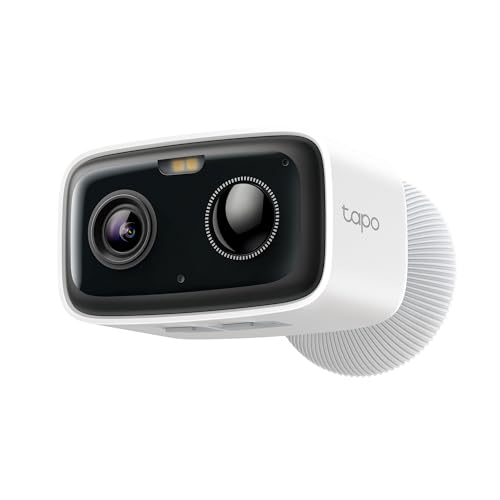
Cellular security cameras are a modern solution for remote monitoring and surveillance. These cameras use cellular networks to transmit data, eliminating the need for a wired internet connection. This makes them ideal for locations where traditional internet connectivity is not available or unreliable.
The operation of a cellular security camera begins with capturing video footage using a built-in camera sensor. The footage is then compressed and encrypted for secure transmission over the cellular network. The camera is equipped with a SIM card, similar to a mobile phone, which allows it to connect to the cellular network and send data to a remote server or cloud storage.
Users can access the live feed from the cellular security camera using a smartphone, tablet, or computer, as long as they have an internet connection. Many cellular security cameras also offer motion detection and alerts, so users can be notified when there is activity in the monitored area. Overall, cellular security cameras provide a flexible and reliable solution for remote monitoring and surveillance needs.
The Basics of Cellular Security Cameras
Cellular security cameras work by utilizing cellular networks to transmit data and footage to a central monitoring station or directly to your smartphone. These cameras are equipped with a SIM card that allows them to connect to the cellular network just like a mobile phone.


When the camera detects motion or an event, it captures the footage and sends it over the cellular network to the designated recipient. This enables you to monitor your property in real-time, receive alerts, and access recorded footage remotely.
Cellular security cameras are ideal for locations where traditional Wi-Fi connection is not feasible or reliable. They provide a reliable and secure way to keep an eye on your property without the need for a wired internet connection.
Understanding Cellular Technology
Cellular technology enables communication between devices using cellular networks, such as 4G and 5G. It allows devices to transmit data wirelessly over long distances without the need for a Wi-Fi network.
Key Components of Cellular Technology:
- Cellular Network: A network of cell towers that connect devices to the internet and enable communication.
- Sim Card: A small card that stores the subscriber’s information and allows the device to connect to the cellular network.
- Modem: A device that converts digital data into a form that can be transmitted over the cellular network.
Cellular technology is widely used in security cameras to provide remote monitoring and surveillance capabilities. Cameras equipped with cellular technology can transmit video footage and alerts to a central monitoring station or a mobile device, ensuring real-time monitoring even in areas without Wi-Fi coverage.
Wireless Connectivity for Remote Monitoring
One of the key features of cellular security cameras is their ability to connect wirelessly to the internet, allowing for remote monitoring from anywhere in the world. These cameras use cellular networks, such as 4G LTE, to transmit data and footage to a central server or cloud storage.
With wireless connectivity, users can access live video feeds, receive alerts, and even control the camera remotely through a smartphone app or web browser. This enables real-time monitoring of security cameras without the need for a wired internet connection, making them ideal for remote locations or temporary setups.
Powering Your Cellular Camera
Cellular security cameras typically require a power source to operate and transmit data. There are several options available for powering your cellular camera:
Battery
Some cellular cameras are designed to run on rechargeable batteries, making them easy to install in remote locations where power sources are not readily available. These cameras can be recharged using a solar panel or a power outlet.
Hardwired
For more permanent installations, you can power your cellular camera using a hardwired connection to an electrical outlet or a power over Ethernet (PoE) connection. This ensures a constant power source for uninterrupted operation.
| Power Source | Pros | Cons |
|---|---|---|
| Battery | Portability, easy installation | Requires recharging |
| Hardwired | Constant power source, uninterrupted operation | Requires professional installation |
Securing Your Data with Cellular Cameras
When it comes to securing your data, cellular cameras offer a reliable and efficient solution. These cameras use cellular networks to transmit data, ensuring that your footage is securely transferred without the need for a Wi-Fi connection.
Cellular cameras are equipped with SIM cards that allow them to connect to the cellular network. This means that even if your Wi-Fi is down or unavailable, the camera can still send data to the cloud or your mobile device. This ensures that your data is always accessible and secure.
Furthermore, cellular cameras often come with advanced encryption protocols to protect your data from unauthorized access. This level of security ensures that your footage remains private and safe from potential cyber threats.
| Benefits of Cellular Cameras: | – Secure data transmission |
| – Reliable connection | |
| – Advanced encryption |
Overall, cellular cameras provide a robust solution for securing your data, offering peace of mind knowing that your footage is safe and accessible whenever you need it.
Choosing the Right Cellular Camera for You
When selecting a cellular security camera, there are several factors to consider to ensure you choose the right one for your specific needs.
1. Coverage: Make sure the camera is compatible with the cellular network in your area to ensure reliable connectivity.
2. Resolution: Consider the resolution of the camera to ensure you get clear and detailed images and videos.
3. Power source: Determine whether the camera is battery-powered, solar-powered, or requires a power source for continuous operation.
4. Storage: Look for cameras that offer sufficient storage options, such as cloud storage or SD card support, for storing captured footage.
5. Remote access: Choose a camera that allows you to access live footage remotely through a mobile app or web portal for real-time monitoring.
By considering these factors, you can select the right cellular camera that meets your security needs and provides peace of mind.
Installing and Setting Up Your Cellular Camera
Setting up a cellular security camera is a relatively straightforward process that typically involves the following steps:
- Choose a suitable location for your camera that provides optimal coverage of the area you want to monitor.
- Insert a SIM card into the camera to enable cellular connectivity. Make sure the SIM card is activated and has a data plan.
- Power on the camera and follow the manufacturer’s instructions to connect it to your smartphone or computer.
- Download the accompanying mobile app or software to access the camera’s live feed and settings.
- Configure the camera’s settings, such as motion detection sensitivity, recording schedule, and alert notifications.
- Mount the camera securely using the included mounting hardware, ensuring it has a clear view of the area you want to monitor.
- Test the camera to ensure it is functioning properly and adjust the settings as needed.
Additional Tips:
- Regularly check the camera’s battery or power source to ensure it remains operational.
- Consider adding additional cameras to cover multiple areas or angles for comprehensive security coverage.


How does a cellular security camera perform in areas with weak cellular signals? Can it still transmit data effectively?
Can someone clarify how the data is secured when using these cellular cameras? I’m worried about privacy and unauthorized access.
I don't think cellular cameras are as reliable as Wi-Fi ones. Wi-Fi cameras seem to have better video quality and features.
How does the battery life of cellular cameras compare to traditional wired ones? Is it worth the trade-off?
I installed a cellular security camera at my farmhouse, where there's no Wi-Fi. It's been great so far! The video quality is decent, and I love being able to check in from anywhere. Just a tip: make sure your SIM card has a good data plan, or you'll run into issues with connectivity.