
 Carmen J. Moore
Digital cameras have revolutionized the way we capture and store memories, offering convenience and flexibility that traditional film cameras could not match.
But have you ever wondered where all those photos actually go once you click the shutter button?


Let’s delve into the fascinating world of digital photography and explore the storage mechanisms that allow us to preserve our precious moments in a digital format.
Understanding Digital Camera Storage
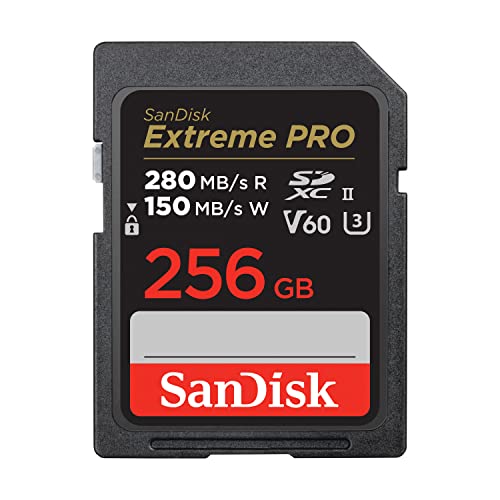
When you take a photo with a digital camera, the image is stored on a memory card inside the camera. The memory card acts as the storage medium where all your photos are saved.
There are different types of memory cards used in digital cameras, such as SD cards, microSD cards, and CompactFlash cards. These cards come in various capacities, ranging from a few gigabytes to several terabytes, allowing you to store a large number of photos depending on the card’s size.
Types of Memory Cards:
- SD Card
- MicroSD Card
- CompactFlash Card
Most digital cameras also have internal storage, but it is usually limited compared to memory cards. Some cameras may allow you to transfer photos from the internal storage to a memory card or a computer to free up space.
It’s essential to choose a memory card with sufficient capacity and speed to ensure smooth photo capture and storage. Regularly backing up your photos to a computer or cloud storage is also recommended to prevent the loss of precious memories.

Internal Memory vs. Memory Cards
When it comes to storing photographs on a digital camera, you have two main options: internal memory and memory cards. Each has its own advantages and limitations.
Internal Memory
Internal memory refers to the built-in storage capacity of the camera itself. This memory is limited and varies from camera to camera. While internal memory allows you to store photos without the need for an external memory card, it typically has a smaller capacity compared to memory cards. This means you may run out of storage space quickly, especially if you take a lot of high-resolution photos or videos.
Memory Cards
Memory cards are external storage devices that can be inserted into your camera to expand its storage capacity. Memory cards come in various sizes and types, such as SD, microSD, and CompactFlash. They offer a greater amount of storage space compared to internal memory, allowing you to store more photos and videos. Additionally, memory cards are portable and can be easily swapped between cameras or transferred to other devices for viewing or backup.
Types of Memory Cards
There are several types of memory cards that digital cameras use to store photographs. Some of the most common types include:
1. Secure Digital (SD) Cards
SD cards are one of the most widely used types of memory cards. They come in different sizes, such as SD, SDHC, and SDXC, with varying storage capacities.
2. CompactFlash (CF) Cards
CompactFlash cards are larger in size compared to SD cards and are often used in professional cameras due to their faster read and write speeds.
Storage Capacity of Digital Cameras
When it comes to storing photographs, digital cameras use various types of memory cards. The storage capacity of a digital camera depends on the type and size of the memory card it uses.
Types of Memory Cards:
- SD (Secure Digital) Cards
- MicroSD Cards
- CompactFlash Cards
- XQD Cards
Each memory card has a different storage capacity, ranging from a few gigabytes (GB) to several terabytes (TB). The higher the capacity of the memory card, the more photographs the digital camera can store.
Factors Affecting Storage Capacity:
- Resolution of the photographs
- File format (JPEG, RAW, etc.)
- Compression level
It’s essential to consider the storage capacity of your digital camera when choosing a memory card to ensure you have enough space to capture all the moments you want to preserve.
Managing and Transferring Photos
Once your digital camera captures a photo, it stores the image file on a memory card inserted into the camera. Memory cards come in various formats like SD, CF, and microSD, and they have different storage capacities.

When you want to transfer photos from your camera to a computer or another device, you can use a USB cable to connect the two devices. Alternatively, you can remove the memory card from the camera and insert it into a card reader connected to the computer.
Cloud Storage Options
Cloud storage has become increasingly popular for storing photographs captured with digital cameras. It offers users the convenience of accessing their photos from any device with an internet connection. Here are some popular cloud storage options:
| Cloud Service | Features |
|---|---|
| Google Photos | Offers free unlimited storage for high-quality photos and videos, automatic organization, and easy sharing options. |
| Dropbox | Provides file storage and syncing, with the ability to store photos in designated folders and easily share them with others. |
| Apple iCloud | Integrated with Apple devices, iCloud offers photo storage, synchronization across devices, and the ability to share albums with friends and family. |
| Amazon Photos | Offers secure photo storage, automatic organization, and the ability to access photos from any device, including Fire tablets and Fire TV. |
These cloud storage options provide convenient solutions for storing and managing the photos captured with digital cameras, ensuring that your memories are safely preserved and easily accessible.
FAQ
How do digital cameras store photographs?
Digital cameras store photographs on a memory card, which is a small, removable storage device typically located in a slot on the camera. The memory card saves the digital image files in a format that can be easily accessed and transferred to a computer or other devices.
What type of memory card is commonly used in digital cameras?
The most common type of memory card used in digital cameras is an SD card (Secure Digital card). SD cards are compact, reliable, and widely compatible with various devices, making them a popular choice for storing photographs.

Can digital cameras store photographs internally?
Yes, some digital cameras have built-in memory that allows them to store photographs internally. However, the storage capacity of internal memory is usually limited compared to external memory cards, so it’s common practice to use memory cards for storing a larger number of photos.
What happens if a memory card in a digital camera gets full?
If a memory card in a digital camera gets full, the camera will typically display a message indicating that the card is full and cannot store additional photos. In this case, you can either transfer the photos to a computer or other storage device to free up space on the memory card, or replace the full memory card with a new one.
Is it possible to transfer photos directly from a digital camera to a smartphone for storage?
Yes, it is possible to transfer photos directly from a digital camera to a smartphone for storage using various methods such as connecting the camera and phone via a USB cable, using a memory card reader with the smartphone, or utilizing wireless transfer technologies like Bluetooth or Wi-Fi. This allows you to easily access and store your photos on your smartphone for sharing or backup purposes.


What are the essential things to look for when choosing a memory card for my digital camera? I mainly shoot in RAW and want to make sure I have enough capacity and speed. Thanks!
When choosing a memory card, consider the capacity (GB/TB), speed class (SD Class 10, UHS-I/UHS-II), and type (SD, microSD, CF). For RAW images, a high-speed card (like UHS-I/UHS-II) is recommended to ensure smooth performance.
I had a CompactFlash card for my DSLR, and it worked well, but I switched to SD cards for my mirrorless camera. The speed difference is noticeable!