
 Carmen J. Moore

Welcome to the world of photography with the Nikon D3000 digital SLR camera! Whether you’re a beginner looking to explore the art of photography or a seasoned pro wanting to unlock the full potential of your camera, this guide is here to help you take your skills to the next level.
The Nikon D3000 is a powerful and versatile camera that offers a wide range of features and capabilities. From capturing stunning landscapes to shooting fast-paced action, this camera is designed to deliver exceptional image quality and performance in any situation.
In this comprehensive guide, we will walk you through the essential functions and settings of the Nikon D3000, helping you understand how to use each feature to its fullest potential. Whether you’re interested in mastering manual mode, exploring the creative possibilities of aperture and shutter speed, or learning how to capture beautiful portraits, this guide will provide you with the knowledge and skills you need to elevate your photography game.
Overview of Nikon D3000 Camera
The Nikon D3000 is a popular digital SLR camera known for its user-friendly design and excellent image quality. It features a 10.2-megapixel DX-format sensor, 3-inch LCD screen, and a range of advanced shooting modes for both beginners and experienced photographers.

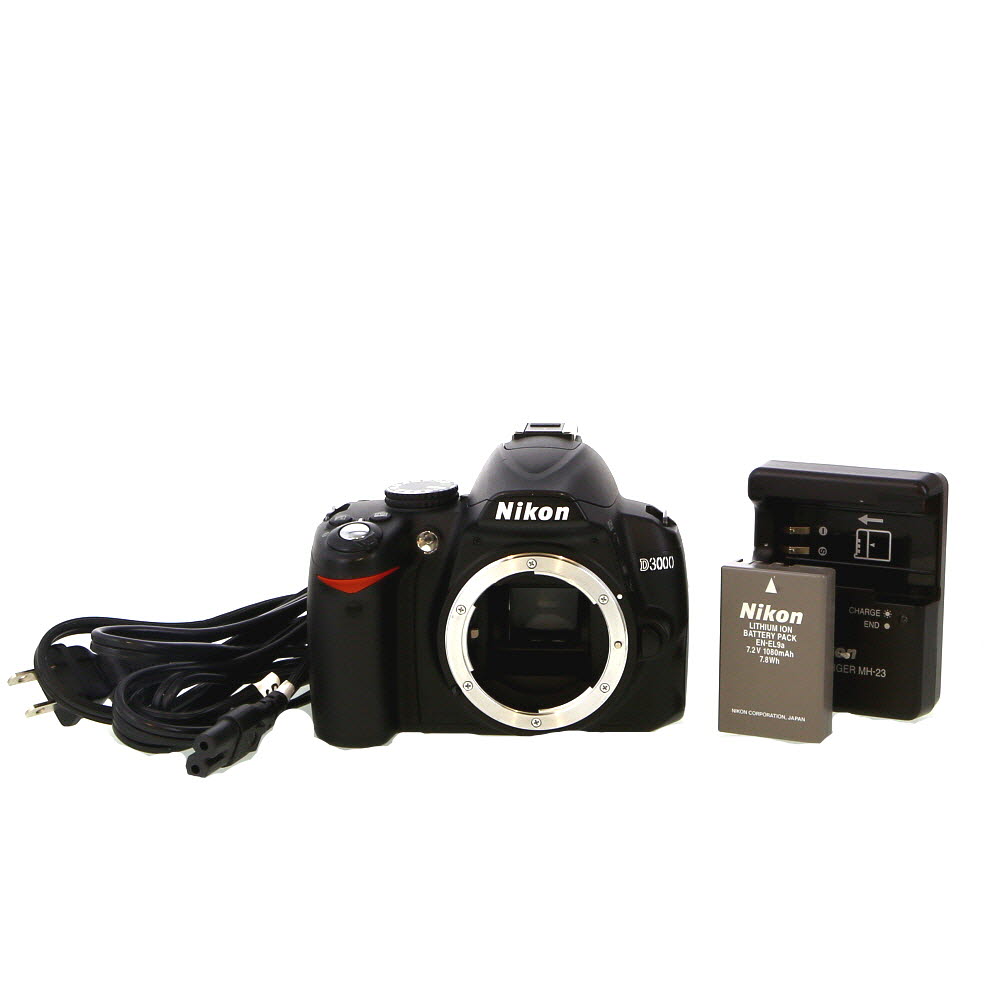


With its compact and lightweight body, the D3000 is easy to carry around, making it a great choice for travel and everyday photography. It also offers a Guide Mode that provides step-by-step assistance for setting up the camera and capturing stunning photos.
Main Features:
- 10.2-megapixel DX-format sensor: Delivers high-resolution images with vibrant colors and sharp details.
- 3-inch LCD screen: Allows for easy framing and reviewing of photos.
- Guide Mode: Helps users learn about different camera settings and techniques.
Basic Features and Functions
The Nikon D3000 digital SLR camera is equipped with a range of basic features and functions to help you capture stunning photos. Here are some key features:
| Resolution | The D3000 offers a resolution of 10.2 megapixels, allowing you to capture high-quality images with fine details. |
| ISO Sensitivity | You can adjust the ISO sensitivity from 100 to 1600, enabling you to shoot in various lighting conditions. |
| Shutter Speed | The camera has a shutter speed range of 1/4000 to 30 seconds, giving you control over motion blur and low-light situations. |
| Exposure Modes | Choose from various exposure modes such as Program, Aperture Priority, Shutter Priority, and Manual to suit your shooting style. |
| Autofocus System | The D3000 features an 11-point autofocus system for fast and accurate focusing on your subject. |
These basic features and functions make the Nikon D3000 a versatile camera for beginners and enthusiasts alike.
Setting Up Your Nikon D3000
Before you start using your Nikon D3000 digital SLR camera, it’s important to set it up properly to ensure optimal performance. Here are the steps to set up your camera:
1. Inserting the Battery
Open the battery compartment on the bottom of the camera and insert the fully charged battery according to the polarity markings. Make sure the battery is securely in place before closing the compartment.

2. Inserting a Memory Card
Open the memory card slot cover on the side of the camera and insert a compatible memory card (SD or SDHC) with the label facing the back of the camera. Push the card in until it clicks into place and close the slot cover.
| Step | Description |
| 3. | Attaching a Lens |
| 4. | Setting the Date and Time |
| 5. | Choosing a Shooting Mode |
Taking Photos with Nikon D3000
When using your Nikon D3000 digital SLR camera to take photos, there are a few key things to keep in mind to ensure you capture high-quality images.
1. Set the Correct Mode
Before taking photos, make sure to set the camera to the appropriate shooting mode based on your subject and desired outcome. The D3000 offers various shooting modes such as Auto, Program, Shutter Priority, Aperture Priority, and Manual. Choose the mode that best suits your shooting conditions.
2. Focus and Composition
Use the camera’s autofocus system to ensure your subject is sharp and in focus. You can also manually adjust the focus for more control. Pay attention to the composition of your shot, using techniques like the rule of thirds to create visually appealing images.
- Frame your shot carefully
- Consider the background
- Experiment with different angles
Adjusting Camera Settings
When using the Nikon D3000 digital SLR camera, it’s essential to adjust the settings to get the best results. Here are some key settings you can adjust:
1. ISO: Adjust the ISO setting to control the camera’s sensitivity to light. A lower ISO is ideal for bright conditions, while a higher ISO is suitable for low-light situations.
2. Aperture: Adjust the aperture to control the amount of light entering the camera. A lower f-stop (wider aperture) allows more light, while a higher f-stop (narrower aperture) lets in less light.
3. Shutter Speed: Adjust the shutter speed to control how long the camera’s shutter remains open. A faster shutter speed freezes motion, while a slower speed creates motion blur.
4. White Balance: Adjust the white balance setting to ensure accurate color reproduction in different lighting conditions. Choose from options like daylight, cloudy, fluorescent, etc.
5. Shooting Mode: Choose the shooting mode based on your subject and shooting conditions. Options include Program Auto, Aperture Priority, Shutter Priority, and Manual.

By adjusting these settings on your Nikon D3000 camera, you can customize your shooting experience and capture high-quality images.
Using Manual Mode on Nikon D3000
Manual mode on the Nikon D3000 allows you to have complete control over your camera settings, including aperture, shutter speed, and ISO. Here’s how to use manual mode on your Nikon D3000:
- Set your camera to manual mode by turning the mode dial to “M” on the top of the camera.
- Adjust the aperture by rotating the command dial while holding down the exposure compensation button.
- Set the desired shutter speed by rotating the command dial.
- Adjust the ISO by pressing the ISO button and rotating the command dial.
- Compose your shot and focus using the focus ring on your lens.
- Check your exposure using the camera’s metering system and adjust settings if needed.
- Press the shutter button to take your photo.
Using manual mode allows you to be creative and take full control of your photography. Practice using manual mode to improve your skills and capture stunning images with your Nikon D3000.
Understanding Exposure Settings
One of the key features of the Nikon D3000 digital SLR camera is its exposure settings, which allow you to control the amount of light that enters the camera and hits the image sensor. Understanding exposure settings is essential for capturing well-exposed photos.
There are three main exposure settings that you need to consider: aperture, shutter speed, and ISO. Aperture controls the size of the opening in the lens that allows light to enter the camera. Shutter speed determines how long the shutter remains open to expose the image sensor to light. ISO measures the sensitivity of the image sensor to light.

By adjusting these settings, you can achieve the desired exposure for your photos. For example, if you want a shallow depth of field with a blurry background, you can use a wide aperture. If you’re shooting a fast-moving subject, you may need to increase the shutter speed to freeze the action. And if you’re shooting in low light conditions, you can increase the ISO to capture more light.
Experimenting with different combinations of aperture, shutter speed, and ISO settings will help you understand how they affect the exposure of your photos. Practice using these settings in different lighting situations to improve your photography skills with the Nikon D3000 digital SLR camera.
Reviewing and Managing Photos
Once you have captured your photos with the Nikon D3000, it’s time to review and manage them. Here are some tips on how to do this effectively:
1. Reviewing Photos
To review the photos you have taken, simply press the playback button on the back of the camera. Use the arrow keys to navigate through the images and the zoom button to zoom in for a closer look. You can also use the histogram feature to check the exposure of your photos.
2. Managing Photos
To manage your photos, you can create folders on your memory card to organize them. You can also delete unwanted photos directly from the camera or use a computer to transfer and organize your images. Consider using photo editing software to enhance your photos and create stunning effects.
Additional Accessories for Nikon D3000
When using your Nikon D3000 digital SLR camera, there are several additional accessories that can enhance your photography experience:
– A camera bag or case to protect your camera from dust, dirt, and damage when not in use.
– Extra batteries and a charger to ensure you never miss a shot due to a dead battery.
– A tripod for stable shots, especially in low light conditions or when using slow shutter speeds.
– Lens filters to enhance your images by reducing glare, improving color saturation, or adding special effects.

– A remote shutter release to avoid camera shake when taking long exposure shots.
– A camera cleaning kit to keep your lens and sensor clean for sharp, clear images.
These accessories can help you get the most out of your Nikon D3000 and take your photography to the next level.
Troubleshooting Common Issues
If you are facing issues with your Nikon D3000 digital SLR camera, here are some common problems and their solutions:
1. Battery not charging: Make sure the battery is properly inserted and the charger is connected to a power source. If the battery still doesn’t charge, try using a different charger or battery.

2. Blurry images: Check if the lens is clean and properly attached. Adjust the focus settings and ensure the camera is stable when taking photos.
3. Memory card error: Remove and reinsert the memory card. If the error persists, try using a different memory card or format the existing one.
4. Camera not turning on: Check the battery level and make sure it is charged. If the camera still doesn’t turn on, try resetting it or contact Nikon customer support.
FAQ
What are the basic features of the Nikon D3000 digital SLR camera?
The Nikon D3000 digital SLR camera features a 10.2-megapixel DX-format sensor, 3-inch LCD screen, 11-point autofocus system, and a Guide Mode for beginners.
How do I adjust the settings on the Nikon D3000 digital SLR camera?
You can adjust the settings on the Nikon D3000 by using the buttons and dials on the camera body. The camera also has a menu system that allows you to customize various options.
What kind of lenses are compatible with the Nikon D3000 digital SLR camera?
The Nikon D3000 is compatible with Nikon F-mount lenses. This includes a wide range of lenses from Nikon as well as third-party manufacturers.
Can I shoot videos with the Nikon D3000 digital SLR camera?
No, the Nikon D3000 is a still camera and does not have video recording capabilities. If you need video recording, you may want to consider other models from Nikon’s lineup.
How can I improve my photography skills using the Nikon D3000 digital SLR camera?
You can improve your photography skills with the Nikon D3000 by practicing regularly, experimenting with different settings and techniques, and learning from online tutorials or photography books. The camera’s Guide Mode can also help you learn the basics of photography.


Can someone clarify how to adjust the ISO on the D3000? I was trying to shoot at night and couldn’t figure it out.
I've been using the Nikon D3000 for a couple of years now. It’s great for beginners! I found that using the Aperture Priority mode really helped me understand depth of field better when taking portraits. The Guide Mode is also super helpful for anyone just starting out.
How does the D3000 compare to the D3200? Is it worth upgrading?
I disagree that the D3000 is only for beginners. I think it’s a solid camera for more experienced photographers too!
I'm new to photography and just got a Nikon D3000. What's the best mode to start with for outdoor landscape shots?