
 Carmen J. Moore

Selfie sticks have become a popular accessory for capturing photos and videos with smartphones, but did you know that you can also use them with digital cameras? Many selfie sticks on the market today come with adjustable mounts that can accommodate a variety of devices, including digital cameras. This opens up a whole new world of possibilities for capturing unique and creative shots.
Using a selfie stick with a digital camera is a great way to take self-portraits, group photos, and even action shots from unique angles. In this guide, we’ll walk you through the steps of how to properly set up and use a selfie stick with your digital camera.

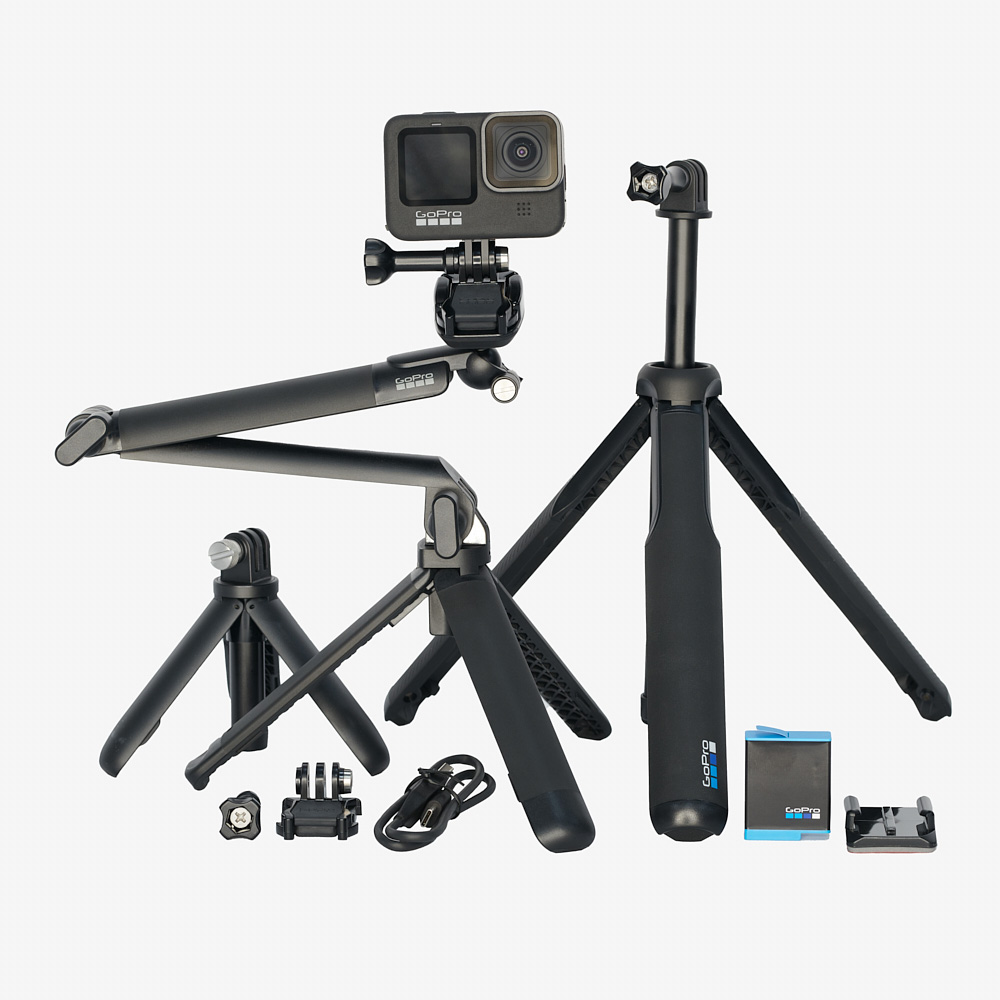


Benefits of Using a Selfie Stick
Selfie sticks offer several advantages when using a digital camera for taking photos:
- Extended reach: Selfie sticks allow you to capture a wider field of view and include more people or scenery in your photos.
- Stability: Using a selfie stick can help reduce camera shake and ensure sharper images, especially in low-light conditions.
- Convenience: With a selfie stick, you can easily take selfies or group photos without having to ask strangers to take the picture for you.
- Versatility: Selfie sticks are adjustable and can be used with various types of digital cameras, making them a versatile accessory for photography.
Choosing the Right Selfie Stick
When selecting a selfie stick for your digital camera, there are a few key factors to consider to ensure you get the best fit for your needs.
Compatibility
First and foremost, make sure the selfie stick you choose is compatible with your digital camera. Check the maximum weight capacity of the selfie stick to ensure it can support the weight of your camera.
Length and Adjustability
Consider the length and adjustability of the selfie stick. Look for a stick that can extend to the desired length for capturing the perfect selfie or group shot. Adjustable angles and rotation capabilities can also enhance your photography experience.
Attaching Your Digital Camera
Before attaching your digital camera to the selfie stick, make sure to check that the camera is securely attached to the mount. Most selfie sticks come with a standard screw mount that fits most digital cameras.

First, locate the screw mount on the selfie stick and ensure it is tightened securely. Then, carefully attach your digital camera to the mount by aligning the screw hole on the camera with the mount on the stick. Use the provided screw to fasten the camera onto the mount.
Once your camera is securely attached, double-check to ensure it is stable and won’t fall off during use. Adjust the angle of the camera as needed to capture the perfect shot.
Adjusting the Angle and Position
Once you have securely attached your digital camera to the selfie stick, it’s important to adjust the angle and position to get the perfect shot. Here are some tips on how to do it:
| 1. Extend the selfie stick: Extend the stick to the desired length, making sure it is stable and secure. |
| 2. Tilt the camera: Use the adjustable head of the selfie stick to tilt the camera up or down to capture the desired angle. |
| 3. Rotate the stick: Rotate the stick left or right to adjust the position of the camera for the best framing. |
| 4. Experiment with different angles: Don’t be afraid to try different angles and positions to find the most flattering shot. |
Taking Selfies with a Selfie Stick
If you want to take awesome selfies with your digital camera using a selfie stick, follow these simple steps:
Step 1: Attach Your Camera
Securely attach your digital camera to the selfie stick mount. Make sure it is tight and stable to prevent any accidents while taking selfies.
Step 2: Extend the Stick
Extend the selfie stick to your desired length. This will help you capture the perfect angle and distance for your selfie.
Tip: Use the selfie stick’s built-in controls to adjust the angle and zoom of your camera for better selfie results.
Now you are ready to start taking amazing selfies with your digital camera and selfie stick!
Editing and Sharing Your Selfies
Once you have taken some great selfies using your selfie stick and digital camera, you may want to edit and enhance them before sharing with friends and family. There are many photo editing apps available that allow you to crop, adjust colors, add filters, and more to make your selfies look even better.
After editing your selfies, you can easily share them on social media platforms like Instagram, Facebook, and Twitter. Don’t forget to use hashtags to reach a wider audience and engage with other selfie enthusiasts. You can also create a photo album or slideshow to showcase your selfie stick adventures.

Remember to always respect the privacy of others when sharing your selfies online and only post photos that you are comfortable sharing with the world. Have fun capturing and sharing your selfie moments!
Tips and Tricks for Using a Selfie Stick
Selfie sticks can be a fun and convenient tool for capturing great photos with your digital camera. Here are some tips and tricks to help you make the most out of your selfie stick:
1. Extend the Stick Fully
Make sure to extend the selfie stick fully to get the best angle and distance for your shot. This will help you capture a wider view and include more of the background in your photos.
2. Use the Timer Function
Most digital cameras come with a timer function that allows you to set a delay before taking the photo. This is especially useful when using a selfie stick to avoid blurry photos caused by shaking the camera while pressing the shutter button.
| Tip: | Set the timer for a few seconds to give yourself enough time to adjust your pose and get ready for the shot. |
FAQ
Can I use a selfie stick with a digital camera?
Yes, you can use a selfie stick with a digital camera as long as the camera is compatible with the stick and has a standard tripod mount. Make sure to check the weight capacity of the selfie stick to ensure it can support your camera.

How do I attach a digital camera to a selfie stick?
To attach a digital camera to a selfie stick, you will need to use the camera’s tripod mount. Simply screw the mount of the selfie stick onto the camera’s tripod socket and make sure it is securely attached before using the stick.
What are the benefits of using a selfie stick with a digital camera?
Using a selfie stick with a digital camera allows you to capture wider angles, take stable shots, and include more people in your photos. It also gives you more flexibility in framing your shots and capturing unique perspectives.
Can I use a Bluetooth remote with a selfie stick and a digital camera?
Yes, you can use a Bluetooth remote with a selfie stick and a digital camera if both the stick and the camera support Bluetooth connectivity. This allows you to remotely trigger the camera shutter while using the selfie stick for better control over your shots.
Are there any tips for using a selfie stick with a digital camera?
When using a selfie stick with a digital camera, make sure to extend the stick fully for better stability, avoid overextending it to prevent accidents, and always check that the camera is securely attached to the stick. Additionally, experiment with different angles and heights to get creative shots.



I don't really see the point of using a selfie stick with a digital camera. It seems like it would be more hassle than it's worth, especially when you can just use a tripod.
I get your point, but I think it offers more flexibility for spontaneous shots. Sometimes a tripod feels too rigid for fun moments.
Can anyone recommend a good selfie stick for DSLR cameras? I want something that can handle the weight without tipping over.
I've had great luck with the Manfrotto selfie stick. It's sturdy and can support heavier cameras well.
Do you think using a selfie stick can really help with low-light photography? I've always struggled with that.
I recently tried using a selfie stick with my digital camera during a trip, and it made a huge difference! I was able to capture some amazing group shots at the beach without relying on strangers. Just remember to check the screw mount properly; I almost lost my camera because I didn't tighten it enough.
Pro tip: Always use the timer function on your camera when taking selfies with a stick to avoid blurry photos!
I read that some selfie sticks can connect via Bluetooth. Is that a common feature?