
 Carmen J. Moore

Wired security cameras have long been a popular choice for home and business surveillance systems due to their reliability and stability. However, as technology advances, many users are looking for ways to make their wired security cameras wireless to take advantage of the flexibility and convenience that wireless systems offer.
Fortunately, there are solutions available that can help convert a wired security camera into a wireless one, allowing users to enjoy the benefits of both worlds. From wireless transmitters and receivers to Wi-Fi adapters and network video recorders, there are several options to choose from depending on your specific needs and requirements.


Can You Convert a Wired Security Camera to Wireless?
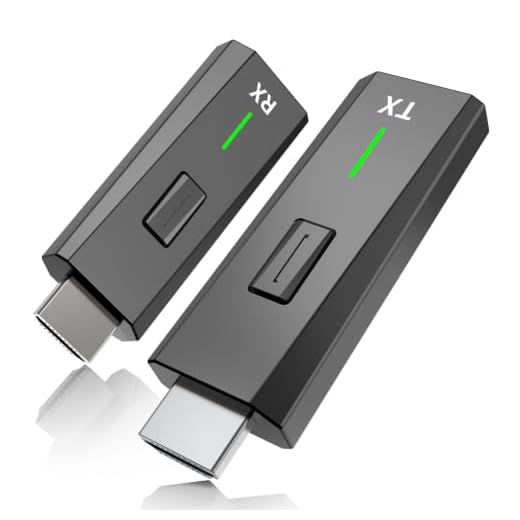
Yes, it is possible to convert a wired security camera to wireless with the help of additional equipment and devices. One common method is to use a wireless video transmitter and receiver kit. These kits can transmit the video signal from the wired camera to a receiver wirelessly, allowing you to view the footage remotely.
Another option is to use a network video recorder (NVR) with built-in Wi-Fi capabilities. By connecting your wired camera to the NVR, you can access the footage over a wireless network. This method eliminates the need for additional transmitters and receivers.
It’s important to note that the conversion process may vary depending on the specific model of your security camera and the equipment you choose to use. It’s recommended to consult the manufacturer’s instructions or seek professional help to ensure a successful conversion.
Exploring The Possibility
Wireless technology has revolutionized the way we interact with devices, offering convenience and flexibility. If you have a wired security camera and wish to make it wireless, there are solutions available that can help you achieve this. By converting your wired camera to a wireless setup, you can enjoy the benefits of remote monitoring and easy installation.
Wireless Conversion Kits
One option to make a wired security camera wireless is to use a wireless conversion kit. These kits typically include a transmitter and receiver that can be connected to your existing camera system. The transmitter sends the video signal wirelessly to the receiver, which then connects to your monitoring device. This setup eliminates the need for running cables and allows you to place your camera in more convenient locations.
Wi-Fi Adapters
Another approach is to use Wi-Fi adapters that can convert a wired camera into a wireless one. These adapters connect to your camera’s video output and transmit the signal over Wi-Fi to your network. By connecting your camera to your home Wi-Fi network, you can access the camera feed remotely using a smartphone or computer. This method provides flexibility and scalability, allowing you to easily expand your camera system.
| Pros | Cons |
|---|---|
| Convenient remote monitoring | May require additional setup |
| Easy installation | Potential signal interference |
| Flexibility in camera placement | Dependent on Wi-Fi network stability |
Advantages of Wireless Security Cameras
Wireless security cameras offer numerous benefits compared to their wired counterparts. Here are some advantages of using wireless security cameras:
- Easy Installation: Wireless cameras are easy to install as they do not require complex wiring. This makes them ideal for DIY installation.
- Flexibility: Wireless cameras can be placed anywhere within the range of the Wi-Fi signal, providing flexibility in positioning and coverage.
- No Wires to Cut: Since wireless cameras do not rely on physical cables, they are not vulnerable to tampering by cutting wires.
- Remote Access: Many wireless cameras offer remote access via smartphone apps, allowing you to monitor your property from anywhere with an internet connection.
- Scalability: Wireless security camera systems can easily be expanded by adding more cameras without the need for additional wiring.
- Clean Aesthetics: Without visible wires, wireless cameras offer a cleaner and more aesthetically pleasing installation.
Options for Converting Wired Cameras
If you have a wired security camera and want to make it wireless, there are several options available to help you achieve this. Here are some common methods:
- Wireless Transmitter and Receiver: One option is to use a wireless transmitter and receiver kit. This kit allows you to connect the transmitter to your camera and the receiver to your recording device or monitor wirelessly.
- Wi-Fi Adapter: Another option is to use a Wi-Fi adapter that can be connected to your camera. This adapter will enable your camera to connect to your Wi-Fi network, allowing you to access the camera’s feed remotely.
- Powerline Adapter: A powerline adapter can also be used to convert a wired camera into a wireless one. This device uses your home’s electrical wiring to transmit data, allowing you to connect your camera to your network without running long cables.
- Wireless Bridge: A wireless bridge can be used to extend your network to reach a wired camera. By connecting the bridge to your network and the camera, you can establish a wireless connection for your camera.
These are just a few options for converting a wired security camera to a wireless one. Depending on your specific needs and setup, one of these methods may be more suitable for you.
Wireless Transmitters and Receivers
One way to make a wired security camera wireless is by using wireless transmitters and receivers. These devices can transmit video and audio signals wirelessly, allowing you to convert your existing wired security camera system into a wireless one.
How it Works
Wireless transmitters are connected to the output of the wired security camera, converting the video and audio signals into a wireless format. These signals are then transmitted to a receiver located nearby, which can be connected to a monitor or recording device.
Benefits
Using wireless transmitters and receivers eliminates the need for long cables and allows for more flexibility in camera placement. It also makes it easier to install or expand your security camera system without the hassle of running additional wires.
| Pros | Cons |
|---|---|
| Eliminates the need for long cables | May experience interference or signal loss |
| Allows for flexible camera placement | Requires power source for transmitters and receivers |
| Easy to install and expand | Cost of wireless transmitters and receivers |
DIY Solutions for Going Wireless
While converting a wired security camera into a wireless one may seem challenging, there are DIY solutions that can help you achieve this transition. Here are some methods you can consider:
1. Wi-Fi Adapter:
One option is to use a Wi-Fi adapter that can connect to your camera’s video output. This adapter can transmit the video wirelessly to your router, allowing you to access the feed remotely.
2. Wireless Transmitter and Receiver:
Another approach is to use a wireless transmitter and receiver kit. By connecting the transmitter to your camera and the receiver to your monitor or recording device, you can establish a wireless connection for your security camera system.
These DIY solutions can help you make your wired security camera wireless, providing you with flexibility and convenience in monitoring your property.
Professional Installation Services
For those who prefer a hands-off approach, professional installation services are available for converting wired security cameras to wireless systems. These services are typically offered by security camera manufacturers or third-party companies specializing in home security installations.
Professional installers have the expertise and tools necessary to seamlessly transition your wired system to a wireless one. They will carefully assess your current setup, determine the best wireless solution, and ensure that the installation is done correctly and securely.
Considerations Before Making the Switch
Before converting your wired security camera to wireless, there are several key considerations to keep in mind:
- Power Source: Ensure that the wireless option you choose has a reliable power source, whether it’s battery-operated or requires a nearby power outlet.
- Signal Strength: Check the wireless signal strength in the area where the camera will be placed to ensure a stable connection.
- Network Compatibility: Make sure that your wireless camera is compatible with your existing network, including any required Wi-Fi specifications.
- Security Features: Look for wireless cameras with robust security features to protect your footage from potential cyber threats.
- Installation Process: Consider the ease of installation and any additional equipment or tools that may be needed to set up the wireless camera successfully.
Cost Comparison: Wired vs Wireless
When considering security camera options, one important factor to take into account is the cost associated with wired and wireless systems. Here is a breakdown of the cost differences between the two:
Wired Security Cameras
Initial Cost: Wired security cameras typically have a higher upfront cost due to the need for cables, connectors, and installation labor.
Maintenance Cost: While wired systems are generally more durable, they may require occasional maintenance or repairs, adding to the overall cost over time.
Wireless Security Cameras
Initial Cost: Wireless security cameras are usually more affordable upfront as they require fewer components and simpler installation.
Maintenance Cost: Wireless systems may have lower maintenance costs since there are fewer physical components to maintain or replace.
Overall, while wired security cameras may have a higher initial cost, they may be more cost-effective in the long run due to their durability. Wireless cameras, on the other hand, offer a more budget-friendly option for those looking for a simple and easy-to-install solution.



Does using a powerline adapter also allow remote access to the camera feed like the Wi-Fi adapter does?
Yes, a powerline adapter can provide remote access if it connects your camera to your local network. You would still need an app or software that allows you to view the feed remotely.
I recently converted my wired camera using a wireless transmitter and receiver kit. It worked well initially, but I started experiencing some signal interference, especially when I moved the receiver too far from the camera. Just a heads up about that. Overall, it was a great upgrade from my old setup, but I had to play around with the placement a bit.
I'm considering converting my wired security camera to wireless, but I'm unsure which method is easiest for someone who isn't very tech-savvy. Any advice on what to choose?
Good question! I think using a Wi-Fi adapter might be the simplest option. It's pretty straightforward and doesn’t require too much technical knowledge.