
 Carmen J. Moore

In today’s digital age, security cameras have become an essential tool for monitoring and protecting our homes and businesses. However, not everyone has access to a reliable internet connection, which can make using traditional security cameras a challenge. But fear not, there are ways to use security cameras without internet!
Offline Security Cameras: One option is to use offline security cameras that do not require an internet connection to function. These cameras typically record footage to a local storage device, such as a microSD card or a DVR, allowing you to review the footage later without the need for an internet connection.
Local Network: Another option is to set up a local network using a router that does not require an internet connection. You can connect your security cameras to this local network and access the footage from a computer or mobile device within the network. This allows you to monitor your cameras without relying on the internet.
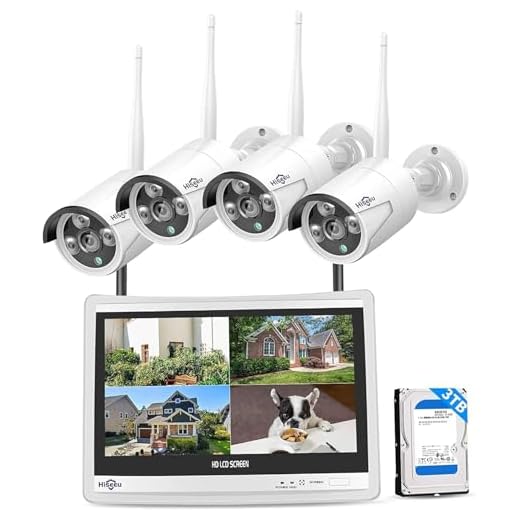


How to Set Up Security Cameras Without Internet
Setting up security cameras without internet can be a useful solution for areas with limited or no internet access. Here are the steps to set up your security cameras without internet:
1. Choose a Local Recording System: Select a security camera system that supports local recording to a hard drive or memory card. This will allow you to store footage directly on the device.
2. Power the Cameras: Connect the security cameras to a power source. Make sure they are properly powered to ensure they function correctly.
3. Set Up the Cameras: Install the cameras in strategic locations to cover the desired areas. Adjust the angles and settings as needed.
4. Configure the Recording Settings: Set up the recording settings on the cameras to capture footage based on your preferences, such as motion detection or continuous recording.
5. Monitor the Footage: Access the recorded footage directly from the local recording system. Review the footage regularly to monitor any suspicious activities.
6. Maintain the System: Keep the cameras clean and well-maintained to ensure they continue to function properly. Check the storage capacity of the recording device regularly.
By following these steps, you can effectively set up security cameras without internet access to enhance the security of your property.
Step-by-Step Guide
Using security cameras without internet is possible with the right setup. Follow these steps to set up your security cameras without internet:
- Choose a security camera system that supports local storage options like SD cards or NVRs.
- Set up the security cameras in the desired locations, ensuring they have a power source.
- Connect the cameras to a local network using Ethernet cables or a Wi-Fi network (optional for initial setup).
- Configure the cameras to record footage to the local storage device instead of cloud storage.
- Set up a monitoring station within the same network to access live footage and recordings.
- Ensure the monitoring station has access to power and a monitor for viewing the camera feeds.
- Regularly check and manage the local storage device to ensure recordings are saved properly.
- Consider setting up a backup system to store footage in case of any local storage failures.
- Test the system periodically to ensure everything is functioning correctly.
Benefits of Offline Security Cameras
Using offline security cameras can offer several advantages, especially in situations where internet connectivity is limited or unreliable. Here are some benefits of using offline security cameras:
| 1. Independence from Internet | Offline security cameras do not rely on internet connectivity to function, making them suitable for remote locations or areas with poor internet coverage. |
| 2. Privacy Protection | With offline security cameras, the footage is stored locally on a physical device, reducing the risk of potential privacy breaches associated with cloud-based storage. |
| 3. Cost-Effective Solution | Offline security cameras typically require less investment in terms of monthly subscription fees for cloud storage, making them a more budget-friendly option. |
| 4. Reliable Recording | Since offline security cameras record footage locally, there is no risk of interruptions due to internet outages or network issues, ensuring continuous surveillance. |
| 5. Easy Installation | Setting up offline security cameras is often simpler and quicker, as they do not require complex network configurations or internet connectivity for operation. |
Types of Security Cameras for Offline Use
When setting up a security system without internet access, it’s important to choose the right type of camera. Here are some common types of security cameras that can be used offline:
1. Analog Cameras: These traditional cameras connect directly to a recording device via cables and do not require an internet connection.
2. Wireless Cameras: Some wireless cameras can function without internet access by connecting directly to a network video recorder (NVR) or a digital video recorder (DVR).
3. Battery-Powered Cameras: These cameras operate on battery power and can store footage locally on a memory card or internal storage, making them suitable for offline use.
4. PoE Cameras: Power over Ethernet (PoE) cameras can be powered and transmit data through a single Ethernet cable, allowing for offline recording on a local NVR.
By selecting the right type of security camera for your offline setup, you can ensure reliable surveillance even without an internet connection.
Storage Options for Offline Security Cameras
When using security cameras without internet connection, it is important to consider the storage options for storing the recorded footage. Here are some common storage options for offline security cameras:
1. Local Storage: Some security cameras come with built-in storage options such as SD cards or USB drives. These devices allow you to store the recorded footage directly on the camera itself.
2. Network-Attached Storage (NAS): You can set up a NAS device on your local network to store the footage from your offline security cameras. This provides a central storage location accessible by multiple devices.
3. External Hard Drive: Another option is to connect an external hard drive to the security camera system to store the recorded footage. This is a cost-effective solution for storing large amounts of video data.
4. Cloud Storage: While offline security cameras do not require internet connectivity, you can still choose to upload the footage to a cloud storage service manually. This provides an additional backup option in case the local storage fails.
By choosing the right storage option for your offline security cameras, you can ensure that your footage is safely stored and easily accessible when needed.
Remote Access to Offline Security Cameras
Even if your security cameras are not connected to the internet, you can still access them remotely using a few different methods. Here are some options:
1. Local Network Access
You can access your offline security cameras by connecting to the same local network as the cameras. This allows you to view the footage on a monitor or device within the network without needing an internet connection.
2. Direct Connection
Some security cameras allow for direct connections via a physical cable or wireless connection. By directly connecting to the cameras, you can access the live feed or footage stored on the camera’s storage device.
These methods provide a way to access your security cameras even without an internet connection, ensuring that you can still monitor your property or premises effectively.
Tips for Maximizing Security Camera Performance
1. Position cameras strategically: Ensure cameras are placed in areas with optimal coverage and minimal obstructions.
2. Regularly clean lenses: Keep camera lenses clean to maintain clear and sharp footage.
3. Adjust camera settings: Fine-tune settings such as resolution, frame rate, and sensitivity for optimal performance.
4. Test camera angles: Experiment with different angles to find the best vantage points for surveillance.
5. Use high-quality cables: Invest in quality cables to ensure reliable connectivity and power supply.
6. Install proper lighting: Adequate lighting can improve camera performance, especially in low-light conditions.
7. Monitor camera health: Regularly check cameras for signs of damage or malfunction and address issues promptly.




Can you clarify if battery-powered cameras need to be charged often? I’m worried about maintenance.
I’ve looked into both wireless and wired offline cameras. Just a heads up: wired options tend to be more reliable for recording, but wireless cameras are easier to install. Has anyone had better experiences with one over the other?
I disagree that offline cameras are always more secure. Even without internet, they can still be hacked if someone accesses the local network. Just food for thought!
Using a local NAS for storage can be a great way to keep recordings organized without relying on the cloud!
Can these offline cameras still send alerts for motion detection, or do they only record?
I recently set up an offline security camera system at my cabin. It was surprisingly easy! I used a DVR with analog cameras, and the footage quality is decent. I like not worrying about internet outages affecting my security.