
 Carmen J. Moore

In today’s world, keeping your home secure is a top priority. With advancements in technology, there are numerous tools available to help you monitor and protect your property. One such tool that has gained popularity is the Moultrie game camera. Originally designed for hunting and wildlife observation, these cameras have now found their way into home security setups, providing an affordable and effective solution for keeping an eye on your property.
Using a Moultrie game camera for home security offers several advantages. These cameras are easy to set up and can be placed discreetly around your property, allowing you to monitor activity without drawing attention to the camera’s presence. With motion detection capabilities, the camera will automatically start recording when it senses movement, providing you with valuable footage in case of any suspicious activity.
Whether you want to keep an eye on your front door, backyard, or other areas of your property, a Moultrie game camera can provide you with peace of mind knowing that you have an extra layer of security in place. In this article, we will explore how you can effectively use a Moultrie game camera for home security and maximize its benefits to protect your home and loved ones.


What is a Moultrie game camera?
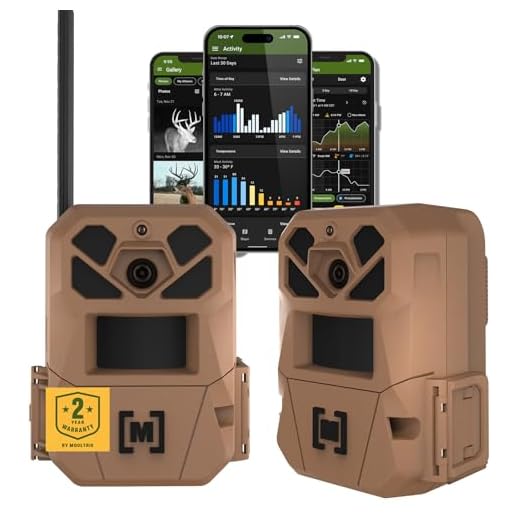
A Moultrie game camera is a specialized camera designed for capturing wildlife and game animals in their natural habitat. These cameras are commonly used by hunters, wildlife enthusiasts, and researchers to monitor wildlife activity without disturbing the animals. Moultrie game cameras are equipped with motion sensors and infrared technology to capture high-quality images and videos, even in low-light conditions. They are weather-resistant and durable, making them suitable for outdoor use in various environments. These cameras are also popular for home security purposes, as they can be used to monitor and record any movement around your property.
Benefits of using a Moultrie game camera
1. 24/7 Surveillance: Moultrie game cameras can provide round-the-clock surveillance of your property, ensuring that any suspicious activity is captured and recorded.
2. Motion-Activated Recording: These cameras are equipped with motion sensors that trigger recording when movement is detected, saving energy and storage space.
3. Remote Monitoring: You can access the camera feed remotely from your smartphone or computer, allowing you to keep an eye on your property from anywhere.
4. High-Quality Images and Videos: Moultrie game cameras capture high-resolution images and videos, ensuring clear and detailed footage of any events on your property.
5. Easy Installation: These cameras are easy to set up and install, making them a convenient option for home security.
6. Weatherproof Design: Moultrie game cameras are designed to withstand various weather conditions, ensuring reliable performance in all seasons.
Choosing the right Moultrie game camera
When selecting a Moultrie game camera for home security, it’s important to consider the following factors:
- Resolution: Choose a camera with high resolution for clear images and videos.
- Trigger speed: Look for a camera with fast trigger speed to capture quick movements.
- Flash type: Decide between infrared flash for discreet night-time recording or white flash for color images.
- Battery life: Opt for a camera with long battery life to minimize the need for frequent battery changes.
- Wireless connectivity: Consider a camera with wireless connectivity for easy access to footage remotely.
By considering these factors, you can choose the right Moultrie game camera to meet your home security needs.
Setting up your Moultrie game camera
Setting up your Moultrie game camera for home security is a straightforward process that can provide you with peace of mind. Follow these steps to get your camera up and running:
1. Choose the right location
Find a strategic location to place your game camera where it has a clear view of the area you want to monitor. Make sure it is out of reach of potential tampering or damage.
2. Install batteries and memory card
Insert fresh batteries into the camera and a compatible memory card to store the footage. Make sure the camera is turned off before inserting the batteries and memory card.
Note: It is recommended to use high-quality batteries to ensure optimal performance.
Once you have completed these steps, you are ready to set up your Moultrie game camera for home security. Be sure to test the camera to ensure it is capturing the footage you need.
Using your Moultrie game camera for home security
When it comes to home security, your Moultrie game camera can be a valuable tool. Here are some tips on how to use it effectively:
- Choose the right location for your camera to cover key entry points and areas of concern.
- Make sure your camera is properly positioned and angled to capture clear images.
- Set up your camera to take photos or videos when motion is detected.
- Regularly check the camera’s memory card for any captured footage.
- Consider using a solar panel or external power source to keep your camera running for extended periods.
- Review the footage regularly to monitor any suspicious activity around your home.
Reviewing footage from your Moultrie game camera
After setting up your Moultrie game camera for home security, it’s essential to regularly review the footage it captures. This will allow you to monitor any activity around your property and ensure the safety of your home. Here are some steps to effectively review the footage from your camera:
1. Remove the SD card
Start by removing the SD card from your Moultrie game camera. This can usually be done by opening the camera’s housing and locating the SD card slot. Carefully remove the SD card and insert it into a card reader or compatible device.
2. Transfer and view the footage
Once you have the SD card inserted into a card reader, connect it to your computer or device to transfer the footage. You can then view the footage on your computer or use the Moultrie Mobile app to access and review the footage remotely.
| Reviewing Tips: | 1. Check for any suspicious activity or intruders. |
|---|---|
| 2. Keep track of any wildlife or pets around your property. | |
| 3. Ensure the camera is positioned correctly for optimal coverage. |
Maintaining your Moultrie game camera
Proper maintenance is essential to ensure that your Moultrie game camera functions effectively and reliably. Here are some tips to help you maintain your camera:
1. Regularly check the camera: Inspect the camera for any signs of damage, wear, or malfunction. Make sure the camera lens is clean and free of obstructions.
2. Keep it clean: Use a soft, dry cloth to clean the exterior of the camera. Avoid using harsh chemicals or abrasive materials that could damage the camera casing.
3. Check the batteries: Monitor the battery levels regularly and replace them as needed. Always use high-quality batteries to ensure optimal performance.
4. Update firmware: Check for firmware updates regularly on the Moultrie website and install them to keep your camera up to date with the latest features and improvements.
5. Secure the camera: Ensure that the camera is securely mounted in its location to prevent it from being tampered with or stolen. Use a sturdy lock or security box if necessary.
By following these maintenance tips, you can prolong the life of your Moultrie game camera and maximize its performance for home security purposes.


How well does the Moultrie game camera work at night? I'm concerned about nighttime security.
Moultrie game cameras typically use infrared technology for night vision, allowing them to capture clear images in low light. This makes them effective for nighttime monitoring.
I've been using a Moultrie game camera for my backyard. It's really easy to set up and I love the motion detection feature. Caught a raccoon last week! Not sure if I’d rely on it as my only security measure, but it’s a good addition.