
 Carmen J. Moore
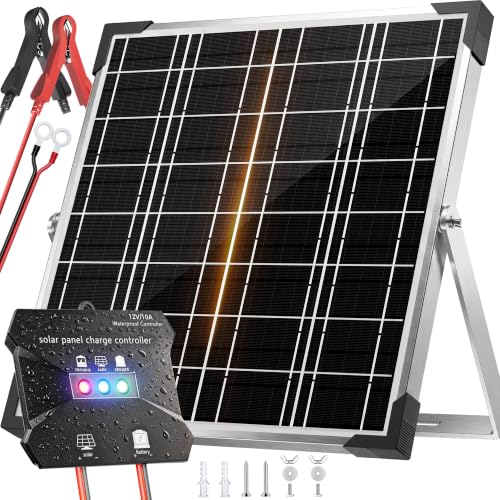
In today’s digital age, security cameras have become an essential tool for protecting homes, businesses, and public spaces. However, one common challenge faced by camera owners is ensuring a reliable power source, especially in remote locations or areas without access to electricity. This is where solar panels come into play, offering a sustainable and cost-effective solution for powering security cameras.
Installing a solar panel to power your security camera can provide you with continuous surveillance without the need for frequent battery changes or complicated wiring. By harnessing the power of the sun, you can keep your camera running 24/7, ensuring maximum security and peace of mind.
In this guide, we will explore the benefits of using solar panels to power security cameras, the components needed for a solar-powered camera system, and step-by-step instructions on how to set it up effectively. Whether you’re a homeowner looking to enhance your property’s security or a business owner in need of reliable surveillance, this guide will help you harness the power of solar energy for your camera needs.


Solar Power for Security Cameras: A Complete Guide
Security cameras are essential for keeping your property safe, but powering them can be a challenge, especially in remote locations where access to electricity is limited. Solar power offers a sustainable and cost-effective solution for powering security cameras. In this guide, we will walk you through the process of setting up a solar power system for your security cameras.
Components Needed
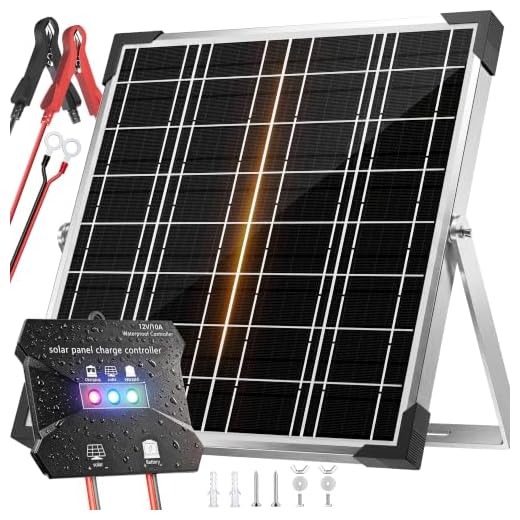
To power your security camera with a solar panel, you will need the following components:
| 1. Solar Panel |
| 2. Charge Controller |
| 3. Battery |
| 4. Inverter (if needed) |
| 5. Security Camera |
Setting Up the System
1. Install the solar panel in a location that receives ample sunlight throughout the day.
2. Connect the solar panel to the charge controller to regulate the power flow.
3. Connect the charge controller to the battery to store excess power generated by the solar panel.
4. Connect the battery to the security camera using the appropriate cables.
5. Test the system to ensure everything is working properly.
Maintenance
Regular maintenance of your solar power system is crucial to ensure optimal performance. Keep the solar panel clean and free of debris, check the connections regularly, and monitor the battery levels to prevent overcharging or discharging.
By following this guide, you can effectively power your security camera with a solar panel, providing a reliable and sustainable energy source for your surveillance needs.
Choosing the Right Solar Panel for Your Security Camera
When it comes to powering your security camera with a solar panel, choosing the right panel is crucial for ensuring optimal performance and efficiency. Here are some key factors to consider when selecting a solar panel for your security camera:
1. Power Output:
Make sure the solar panel you choose can provide enough power to meet the energy requirements of your security camera. Check the power output specifications of both the camera and the solar panel to ensure compatibility.
2. Size and Efficiency:
Consider the size and efficiency of the solar panel. A larger panel will typically generate more power, but it may not be suitable for smaller installations. Look for panels with high efficiency ratings to maximize the energy conversion from sunlight to electrical power.
Positioning Your Solar Panel for Maximum Sun Exposure
When installing a solar panel to power your security camera, it is crucial to position it in a location that receives maximum sun exposure throughout the day. Here are some tips to help you optimize the positioning of your solar panel:
- Place the solar panel in an area free from obstructions such as trees, buildings, or shadows that can block sunlight.
- Angle the solar panel towards the sun’s path to ensure it captures the most sunlight possible. In the northern hemisphere, facing the panel south is ideal, while in the southern hemisphere, facing it north is recommended.
- Mount the solar panel at a tilt to maximize sun exposure. The optimal tilt angle will depend on your location’s latitude and the season, so adjust the angle accordingly for best results.
- Regularly clean the solar panel surface to remove dust, dirt, and debris that can reduce its efficiency in converting sunlight into energy.
- Monitor the solar panel’s performance and make adjustments as needed to maintain optimal sun exposure for powering your security camera.
Connecting Your Solar Panel to the Security Camera
Once you have installed your solar panel and positioned it to receive maximum sunlight, it’s time to connect it to your security camera. Here are the steps to follow:
| Step 1: | Connect the positive (+) cable from the solar panel to the positive (+) input on the charge controller. |
| Step 2: | Connect the negative (-) cable from the solar panel to the negative (-) input on the charge controller. |
| Step 3: | Connect the positive (+) output from the charge controller to the positive (+) input on the security camera. |
| Step 4: | Connect the negative (-) output from the charge controller to the negative (-) input on the security camera. |
Make sure all connections are secure and insulated to prevent any electrical hazards. Once everything is connected, your security camera should start receiving power from the solar panel and operate efficiently.
Benefits of Using Solar Power for Security Cameras
Solar power offers several advantages when it comes to powering security cameras. Here are some key benefits:
1. Cost-Effective
Using solar power to run security cameras can significantly reduce electricity costs. Once the initial investment in solar panels is made, the energy they provide is essentially free, making it a cost-effective solution in the long run.
2. Environmentally Friendly
Solar power is a clean and renewable energy source, making it an environmentally friendly choice for powering security cameras. By using solar energy, you can reduce your carbon footprint and contribute to a more sustainable future.
Ensuring the Proper Functioning of Your Solar-Powered Security Camera
Once you have set up your security camera with a solar panel, it is essential to ensure that it functions properly to provide reliable surveillance. Here are some tips to help you maintain the efficiency of your solar-powered security camera:
- Regular Cleaning: Keep the solar panel clean by removing any dust, dirt, or debris that may accumulate on its surface. This will help maximize sunlight absorption and maintain optimal power generation.
- Proper Positioning: Ensure that the solar panel is positioned facing the sun to receive maximum sunlight exposure throughout the day. Adjust the angle and direction as needed to optimize energy production.
- Battery Health: Monitor the battery status regularly and replace it when necessary to prevent power failures. A well-maintained battery is crucial for continuous camera operation.
- Weather Protection: Install the security camera and solar panel in a weather-resistant housing to shield them from rain, snow, and extreme temperatures. This will prolong their lifespan and ensure consistent performance.
- Regular Inspections: Periodically check the connections, wires, and mounting hardware to detect any signs of damage or wear. Tighten loose components and make repairs promptly to prevent malfunctions.
By following these maintenance practices, you can enhance the longevity and efficiency of your solar-powered security camera system, allowing you to enjoy continuous surveillance without interruptions.
Additional Components You Might Need for Solar-Powered Security Cameras
While a solar panel is essential for powering your security camera, there are additional components you may need to ensure optimal performance.
Battery Backup:
Installing a battery backup system is crucial to store excess energy generated by the solar panel. This ensures uninterrupted power supply during periods of low sunlight or at night.
Solar Charge Controller:
A solar charge controller regulates the voltage and current from the solar panel to the battery, preventing overcharging and extending the battery’s lifespan.
- Mounting Bracket:
- Choose a sturdy mounting bracket to securely attach the solar panel to a suitable location, ensuring maximum exposure to sunlight.
By incorporating these additional components, you can maximize the efficiency and reliability of your solar-powered security camera system.
Understanding the Cost Savings of Solar-Powered Security Cameras
Solar-powered security cameras offer a cost-effective and eco-friendly solution for surveillance needs. By harnessing the power of the sun, these cameras can operate without the need for traditional electrical wiring or batteries, resulting in significant cost savings over time.
One of the key benefits of solar-powered security cameras is their low operational costs. Once installed, the cameras draw power from the solar panel during the day and store excess energy in a battery for night-time use. This eliminates the need for ongoing electricity bills, making them a sustainable and budget-friendly option.
In addition to energy savings, solar-powered security cameras also require minimal maintenance. With fewer components to replace or repair, the overall maintenance costs are reduced, saving both time and money in the long run.
Furthermore, the durability and reliability of solar-powered security cameras make them a cost-effective choice for outdoor surveillance. With weather-resistant designs and long-lasting batteries, these cameras can withstand harsh conditions and continue to operate efficiently for years to come.
Overall, the cost savings associated with solar-powered security cameras make them a smart investment for both residential and commercial properties. By reducing operational expenses and maintenance requirements, these cameras provide a sustainable and affordable security solution.
Environmental Impact of Using Solar Power for Security Cameras
Solar power is a renewable energy source that has a minimal environmental impact compared to traditional energy sources. When security cameras are powered by solar panels, they reduce the reliance on fossil fuels and decrease greenhouse gas emissions. This shift towards solar power helps in mitigating climate change and reducing air pollution.
Advantages of Using Solar Power for Security Cameras:
- Reduces carbon footprint: Solar power generates electricity without producing harmful emissions.
- Conserves natural resources: By harnessing solar energy, we reduce the consumption of finite resources like coal and oil.
- Cost-effective and sustainable: Solar panels have a long lifespan and require minimal maintenance, making them a sustainable and economical choice.
By utilizing solar power for security cameras, we contribute to a cleaner and greener environment, promoting sustainability and reducing our ecological footprint.



Can this setup work in cloudy weather? How much sun does it need to function well?
Yes, solar panels can still generate power on cloudy days, but their efficiency will be reduced. Ideally, they should receive direct sunlight for optimal performance.
What kind of battery should I use with the solar panel for my security camera? Is there a specific type that works best?
I recently installed a solar panel to power my security camera, and it’s been great! I followed the steps outlined here, but I had to adjust the angle of the panel a few times to get the most sun exposure. It's really made a difference in performance. Just remember to keep the panel clean!
Thanks for sharing your experience! Adjusting the angle can indeed optimize energy production, and regular cleaning is vital for maintaining efficiency.
I’m debating between using a solar panel or just running an extension cord to power my camera. What are the pros and cons of each method?
Using a solar panel is more sustainable and can save on electricity costs, especially in remote areas. An extension cord is easier to set up but may not be feasible in locations far from power sources.
I don't think solar is always the best option. In areas with lots of rainy days, it might not provide reliable power for security cameras.
I’ve found that positioning is key! My camera works way better since I moved the solar panel to a sunnier spot.