
 Carmen J. Moore
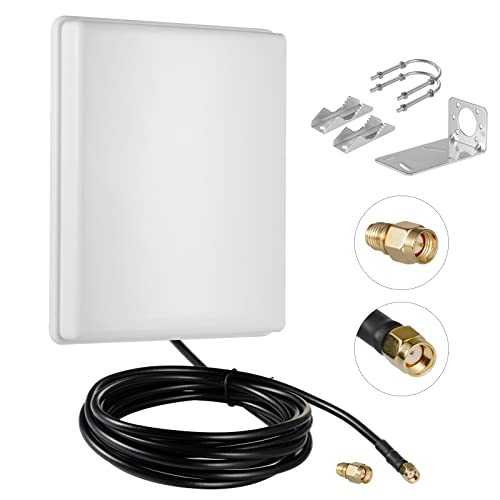
Having a security camera is a great way to protect your home or business, but in order to maximize its effectiveness, it’s important to ensure that the WiFi antenna is pointed in the right direction. A well-positioned antenna can improve the signal strength and quality of the video feed, leading to better overall security.

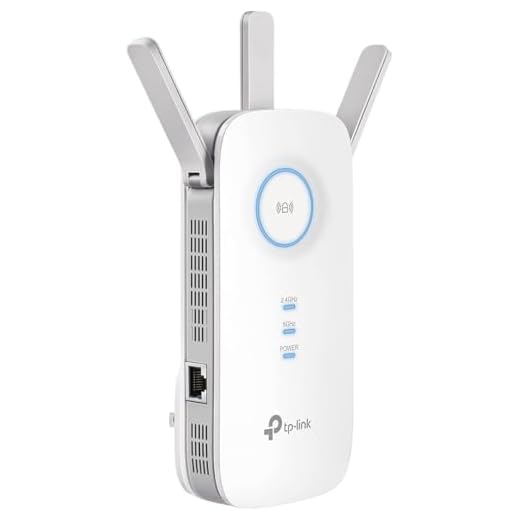

When setting up your security camera, take the time to properly position the WiFi antenna for optimal performance. This may involve adjusting the angle and direction of the antenna to ensure that it is pointed towards the WiFi router or access point.
By pointing the WiFi antenna in the right direction, you can reduce interference and improve the stability of your camera’s connection to the network. This can help prevent dropped connections and ensure that you have a reliable video feed when you need it most.
Benefits of Wifi Antenna
Wifi antennas offer several advantages when used with security cameras:
- Extended Range: Wifi antennas can significantly increase the range of your camera’s wifi signal, allowing you to place your security camera further from your router without losing connectivity.
- Improved Signal Strength: By using a wifi antenna, you can enhance the signal strength and stability of your camera’s connection to the network, reducing the chances of dropped connections or lag.
- Flexible Installation: With a wifi antenna, you have the flexibility to position your security camera in the optimal location for surveillance, even if it’s far from your router or in an area with poor wifi coverage.
Overall, wifi antennas can enhance the performance and reliability of your security camera system, providing you with better coverage and peace of mind.
Importance of Security Cameras
Security cameras play a crucial role in protecting homes, businesses, and public spaces. They act as a deterrent to potential criminals and provide valuable evidence in case of theft, vandalism, or other crimes. With advancements in technology, security cameras can now be accessed remotely, allowing homeowners and business owners to monitor their properties from anywhere in the world.
Benefits of Security Cameras:
- Enhanced security and peace of mind
- Crime deterrence
- Remote monitoring capabilities
- Legal evidence in case of incidents
Investing in quality security cameras and properly positioning them can greatly enhance the overall security of a property and provide a sense of safety for occupants.
Positioning Your Wifi Antenna
Properly positioning your wifi antenna is crucial for ensuring a strong and stable connection to your security camera. Here are some tips to help you optimize the placement of your antenna:
1. Line of Sight
Make sure there is a clear line of sight between the wifi antenna and your security camera. Avoid obstructions such as walls, furniture, or other electronic devices that may interfere with the signal.
2. Height Matters
Try to position the wifi antenna at a higher elevation to improve the signal strength. Mounting the antenna on a wall or ceiling can help minimize interference and maximize coverage.
- Experiment with different heights to find the optimal position for your antenna.
- Avoid placing the antenna near metal objects or reflective surfaces, as they can reflect the signal and cause interference.
By following these tips and adjusting the position of your wifi antenna, you can ensure a reliable connection to your security camera and maintain a secure surveillance system.
Optimizing Wifi Signal Strength
When setting up a security camera with a wifi connection, it’s crucial to optimize the wifi signal strength to ensure a stable and reliable connection. Here are some tips to help you maximize the signal strength:
1. Position the Antenna Correctly
Point the wifi antenna of your security camera in the direction of the wifi router to improve signal reception. Avoid obstructions and interference to ensure a clear line of sight between the camera and the router.
2. Avoid Signal Interference
Avoid placing the security camera near devices that can cause signal interference, such as microwaves, cordless phones, or other electronic devices. This can help prevent signal degradation and maintain a strong connection.
Remember: A strong wifi signal is essential for the proper functioning of your security camera, so take steps to optimize signal strength for optimal performance.
Enhancing Security Camera Performance
Having a reliable wifi connection is essential for the optimal performance of your security camera. Follow these tips to enhance the performance of your security camera:
1. Properly Position the Wifi Antenna: Point the wifi antenna of your security camera towards the router for a stronger signal. Avoid obstructions such as walls or metal objects that can interfere with the wifi signal.
2. Upgrade Your Wifi Router: Consider upgrading to a more powerful wifi router to improve the signal strength and stability for your security camera.
3. Install Wifi Range Extenders: If your security camera is located far from the router, consider using wifi range extenders to boost the signal and improve connectivity.
4. Check for Interference: Identify and eliminate sources of interference such as other electronic devices or appliances that may disrupt the wifi signal to your security camera.
5. Update Firmware: Ensure that your security camera’s firmware is up to date to receive the latest performance enhancements and security updates.
Troubleshooting Wifi Antenna Issues
If you are experiencing connectivity issues with your security camera due to problems with the wifi antenna, here are some troubleshooting steps you can take:
1. Check the Antenna Placement
Ensure that the wifi antenna is properly positioned and pointing in the direction of the wifi router. Avoid obstructions that may interfere with the signal.
2. Verify Antenna Connections
Make sure the antenna is securely connected to the security camera. Check for any loose connections or damage to the antenna cable.
- Inspect the antenna cable for any cuts or bends that may affect signal transmission.
- Tighten the antenna connection to ensure a stable connection.
By following these troubleshooting steps, you can improve the wifi signal strength and connectivity of your security camera.







Remember to regularly check for firmware updates on your cameras too. It can really help performance.
Could you clarify how far I should ideally place the security camera from the router? What’s a good distance to aim for?
The ideal distance can vary based on your environment, but generally, keeping the camera within 100-200 feet of the router is a good benchmark. Just ensure there are minimal obstacles in between!
I’m curious, how much of a difference does properly positioning the wifi antenna really make? Is it worth the effort?
Great question! I repositioned mine, and I noticed a significant improvement in video quality and connection stability.
I had a lot of trouble with my security camera dropping out before I read this article. I raised the antenna to a higher spot and aimed it directly at the router. It took a bit of trial and error, but now the feed is super reliable, and I can see everything clearly. Totally worth it!
I’ve heard mixed reviews about using wifi range extenders. Are they reliable enough for security cameras, or do they sometimes cause more issues?
I actually found that my camera worked just fine without adjusting the antenna at all. Sometimes I think it’s more about the camera quality than the antenna positioning.
That's a valid point! Camera quality does play a significant role, but optimal antenna placement can enhance performance even further, especially in challenging environments.