
 Carmen J. Moore

Security cameras are an essential component of any modern security system. They provide peace of mind and surveillance capabilities to protect your property and loved ones. However, there may be instances where you need to pick up security camera signals for various reasons, such as troubleshooting issues or upgrading your system. In this article, we will explore the steps you can take to successfully pick up security camera signals.


Before attempting to pick up security camera signals, it is important to understand the types of signals different cameras use. Analog cameras transmit signals via coaxial cables, while IP cameras use network cables to send data. Knowing the type of camera system you have will help you determine the best approach to pick up the signals.
There are several methods you can use to pick up security camera signals, depending on the type of camera system you have. You can use a CCTV tester to check the signal strength and quality of analog cameras, or you can configure your network settings to access the IP camera feed. By following the right steps and using the appropriate tools, you can successfully pick up security camera signals and ensure that your surveillance system is working effectively.
Choosing the Right Security Camera
When selecting a security camera for your home or business, there are several factors to consider to ensure you choose the right one for your needs.
1. Resolution
One of the most important features to consider is the camera’s resolution. Higher resolution cameras will provide clearer and more detailed images, making it easier to identify individuals and objects in the footage.
2. Night Vision
If you need surveillance around the clock, be sure to choose a camera with good night vision capabilities. Look for cameras with infrared technology that can capture clear images even in low-light or no-light conditions.
Understanding Signal Strength
Signal strength is a critical factor when picking up security camera signals. The strength of the signal determines the quality of the video feed and the reliability of the connection. Here are some key points to consider:
| Signal Strength | The signal strength is measured in decibels (dB). A higher dB value indicates a stronger signal. |
| Interference | Interference from other electronic devices or physical obstacles can weaken the signal strength. |
| Signal-to-Noise Ratio | The signal-to-noise ratio (SNR) is important for clear video transmission. A higher SNR indicates less interference and better signal quality. |
| Signal Loss | Signal loss can occur over long distances or through thick walls. Using signal boosters or repeaters can help strengthen the signal. |
By understanding signal strength and its factors, you can optimize your security camera system for reliable and high-quality video monitoring.
Positioning the Camera for Best Signal
When setting up your security camera, it’s important to consider the positioning for the best signal reception. Make sure the camera is placed in a location with minimal obstructions between the camera and the receiver. Avoid placing the camera near large metal objects or electronic devices that may interfere with the signal.
For outdoor cameras, try to position them higher up to avoid interference from walls or other obstacles. Additionally, ensure that the camera is facing the area you want to monitor without any obstructions blocking the view.
Regularly check the signal strength on your monitoring device and adjust the camera’s position as needed to ensure optimal signal reception. By carefully positioning your security camera, you can ensure a clear and reliable signal for effective monitoring.
Avoiding Signal Interference
Signal interference can disrupt the quality of your security camera feed. To avoid this, follow these tips:
- Place your security cameras away from devices that emit strong radio signals, such as Wi-Fi routers or microwaves.
- Ensure that there are no physical obstructions between the camera and the receiver, as these can weaken the signal.
- Use high-quality shielded cables to connect your cameras to the recording device to minimize signal loss.
- Adjust the frequency settings on your cameras to avoid overlap with other wireless devices in your area.
- Regularly check and maintain your cameras to ensure they are functioning properly and the signals are clear.
Using Signal Boosters
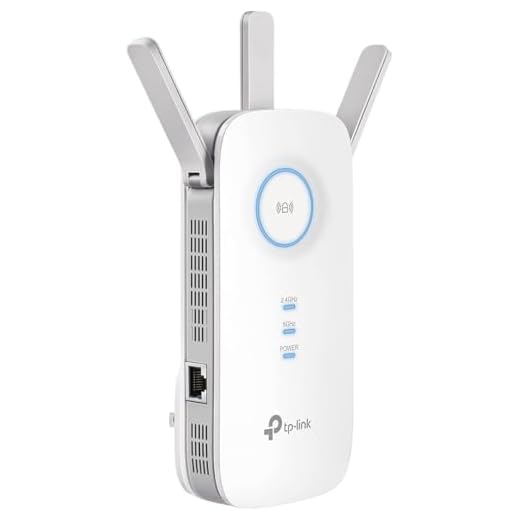
If you are struggling to pick up security camera signals, you may want to consider using signal boosters. Signal boosters are devices that amplify the strength of the signal being transmitted, allowing you to receive a clearer and stronger signal.
There are different types of signal boosters available, including wireless signal boosters and wired signal boosters. Wireless signal boosters can be placed near your security camera to enhance the signal, while wired signal boosters are connected directly to the camera with a cable.
Benefits of Using Signal Boosters:
- Improved Signal Strength: Signal boosters can help improve the strength of the signal, reducing interference and ensuring a clear transmission.
- Extended Range: Signal boosters can also extend the range of your security camera signal, allowing you to monitor a larger area.
Checking for Signal Jamming
Signal jamming is a common tactic used to disrupt security camera signals. To check for signal jamming, you can:
- Monitor the camera feed for sudden drops in quality or interruptions.
- Use a spectrum analyzer to detect unusual frequency interference.
- Inspect the area for suspicious devices that could be causing the jamming.
If you suspect signal jamming, it’s important to take immediate action to secure your camera system and investigate the source of the interference.
Testing Signal Quality
Once you have located the security camera signal, it is important to test the quality of the signal. This can be done by checking the video feed for any distortions, interference, or dropouts. You can also monitor the signal strength to ensure that it remains strong and stable. If the signal quality is poor, you may need to adjust the position of the camera or the receiver to improve the connection.
Troubleshooting Signal Issues
If you are experiencing signal issues with your security camera system, there are a few steps you can take to troubleshoot the problem:
1. Check the Camera Connection
Make sure that the camera is properly connected to the power source and the recording device. Check all cables and connections for any damage or loose fittings.
2. Adjust Camera Placement
Try repositioning the camera to see if the signal improves. Sometimes obstacles or interference can affect the signal, so finding a better location for the camera may help.
- Ensure there are no obstacles blocking the signal path.
- Avoid placing the camera near electronic devices that may cause interference.
By following these steps, you can troubleshoot signal issues with your security camera system and ensure that it functions properly.
Upgrading to Higher Frequency
If you are having trouble picking up security camera signals, consider upgrading to a higher frequency system. Higher frequency cameras typically offer better image quality and longer range. By upgrading to a higher frequency, you can improve the overall performance of your security camera system.
Before making the switch, make sure to check the compatibility of your current equipment with the higher frequency system. You may need to upgrade not only the cameras but also the receivers and monitors to ensure seamless operation.
Maintaining Signal Integrity
When picking up security camera signals, it is crucial to maintain signal integrity to ensure clear and reliable footage. Here are some tips to help you achieve this:
1. Proper Placement: Ensure that your security camera is positioned in a location where it has a clear line of sight to the transmitter. Avoid obstructions such as walls or metallic objects that can interfere with the signal.
2. Use High-Quality Equipment: Invest in high-quality cameras, receivers, and transmitters to ensure a strong and stable signal. Cheap or low-quality equipment can result in poor signal quality and interference.
3. Avoid Interference: Keep your camera away from other electronic devices that may cause interference, such as Wi-Fi routers, microwaves, or cordless phones. Interference can disrupt the signal and result in poor image quality.
4. Regular Maintenance: Check your equipment periodically for any signs of damage or wear. Clean the camera lens and check the cables for any fraying or damage that may affect the signal.
5. Signal Boosters: If you are having trouble picking up the signal, consider using signal boosters or repeaters to strengthen the signal and improve the quality of the footage.
By following these tips, you can ensure that your security camera signals are strong and clear, providing you with reliable surveillance footage.






I’m trying to decide between an analog and an IP camera. Can you explain the main differences in signal strength and quality?
Signal boosters are a game changer. I’ve noticed a clearer feed since I installed mine.
Can someone clarify what 'signal-to-noise ratio' means? How does it affect the video quality?
The signal-to-noise ratio (SNR) measures the level of desired signal compared to background noise. A higher SNR means that the video will be clearer and less distorted, crucial for identifying details in footage.
What tools do I need to pick up security camera signals effectively?
I don’t think upgrading to a higher frequency is necessary for everyone. Sometimes a good placement is all you need.
I had a lot of trouble with my IP camera signals. I ended up using a network cable instead of Wi-Fi, and it made a huge difference!