
 Carmen J. Moore

Ensuring the security of your property and loved ones is crucial in today’s world. Installing security cameras is a common practice to monitor your surroundings and deter potential intruders. However, it’s essential to make sure that your security cameras are tamper-proof to prevent unauthorized access or tampering.
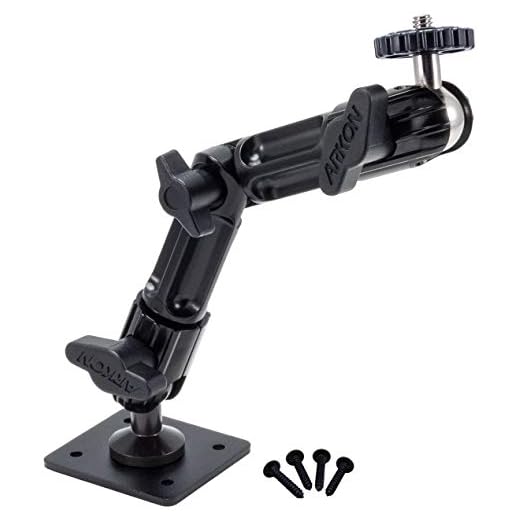


Here are some tips to make your security camera system more secure:
1. Secure the camera mounting: Make sure to install your cameras in a location that is out of reach and not easily accessible. Mount them high up and angle them in a way that makes it difficult for someone to tamper with them.
2. Use tamper-resistant cameras: Invest in security cameras that are specifically designed to be tamper-resistant. These cameras are built with durable materials and feature anti-tampering mechanisms to prevent any unwanted interference.
Securing Your Security Camera
When it comes to protecting your property, it’s important to make sure your security camera is secure. Here are some tips to help you keep your security camera tamper-proof:
1. Choose a strategic location: Install your security camera in a location that is not easily accessible to intruders. This will help prevent tampering and ensure that your camera captures clear footage.
2. Use tamper-resistant hardware: Consider using tamper-resistant screws and mounts to secure your camera in place. This will make it more difficult for intruders to tamper with or remove your camera.
3. Install a protective housing: Invest in a weatherproof and vandal-resistant housing for your security camera. This will protect your camera from damage and tampering, ensuring it remains operational in all conditions.
4. Secure your cables: Make sure your camera’s cables are hidden and secured to prevent tampering. Use cable conduits or protective covers to keep your cables safe from intruders.
5. Regularly check and maintain your camera: Inspect your security camera regularly to ensure it is working properly. Clean the lens, check for any signs of tampering, and make sure the camera is securely mounted.
By following these tips, you can help make your security camera tamper-proof and provide added security to your property.
Choosing the Right Location
When installing security cameras, it is crucial to choose the right location to ensure they are tamper-proof. Here are some key considerations:
1. Strategic Placement
Place cameras in strategic locations that provide optimal coverage of the area you want to monitor. Consider high-traffic areas, entry points, and blind spots.
2. Height and Angle
Mount cameras at a height that is out of reach and provides a clear view of the surroundings. Angle the camera downward to capture faces and activities more effectively.
Installing Tamper-Proof Mounting
One of the most effective ways to make a security camera tamper-proof is by installing tamper-proof mounting hardware. This type of mounting system is designed to prevent unauthorized access to the camera by using specialized tools or techniques.
When installing tamper-proof mounting hardware, make sure to follow the manufacturer’s instructions carefully to ensure proper installation. This may involve using special screws, locks, or brackets that are designed to deter tampering attempts.
By using tamper-proof mounting hardware, you can help ensure that your security camera remains secure and in place, providing reliable surveillance and protection for your property.
Concealing Wires and Cables
One way to make your security camera tamper-proof is by concealing the wires and cables. Exposed wires can be easily cut or tampered with, rendering your security system ineffective. Here are some tips to help you hide and protect the cables:
1. Use Cable Concealers
Invest in cable concealers or cable management solutions to hide the wires along walls, ceilings, or floors. This will not only make your setup look neater but also prevent intruders from accessing and tampering with the cables.
2. Utilize Cable Channels
Install cable channels or raceways to cover and protect the wires in high-traffic areas. These channels can be painted to blend with the surrounding environment and provide an extra layer of security for your security camera system.
| Tip: | Secure cables with cable clips or ties to prevent them from being easily pulled or cut. |
Using Vandal-Resistant Cameras
Vandal-resistant cameras are specially designed to withstand tampering attempts. These cameras are typically housed in durable materials such as metal or polycarbonate to prevent damage from physical impact.
Additionally, vandal-resistant cameras often feature tamper detection capabilities that can alert you if someone tries to interfere with the camera. Some models also come with protective accessories like anti-vandal cages or brackets to further enhance security.
When installing security cameras in high-risk areas, opting for vandal-resistant models can provide an extra layer of protection against tampering and ensure continuous surveillance coverage.
Setting Up Remote Monitoring
One of the key features of a tamper-proof security camera system is remote monitoring. This allows you to access live video feeds and recordings from anywhere using a computer or mobile device.
To set up remote monitoring, you will need to connect your security camera system to the internet. This can typically be done by connecting the system to your home network or through a dedicated cellular connection.
Steps:
- Ensure your security camera system is connected to the internet.
- Enable remote access on your security camera system’s settings.
- Download the corresponding mobile app or software for remote viewing.
- Create an account and log in to access your camera feeds remotely.
Once remote monitoring is set up, you can check in on your security cameras from anywhere, providing an extra layer of security and peace of mind.
Regular Maintenance and Checks
Regular maintenance and checks are crucial to ensuring the security camera system remains tamper-proof. Here are some key steps to include in your maintenance routine:
- Inspect the camera housing and mounting brackets for any signs of tampering or damage.
- Check the camera lens for smudges, dirt, or obstructions that could affect the image quality.
- Ensure all cables and connections are secure and undamaged.
- Test the camera’s functionality by reviewing the footage and checking for any irregularities.
- Update the camera firmware and software regularly to address security vulnerabilities.
By conducting regular maintenance and checks, you can proactively identify and address any potential security risks to keep your security camera system tamper-proof.
Upgrading Firmware and Software
One of the most important steps in making your security camera tamper-proof is to regularly update the firmware and software. Manufacturers often release updates to fix security vulnerabilities and improve the overall performance of the camera.
Check the manufacturer’s website or the camera’s user manual for instructions on how to check for updates and install them. Make sure to set up automatic updates if possible to ensure that your camera is always running the latest software version.
Implementing Access Control
One crucial aspect of making security cameras tamper-proof is implementing access control measures. Access control ensures that only authorized individuals have access to the security camera system. This can be achieved through various methods:
1. User Authentication
Require users to authenticate themselves before accessing the security camera system. This can be done through passwords, biometrics, or two-factor authentication.
2. Role-Based Access Control
Assign specific roles to users and grant them access privileges based on their roles. This ensures that users only have access to the necessary functions and data.
Monitoring and Responding to Tampering Attempts
Once you have installed tamper-proof security cameras, it is crucial to monitor them regularly to ensure they are functioning properly. Set up alerts and notifications that will notify you immediately if any tampering attempts are detected.
Additionally, consider installing dummy cameras in visible locations to deter potential intruders. These fake cameras can act as a deterrent and help protect your real security cameras from tampering.
Regular Inspections
Perform regular inspections of your security cameras to check for any signs of tampering or damage. Look for loose wires, scratches, or other indicators that someone may have tried to interfere with the cameras.
Immediate Response
If you receive an alert or notice any suspicious activity near your security cameras, respond immediately. Contact the authorities if necessary and take steps to secure the area and prevent further tampering attempts.


I recently installed a security camera at my business and took your advice on mounting it high and using tamper-resistant screws. It was a bit tricky to install, but it feels much more secure now. I also used cable concealers to hide the wires, which made everything look neat! Just a tip: regularly checking the camera helps, as I found some condensation on the lens after a storm, which affected the footage.
Thanks for sharing your experience! I had the same issue with condensation. It's good to know I'm not the only one dealing with that!
What are some affordable tamper-resistant camera options? I'm just starting out with home security and I don't want to overspend.
Good question! I found a few brands that offer budget-friendly options like Reolink and Wyze. They have decent features for the price.
Thanks for your question! Brands like Reolink and Wyze are indeed popular for affordable security cameras. Just make sure to check reviews for specific models to ensure they fit your needs.