
 Carmen J. Moore

When it comes to protecting your home or business, installing security cameras is a smart move. However, purchasing and setting up real security cameras can be a costly and time-consuming process. Luckily, there is a budget-friendly alternative: dummy security cameras.
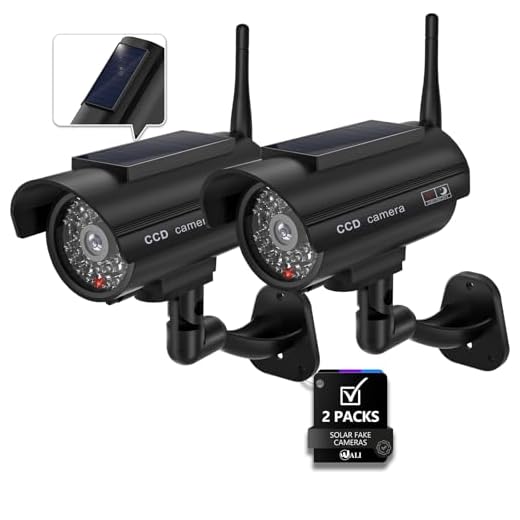


Dummy security cameras look like real cameras but do not actually record or transmit any footage. They are designed to deter potential intruders by giving the impression that the property is under surveillance. Installing dummy security cameras can be a simple and effective way to enhance the security of your property without breaking the bank.
In this guide, we will walk you through the steps to install dummy security cameras. From choosing the right locations to mounting the cameras properly, you’ll learn how to create a convincing security presence that will help keep your home or business safe.
Step-by-Step Guide
Step 1: Choose the location for your dummy security camera. Make sure it’s visible to deter potential intruders.
Step 2: Install the camera mount on the chosen spot using screws or adhesive. Ensure it’s securely attached.
Step 3: Attach the dummy camera to the mount. Make sure it’s facing the right direction for maximum effectiveness.
Step 4: Adjust the angle of the camera to mimic real surveillance cameras. This can enhance the deterrent effect.
Step 5: Add any additional features like blinking LED lights or fake wiring to make the dummy camera look more convincing.
Step 6: Test the camera from a distance to ensure it looks realistic and is visible from various angles.
Step 7: Regularly check and maintain the dummy camera to ensure it continues to act as a deterrent to potential intruders.
Choosing the Right Location
When installing dummy security cameras, choosing the right location is crucial to make them look realistic and effective. Here are some tips to help you select the best spots for your dummy cameras:
- Place cameras at eye level: Mounting the cameras at eye level will make them more visible and realistic to potential intruders.
- Strategic positioning: Position the cameras in areas where they are easily noticeable but also appear to cover important entry points.
- Avoid obvious spots: Avoid placing dummy cameras in locations where they are clearly visible and easily identified as fake.
- Consider lighting: Make sure the cameras are placed in well-lit areas to enhance their visibility and deterrence effect.
- Blend in with real cameras: If you have real security cameras installed, place dummy cameras near them to create a consistent security presence.
Mounting the Camera Bracket
To mount the camera bracket, start by selecting a suitable location for the dummy security camera. Make sure it is easily visible to deter potential intruders. Use a pencil to mark the spots where you will be installing the bracket.
Step 1: Attach the Bracket
Securely attach the camera bracket to the wall or ceiling using screws or mounting hardware provided with the dummy camera. Ensure that the bracket is firmly fixed in place to support the weight of the camera.
Step 2: Adjust the Angle
Adjust the angle of the camera bracket to ensure that the dummy camera is pointing in the desired direction. This will help create a more realistic appearance and enhance the effectiveness of the dummy security camera.
Positioning the Camera
When installing a dummy security camera, positioning is key to creating a realistic deterrent. Place the camera in a highly visible location where it can be easily seen by potential intruders. Make sure the camera is mounted at a height that is typical for security cameras, such as at eye level or slightly above. Angle the camera slightly downward to give the impression that it is watching the area below. Additionally, consider placing the camera near entry points or areas of high traffic to maximize its effectiveness.
Connecting the Camera Wires
Once you have mounted the dummy security camera in the desired location, it’s time to connect the camera wires. Start by identifying the power source for the camera. Typically, dummy cameras are powered by batteries, so ensure that the batteries are properly installed and functioning.
Next, locate the wire coming out of the dummy camera. This wire is usually a dummy wire that does not transmit any data but is used for aesthetic purposes. You can simply tuck this wire into the wall or ceiling to make it look like a real security camera.
If you want to add an extra layer of authenticity, you can connect the dummy wire to a power source using a power adapter. This will make the dummy camera look even more realistic and convincing to potential intruders.
| Tip: | Make sure to secure the wires properly to prevent them from dangling or being exposed, as this can give away the fact that the camera is a dummy. |
Installing the Camera Housing
Once you have chosen the location for your dummy security camera, you will need to install the camera housing. Begin by attaching the housing to the wall or ceiling using the provided screws and anchors. Make sure the housing is securely fastened to prevent it from falling or being tampered with.
Next, insert the dummy camera into the housing and secure it in place according to the manufacturer’s instructions. Ensure that the camera is positioned in a way that mimics the appearance of a real security camera, such as facing a high-traffic area or entry point.
Finally, adjust the angle of the camera to achieve the desired surveillance coverage. This may involve tilting or swiveling the camera within the housing to capture the best view of the area you want to monitor. Once the camera housing is installed and the dummy camera is in place, your dummy security system will be ready to deter potential intruders.
Adjusting the Camera Angle
Once you have installed the dummy security camera in the desired location, it’s important to adjust the camera angle for optimal surveillance simulation. Follow these steps to adjust the camera angle:
- Positioning: Make sure the camera is positioned in a way that covers the area you want to monitor. Adjust the angle so that it captures the most critical areas.
- Tilt and Swivel: Use the tilt and swivel mechanism, if available, to adjust the vertical and horizontal angles of the camera. This will help you fine-tune the viewing angle for maximum effectiveness.
By adjusting the camera angle properly, you can create a more convincing security presence and deter potential intruders effectively.
Testing the Camera Functionality
After installing the dummy security camera, it is essential to test its functionality to ensure that it appears realistic and deters potential intruders.
Here are some steps to test the camera:
| 1. | Check the LED light: Make sure the LED light on the camera is blinking or glowing, indicating that it is powered and operational. |
| 2. | Adjust the positioning: Ensure that the camera is positioned properly to cover the desired area effectively. |
| 3. | Monitor the camera feed: If the dummy camera includes a fake feed or blinking light to simulate recording, check if it is functioning correctly. |
| 4. | Observe reactions: Monitor the reactions of individuals passing by the camera to see if they react as if being watched, indicating its effectiveness as a deterrent. |
Securing the Camera in Place
Once you have chosen the ideal location for your dummy security camera, it is important to secure it properly to ensure it stays in place. Use the mounting hardware included in the package to attach the camera to the desired surface. Make sure the camera is positioned at the correct angle for optimal visibility.
For a ceiling-mounted camera, use screws to attach the mounting bracket securely to the ceiling. For a wall-mounted camera, ensure the bracket is level before securing it with screws. Double-check that the camera is securely attached to prevent it from falling or being tampered with.
Consider using additional adhesive or silicone sealant for extra security, especially if the camera will be exposed to the elements. Regularly check the camera to ensure it remains secure and adjust as needed.
Maintaining the Dummy Camera
Even though dummy security cameras do not function like real cameras, they still need to be maintained to ensure their effectiveness as a deterrent. Here are some tips for keeping your dummy camera in good condition:
1. Regularly clean the camera: Dust and dirt can accumulate on the camera lens, making it look less realistic. Wipe the camera lens with a soft cloth to keep it clean and clear.
2. Check the battery compartment: If your dummy camera has a battery compartment, make sure to check it periodically to ensure that it is clean and free of corrosion. Replace the batteries as needed.
3. Securely mount the camera: Ensure that the dummy camera is securely mounted in a visible location. Check the mounting hardware regularly to make sure it is still secure.
4. Inspect the camera housing: Check the camera housing for any cracks or damage that may detract from its realistic appearance. Repair or replace the housing as needed.
5. Change the camera position: To enhance the effectiveness of the dummy camera, occasionally change its position or angle. This can create the illusion of surveillance coverage over a larger area.
By following these maintenance tips, you can ensure that your dummy security camera continues to serve as a convincing deterrent to potential intruders.



I installed dummy cameras around my property last year, and I noticed a significant drop in suspicious activity. I placed them near entry points and in well-lit areas, just as the article suggested. It really did give the impression that my home was being monitored.
Thanks for sharing your experience! Proper placement is key to increasing their effectiveness.
I've been debating between real security cameras and dummy ones. While real cameras provide actual footage, they are more expensive and require maintenance. Do dummy cameras really work as a deterrent compared to real ones? Anyone has experience with both?
In my view, dummy cameras can definitely deter intruders, especially if placed strategically. I have both types, and while real cameras are great for monitoring, dummy ones serve as a good initial deterrent.
That's a great point! Dummy cameras can be effective when used alongside real cameras, especially in creating a perception of surveillance.
I’m not convinced that dummy cameras are as effective as the article says. If someone is determined to break in, I feel like they wouldn’t be deterred by a fake camera. Has anyone had issues with this?
I understand your point, but I think they can work in many cases. It’s not just about preventing every crime, but rather making your home look less appealing for potential intruders.
Can you clarify if the dummy cameras need any special installation steps? You mentioned some wires—are those necessary to make it look more realistic?
I found that using blinking LED lights on dummy cameras really helps in making them look convincing. It catches the eye!
What are some good locations to install dummy cameras for maximum effect?