
 Carmen J. Moore
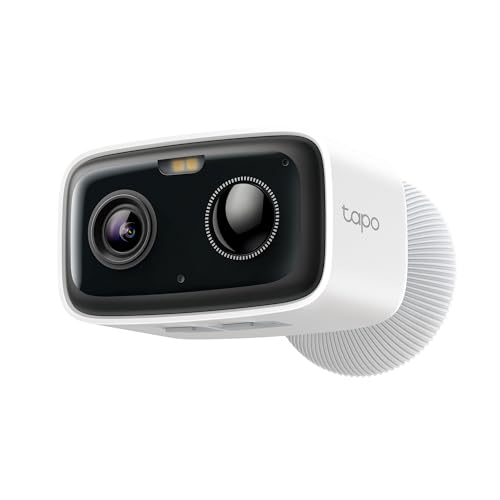
Wireless security cameras have become increasingly popular due to their convenience and ease of installation. However, many people wonder if they still need to plug them in to a power source.


The short answer is yes, wireless security cameras still need to be plugged in to a power source to function properly. While they do not require a physical connection to a recording device or monitor, they need a power supply to operate.
Some wireless security cameras come with rechargeable batteries, allowing them to be temporarily unplugged for charging. However, these batteries will eventually need to be recharged, so the camera will need to be plugged in periodically.
Do You Need to Connect Wireless Security Cameras to Power?
Even though wireless security cameras are designed to transmit video wirelessly, they still need to be connected to power in order to function. This is because they require electricity to power the camera itself, as well as any built-in features such as night vision or motion detection.
While the video signal is transmitted wirelessly to your recording device or monitor, the camera still needs a power source to operate. Some wireless security cameras are battery-powered, but most models require a constant power supply to ensure continuous operation.
Therefore, if you are considering installing wireless security cameras, make sure you have a power source nearby to plug them in. This could be an outlet indoors or outdoors, or you may need to use an extension cord to reach the desired location.
Understanding the Power Source of Wireless Security Cameras
One common misconception about wireless security cameras is that they don’t require any power source at all. However, this is not entirely true. While wireless security cameras do not need to be plugged into a wall outlet for data transmission, they still require a power source to operate.
Most wireless security cameras are powered by rechargeable batteries or solar panels. These power sources provide the necessary energy for the camera to function and transmit data wirelessly. Rechargeable batteries are convenient as they can be easily replaced or recharged when needed, ensuring continuous surveillance.
Solar-powered wireless security cameras are an eco-friendly option that harnesses energy from the sun to power the camera. These cameras are ideal for outdoor surveillance where access to a power outlet may be limited. The solar panels charge the camera’s batteries during the day, allowing it to operate at night without interruption.
It’s important to consider the power source of wireless security cameras when choosing a system for your home or business. Understanding how these cameras are powered can help you make an informed decision that meets your surveillance needs effectively.
Benefits of Wired vs. Wireless Security Cameras
When considering security cameras for your home or business, you may wonder whether to choose wired or wireless options. Both types have their own advantages, so it’s important to weigh the benefits to determine which is best for your needs.
Wired Security Cameras:
1. Reliable Connection: Wired cameras are connected directly to your recording device, ensuring a stable and secure connection.
2. Power Source: Wired cameras require a constant power source, so you don’t have to worry about changing or charging batteries.
3. Signal Interference: With a wired connection, you won’t experience signal interference from other devices or obstacles.
Overall, wired security cameras are a great choice for areas where a stable connection is crucial.
Wireless Security Cameras:
1. Easy Installation: Wireless cameras are easier to install since they don’t require cables or wires to connect to your recording device.
2. Flexibility: You can place wireless cameras anywhere within range of your Wi-Fi signal, giving you more flexibility in surveillance placement.
3. Remote Access: Many wireless cameras offer remote access through a mobile app, allowing you to monitor your property from anywhere.
Wireless security cameras are a convenient option for those looking for flexibility and easy installation.
Consider these benefits when deciding between wired and wireless security cameras to find the best option for your security needs.
Power Options for Wireless Security Cameras
Wireless security cameras offer various power options to suit different needs and preferences. Some models are battery-powered, allowing for easy installation without the need for electrical outlets. These cameras are ideal for locations where running wires is difficult or impractical.
Other wireless security cameras can be powered by a rechargeable battery that can be easily removed and recharged as needed. This option provides flexibility and convenience, as you can quickly swap out the battery without disrupting the camera’s operation.
Alternatively, some wireless security cameras can be plugged into a power outlet for continuous power supply. While this option requires access to an electrical outlet, it ensures uninterrupted operation without the need to recharge or replace batteries.
Ultimately, the power option you choose for your wireless security camera will depend on your specific requirements, such as installation ease, maintenance convenience, and power source availability.
Factors to Consider When Choosing Power Source
When selecting a power source for your wireless security camera, there are several factors to consider:
Battery-powered cameras: These cameras are easy to install and provide flexibility in camera placement. However, you will need to regularly replace or recharge the batteries, which can be a hassle.
Solar-powered cameras: These cameras are environmentally friendly and cost-effective in the long run. They rely on sunlight to recharge, so make sure your camera’s location receives enough sunlight for efficient operation.
Hardwired cameras: These cameras are reliable and provide continuous power without the need for battery replacements. However, installation can be more complex and limited to areas with access to power outlets.
Power over Ethernet (PoE) cameras: These cameras receive power and data through a single Ethernet cable, making installation simpler and more streamlined. Ensure your network infrastructure supports PoE if you choose this option.
Consider your specific needs and preferences when selecting the power source for your wireless security camera to ensure optimal performance and convenience.
Installation Tips for Wireless Security Cameras
Installing wireless security cameras can be a straightforward process if you follow these tips:
1. Choose the Right Location
Place your cameras in strategic locations to ensure optimal coverage of your property. Consider the range of the camera’s signal and any potential obstructions that could interfere with the signal.
2. Secure Mounting
Make sure your cameras are securely mounted to prevent tampering or theft. Use weatherproof mounting brackets if you are installing cameras outdoors.
| Tip | Use a power drill to securely mount your cameras to walls or ceilings. |



I've used both wired and wireless cameras. The wired ones are definitely more reliable, especially in areas with a lot of interference. But I love the flexibility of wireless cameras for placement. It just depends on your needs, I guess.
I agree, wireless setups are easier to install but can be tricky with battery life.
I’m curious if all wireless security cameras require a power outlet. What if I want to install one outside in a location far from any outlets?
Many wireless security cameras do require a power supply. However, there are battery-powered models and solar-powered options that can be ideal for outdoor use without nearby outlets.
I installed a wireless camera with a rechargeable battery. It’s nice not having to deal with wires, but I have to remember to recharge it often!
It's worth noting that some solar-powered cameras can be a good option for places without outlets. Just make sure they get enough sunlight!