
 Carmen J. Moore
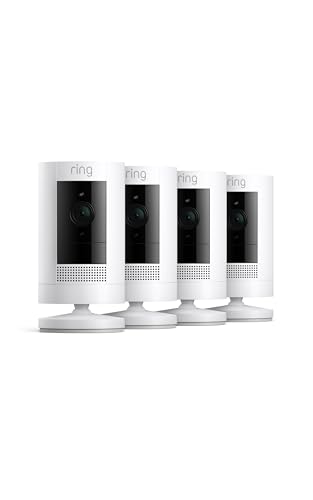
Ring is a popular choice for home security systems, known for its easy installation and user-friendly interface. Many homeowners wonder if they can add cameras to their existing Ring security system to enhance their surveillance capabilities.
The good news is that Ring offers a range of compatible cameras that can be seamlessly integrated into your Ring system. Whether you’re looking to monitor the front door, backyard, or any other area of your home, there is a camera option available to suit your needs.
Adding cameras to your Ring security system can provide you with increased peace of mind and a more comprehensive view of your property. With features like motion detection, two-way audio, and live streaming, you can keep an eye on your home from anywhere, at any time.


Can You Add Cameras to Ring Security System
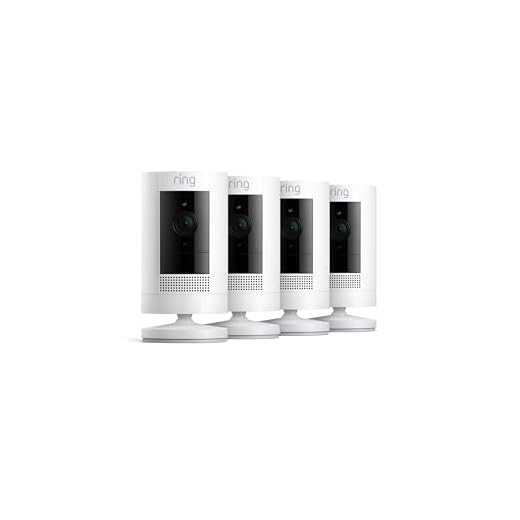
If you already have a Ring security system installed in your home, you may be wondering if you can add cameras to enhance your security setup. The good news is that Ring offers a range of cameras that are compatible with their security systems, allowing you to easily expand your surveillance capabilities.
Types of Ring Cameras
Ring offers various types of cameras that you can add to your security system, including indoor cameras, outdoor cameras, and doorbell cameras. Each type of camera serves a different purpose and can help you monitor different areas of your home.
How to Add Cameras
To add cameras to your Ring security system, simply purchase the cameras you want and follow the instructions provided by Ring for installation and setup. You can then access and control all your cameras through the Ring app, giving you complete visibility and control over your home security.
Benefits of Adding Cameras
Adding cameras to your Ring security system can provide numerous benefits:
Enhanced Security: Cameras offer an additional layer of security, allowing you to monitor and record activity around your home.
Visual Verification: With cameras, you can visually verify any alerts or notifications received from your security system.
Deterrence: Visible cameras can act as a deterrent to potential intruders and help prevent break-ins.
Remote Monitoring: You can check the live feed from your cameras remotely using the Ring app, giving you peace of mind when you’re away from home.
Evidence Collection: In the event of a security incident, cameras can provide valuable evidence to authorities.
Compatibility with Ring System
When considering adding cameras to your Ring security system, it’s important to ensure compatibility with your existing setup. Ring offers a range of cameras that seamlessly integrate with their security systems, providing you with additional layers of protection.
Before purchasing a new camera, make sure to check the compatibility requirements specified by Ring. Some cameras may require specific base stations or hubs to function properly within the Ring ecosystem.
By choosing cameras that are compatible with your Ring system, you can enhance the overall security of your home and enjoy the convenience of a fully integrated smart home setup. Stay informed about the latest updates and releases from Ring to make the most of your security system.
Installation Process for Cameras
To add cameras to your Ring security system, follow these steps:
1. Check Compatibility: Make sure the cameras you want to add are compatible with your Ring system. Check the Ring website or contact customer support for information on compatible devices.
2. Set Up the Camera: Follow the manufacturer’s instructions to set up the camera and connect it to your Wi-Fi network. Make sure the camera is working properly before proceeding.
3. Add Camera to Ring App: Open the Ring app on your mobile device and navigate to the settings section. Look for the option to add a new device and follow the on-screen instructions to connect the camera to your Ring system.
4. Position the Camera: Choose a suitable location to mount the camera, ensuring it has a clear view of the area you want to monitor. Use the mounting hardware provided to securely install the camera.
5. Test the Camera: Once the camera is installed, test it to ensure it is capturing the desired footage and functioning correctly. Adjust the camera angle if needed to optimize its performance.
6. Configure Settings: Customize the camera settings in the Ring app to suit your preferences. Set up motion detection, alerts, and other features to enhance the security capabilities of your system.
Types of Cameras Available
When considering adding cameras to your Ring security system, you have several options to choose from. Here are some of the types of cameras available:
| Camera Type | Description |
|---|---|
| Ring Stick Up Cam | A versatile camera that can be used indoors or outdoors, providing 1080p HD video and two-way talk. |
| Ring Spotlight Cam | This camera features built-in spotlights and sirens, along with 1080p HD video and two-way talk. |
Cost of Adding Cameras
Adding cameras to your Ring security system can vary in cost depending on the type and number of cameras you choose. Ring offers a range of indoor and outdoor cameras with different features and price points.
Factors to Consider:
- Cost of individual cameras
- Cost of camera bundles
- Installation costs
- Subscription fees for cloud storage and monitoring services
It’s important to factor in all these costs when considering adding cameras to your Ring security system to ensure you stay within your budget.
Integration with Ring App
The Ring security system allows for seamless integration with additional cameras to enhance your home security setup. By adding cameras to your Ring system, you can monitor various areas of your property, receive alerts, and access live footage through the Ring mobile app.
Easy SetupIntegrating cameras with your Ring system is simple and straightforward. Follow the instructions provided by Ring to connect the cameras to your existing setup. |
Enhanced MonitoringWith added cameras, you can expand your surveillance coverage and keep an eye on more areas of your home. This allows for better monitoring and greater peace of mind. |
Enhanced Security Features
Adding cameras to your Ring security system can provide enhanced security features to your home. With cameras strategically placed around your property, you can monitor different areas in real-time and receive alerts on your mobile device if any suspicious activity is detected.
By integrating cameras into your Ring system, you can also have a visual record of events that occur on your property, which can be invaluable in case of a security breach or other incidents. The footage captured by the cameras can help law enforcement authorities in their investigations and provide valuable evidence.
Customer Reviews and Feedback
Here are some customer reviews and feedback about adding cameras to the Ring security system:
| Customer | Review |
|---|---|
| John D. | “I recently added cameras to my Ring security system, and I am extremely satisfied with the results. The cameras provide clear video footage, and the integration with the existing Ring system was seamless.” |
| Sarah W. | “The addition of cameras to my Ring security system has given me peace of mind. I can now monitor my property remotely and receive alerts if any suspicious activity is detected. Highly recommend!” |
| Michael S. | “I was hesitant to add cameras to my Ring security system at first, but I’m so glad I did. The cameras have enhanced the overall security of my home, and the app allows me to easily access live footage whenever I need to.” |


I've added a couple of Ring cameras, and the remote monitoring feature is a game changer. Being able to check in while away brings so much peace of mind.
I recently added a Ring Stick Up Cam to my existing system. The installation was straightforward, just like the article mentioned. I was worried about connecting it to Wi-Fi, but the app guided me perfectly. Now, I feel much safer knowing I can monitor my backyard in real time!
I appreciate that the cameras can act as a deterrent. It definitely makes me feel safer at home.
I'm trying to decide between the Ring Stick Up Cam and the Spotlight Cam. Can anyone break down the main differences? Is one better for outdoor use?
Great input! The Spotlight Cam's extra features can definitely enhance security outdoors, especially at night. It's important to weigh your specific needs when choosing.
I have both, and I would say the Spotlight Cam is better for outdoor use because of the built-in spotlights and sirens. The Stick Up Cam is versatile but doesn't have those features.
Can anyone clarify if I need a specific base station for the new Ring cameras? I already have a basic Ring setup.
Can anyone share their experience with setting up additional cameras on the Ring system? I'm curious about how user-friendly the process is.
I found it pretty straightforward! The app guides you through each step, and it didn't take long to get everything set up.
I recently added a Ring Stick Up Cam to my setup, and the process was super straightforward. The video quality is great, and I love the two-way talk feature. It's nice being able to communicate with delivery people when I'm not home. Just make sure you have a strong Wi-Fi connection, as I had some lag initially.
That's good to know! Did you encounter any issues during the installation process?
Thanks for sharing your experience! Installation is usually easy, but ensuring a strong Wi-Fi connection is indeed crucial for optimal performance.
I don't think adding cameras is necessary if you already have a Ring doorbell. The doorbell captures most activity already, don’t you think?
That makes sense, but I feel like having more cameras gives a better overall view, especially for larger properties.
Can I mix different types of Ring cameras in one system? For example, can I use an indoor camera with an outdoor one?