
 Carmen J. Moore

Smart home technology has become increasingly popular in recent years, offering homeowners convenience, security, and peace of mind. One key aspect of a smart home is security cameras, which allow you to monitor your property remotely and keep an eye on things while you’re away. Honeywell is a well-known brand in the security industry, offering a range of high-quality security cameras that are trusted by many homeowners.
One common question that arises for smart home enthusiasts is whether these Honeywell security cameras can be integrated with Amazon Alexa, the popular voice-controlled virtual assistant. The ability to control your security cameras with voice commands can enhance the overall convenience and functionality of your smart home setup.
So, can Alexa work with Honeywell security cameras? In this article, we will explore the compatibility between Honeywell security cameras and Alexa, and provide you with the information you need to make the most of your smart home security system.


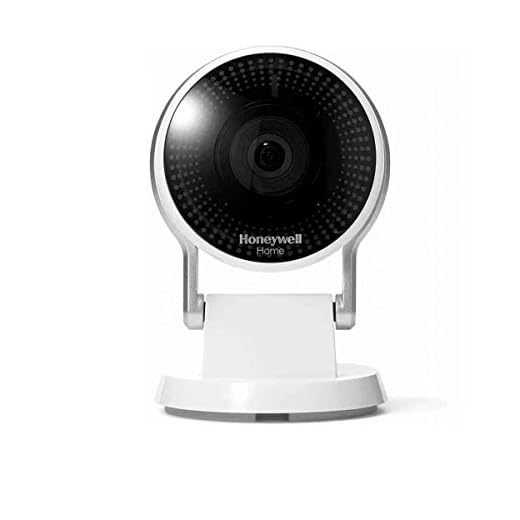
Is Alexa Compatible with Honeywell Security Cameras
Honeywell security cameras are known for their quality and reliability in providing home security solutions. Many users wonder if these cameras can be integrated with Alexa for added convenience and control. The good news is that Honeywell security cameras are compatible with Alexa, allowing users to access their camera feeds through voice commands.
By enabling the Honeywell Home skill on Alexa, users can easily connect their security cameras to their Alexa devices. This integration enables users to view live camera feeds, receive motion detection alerts, and even control camera settings using voice commands. With Alexa, users can conveniently monitor their home security cameras without having to navigate through multiple apps or interfaces.
How to Connect Honeywell Security Cameras with Alexa
To connect your Honeywell security cameras with Alexa, follow these simple steps:
- Open the Alexa app on your smartphone or tablet.
- Go to the Skills & Games section and search for the “Honeywell Home” skill.
- Enable the skill and link your Honeywell Home account to Alexa.
- Discover devices in the Alexa app to sync your Honeywell security cameras with Alexa.
- You can now use voice commands to control and monitor your Honeywell security cameras through Alexa.
With Alexa integration, Honeywell security camera users can enjoy a seamless home security experience with hands-free control and monitoring capabilities.
Overview of Alexa and Honeywell Security Cameras
Alexa, Amazon’s virtual assistant, can work with Honeywell security cameras to provide users with a seamless smart home security experience. By integrating Alexa with Honeywell security cameras, users can easily control their cameras using voice commands and access live feeds through compatible devices.
Key Features:
- Voice Control: Users can use Alexa voice commands to arm/disarm their security cameras, view live feeds, and more.
- Smart Home Integration: Alexa can be integrated with other smart home devices to create a comprehensive home automation system.
Compatibility:
| Honeywell Security Cameras | Alexa Compatibility |
|---|---|
| Honeywell Home Security Cameras | Works with Alexa for voice control |
| Honeywell Smart Home Security Cameras | Integrated with Alexa for seamless control |
Integration of Alexa with Honeywell Security Cameras
Alexa, the voice assistant developed by Amazon, can be integrated with Honeywell security cameras to provide users with a seamless smart home security experience. By connecting Alexa with Honeywell security cameras, users can control their cameras and view live feeds using voice commands.
Through the Alexa app, users can enable the Honeywell Home skill and link it to their Honeywell Total Connect account. This integration allows users to ask Alexa to show live video feeds from their Honeywell security cameras on compatible devices such as Echo Show or Fire TV. Users can also use voice commands to arm or disarm their security system, check the status of sensors, and receive alerts about any security events.
With the integration of Alexa and Honeywell security cameras, users can enjoy hands-free control of their home security system and monitor their property with ease. This integration enhances the overall security and convenience of smart home systems, providing users with peace of mind knowing that their homes are protected.
Benefits of Using Alexa with Honeywell Security Cameras
Integrating Alexa with Honeywell security cameras offers a range of benefits for homeowners looking to enhance their home security system. Some of the key advantages include:
- Voice Control: With Alexa, you can easily control your Honeywell security cameras using voice commands, making it convenient to monitor your home from anywhere.
- Hands-Free Operation: Alexa allows you to operate your security cameras hands-free, enabling you to check live feeds, arm/disarm the system, or receive alerts without lifting a finger.
- Smart Home Integration: By integrating Alexa with Honeywell security cameras, you can create a seamless smart home ecosystem where you can control multiple devices through voice commands.
- Customizable Alerts: Alexa can provide customizable alerts for your Honeywell security cameras, notifying you of any suspicious activity or triggering events in real-time.
- Enhanced Security: The combination of Alexa and Honeywell security cameras enhances the overall security of your home, giving you peace of mind and better control over your surveillance system.
How to Set Up Alexa with Honeywell Security Cameras
If you want to integrate your Honeywell security cameras with Alexa for voice control and monitoring, follow these steps:
- Check Compatibility: Ensure that your Honeywell security cameras are compatible with Alexa. Most modern Honeywell cameras can be integrated with Alexa.
- Set Up your Honeywell Cameras: Install and set up your Honeywell security cameras according to the manufacturer’s instructions. Make sure they are connected to your home network.
- Enable Honeywell Skills: Open the Alexa app on your smartphone or tablet and search for the Honeywell skill. Enable the skill and link it to your Honeywell account.
- Discover Devices: In the Alexa app, go to the Devices tab and select “Discover.” Alexa will scan for new devices, including your Honeywell security cameras.
- Name your Cameras: Give each camera a unique name that is easy to remember. This will make it easier to control them using Alexa voice commands.
- Control with Voice Commands: You can now use Alexa to view live feeds from your Honeywell security cameras, control camera settings, and receive alerts or notifications.
By following these steps, you can seamlessly set up your Honeywell security cameras with Alexa for added convenience and control over your home security system.
Limitations and Challenges of Using Alexa with Honeywell Security Cameras
1. Compatibility Issues: One of the main challenges of using Alexa with Honeywell security cameras is compatibility. Not all Honeywell security camera models may be compatible with Alexa, which can limit the functionality and integration between the devices.
2. Limited Control: While Alexa can be used to view live feeds from Honeywell security cameras and control some basic functions, the level of control may be limited compared to using the dedicated Honeywell app. This can be a drawback for users looking for more advanced features and settings.
3. Privacy Concerns: Integrating Alexa with security cameras raises privacy concerns as it involves sharing camera feeds and potentially sensitive information with a third-party service. Users need to be cautious about the privacy implications and ensure proper security measures are in place.
4. Connectivity Issues: Connectivity issues can arise when using Alexa with Honeywell security cameras, leading to delays or disruptions in accessing camera feeds or controlling the cameras remotely. This can impact the reliability and effectiveness of the security system.
5. Customization and Integration: Customization options and integration capabilities may be limited when using Alexa with Honeywell security cameras. Users may not be able to fully customize settings or integrate the cameras with other smart home devices as seamlessly as with the Honeywell app.


Can you clarify if all Honeywell camera models are compatible with Alexa, or only some? I want to make sure before I buy one.
Not all Honeywell cameras are compatible with Alexa. It's best to check the specifications of the model you're considering to ensure it supports Alexa integration.
Can I use voice commands to control all Honeywell camera features with Alexa?
I disagree about the convenience. I find it easier to use the Honeywell app directly. Sometimes Alexa doesn’t respond as quickly as I’d like when I ask to see a live feed.
Just a heads up, I've had some connectivity issues with my Honeywell cameras and Alexa. Sometimes the live feed takes a while to load.
I have both Honeywell cameras and another brand that integrates with Alexa. The Honeywell cameras have good image quality, but the other brand allows more customization through their app. Anyone else notice a difference in features?
I've found the same thing. While Honeywell is reliable, I appreciate the extra settings my other brand offers.
I disagree that Alexa makes security more convenient. I feel that using the Honeywell app gives me more control and security over my cameras.
I see your point, but I find Alexa integration useful for quick checks without needing to open an app.
Both perspectives are valid! Using the app may offer more features, but voice control can enhance accessibility for many users.
Just a reminder that when using Alexa with security cameras, privacy is important. Make sure to check your settings to keep your data secure!
I recently set up my Honeywell camera with Alexa, and I have to say, it's pretty convenient! The voice commands work well, but I did have some trouble connecting at first. Make sure to double-check your network settings and the skill permissions. Once it was set up, though, it's been smooth sailing. I love being able to check the feeds on my Echo Show.
How do Honeywell cameras compare to other brands like Ring or Arlo in terms of Alexa integration? Do they offer similar features?
Is it easy to set up Honeywell security cameras with Alexa? Are there specific steps I should be aware of?
What do I need to do if my Honeywell camera isn't showing up in the Alexa app?
If your camera isn't showing up, double-check that the Honeywell skill is enabled and that your cameras are properly connected to your Wi-Fi. You might also want to try rediscovering devices in the Alexa app.
I recently connected my Honeywell camera to Alexa, and it's been super convenient! I can just say, 'Alexa, show me the front door camera,' and it works perfectly on my Echo Show. The voice control feature really makes monitoring easy without needing to grab my phone.
What happens if my Wi-Fi goes down? Will I still be able to use the cameras?
If your Wi-Fi goes down, you won't be able to access the camera feeds through Alexa. However, you should still be able to view the feeds directly on the Honeywell app if your cameras are online.
I set up my Honeywell cameras with Alexa last week, and it was pretty straightforward! The live feed works great on my Echo Show. Just make sure to follow the steps closely!
Thanks for sharing your experience! It's great to hear that the setup process was smooth for you. If you have any tips for others, feel free to share!