
 Carmen J. Moore

Have you noticed a decline in the quality of your iPhone camera’s performance lately? You’re not alone. Many users have reported a decrease in image sharpness, focus issues, and overall image quality deterioration over time. So, what could be causing this decline in your iPhone camera’s performance?
There are several factors that can contribute to your iPhone camera’s decline in quality. One common reason is the accumulation of dirt, dust, and fingerprints on the camera lens, which can affect image clarity and sharpness. Additionally, software updates or bugs can also impact the camera’s performance, leading to issues such as slow autofocus or exposure problems.
Another possible reason for your iPhone camera getting worse could be hardware damage or wear and tear. If your iPhone has been dropped or exposed to moisture, it could result in camera issues. In some cases, the camera module itself may need to be replaced to restore the original image quality.


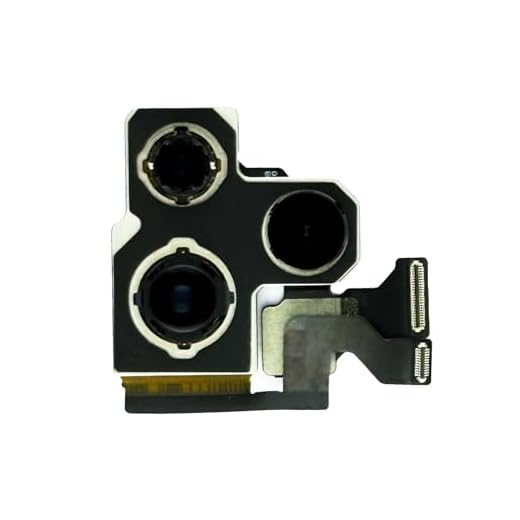
Reasons Why Your iPhone Camera Quality Has Declined
If you’ve noticed a decline in the quality of your iPhone camera, there could be several reasons behind it. Here are some common factors that may be affecting the performance of your camera:
1. Dirty lens: Over time, the lens of your iPhone camera can accumulate dust, fingerprints, and other debris, which can affect the clarity of your photos.
2. Outdated software: If your iPhone’s operating system or camera app is not up to date, it may not be optimized for the latest camera features and improvements.
3. Physical damage: Dropping your iPhone or exposing it to water can cause physical damage to the camera lens or sensor, leading to a decrease in image quality.
4. Settings misconfiguration: Incorrect camera settings, such as exposure, focus, or white balance, can result in poor quality photos.
5. Low light conditions: The iPhone camera performs best in well-lit environments, so taking photos in low light situations can result in grainy or blurry images.
6. Hardware issues: In some cases, hardware problems with the camera module itself can lead to a decrease in image quality.
By addressing these potential issues, you may be able to improve the quality of your iPhone camera and capture better photos.
Outdated Software or Operating System
If your iPhone camera has suddenly started producing lower quality images, it could be due to outdated software or operating system. Apple regularly releases updates to improve the performance of their devices, including the camera. If you have not updated your iPhone’s software in a while, it may be causing issues with the camera’s functionality. Check for any available updates in the Settings app under “General” and “Software Update” to ensure that your device is running the latest software version.
Physical Damage or Lens Debris
If your iPhone camera has gotten worse, it could be due to physical damage or debris on the lens. Physical damage, such as scratches or cracks on the lens, can affect the quality of your photos. Additionally, dust, dirt, or fingerprints on the lens can also degrade the image quality.
To improve the performance of your iPhone camera, make sure to clean the lens regularly with a soft, lint-free cloth. If there is physical damage to the lens, you may need to get it repaired or replaced by a professional. Avoid exposing your iPhone to harsh conditions that can cause damage to the camera lens.
Storage Space and Memory Issues
One possible reason for the decline in your iPhone camera’s performance could be related to storage space and memory issues. As you use your iPhone to take photos and videos, the device’s storage can quickly fill up, leading to a decrease in available memory for processing images. This can result in slower camera performance, lower image quality, and potential issues with autofocus and exposure settings.
To address this issue, try freeing up storage space on your iPhone by deleting unnecessary apps, photos, and videos. You can also transfer media files to an external storage device or cloud storage service to make more room for new photos and videos. Additionally, restarting your iPhone or resetting its settings can help refresh its memory and improve camera performance.
Software Glitches or Bugs
Another common reason for a decrease in camera quality on your iPhone could be due to software glitches or bugs. When your device’s software is not functioning properly, it can affect the performance of the camera. This can result in blurry images, slow autofocus, or other issues that impact the quality of your photos and videos.
If you suspect that software issues are causing the decline in camera quality, you can try troubleshooting steps such as restarting your device, updating to the latest software version, or resetting your camera settings. If the problem persists, you may need to contact Apple Support for further assistance.
Exposure to Extreme Temperatures
Extreme temperatures can have a negative impact on your iPhone camera’s performance. When your device is exposed to very hot or very cold temperatures, it can cause the camera components to expand or contract, leading to issues such as blurry images, focus problems, or color distortion. To prevent damage, avoid leaving your iPhone in direct sunlight or extreme cold for extended periods of time. Additionally, make sure to keep your device within the recommended temperature range specified by Apple.
Water Damage or Moisture Exposure
If your iPhone has been exposed to water or moisture, it can significantly affect the camera performance. Water damage can cause corrosion on the camera lens or other internal components, leading to blurry or distorted images. Moisture exposure can also result in condensation inside the camera lens, causing foggy pictures or a black screen.
Tip: If your iPhone has been exposed to water, try placing it in a bag of uncooked rice for 24-48 hours to absorb the moisture. Avoid using a hairdryer or heat source to dry the device, as this can cause further damage.
Incompatible Apps or Third-Party Accessories
One possible reason for your iPhone camera quality deteriorating could be due to incompatible apps or third-party accessories. Some apps may not be optimized for your iPhone’s camera system, leading to lower-quality images or video recordings. Similarly, using non-Apple approved accessories such as lenses or cases may interfere with the camera’s performance, resulting in a degradation of image quality. It is recommended to only use apps and accessories that are compatible with your iPhone model to ensure optimal camera performance.
Settings Misconfiguration or Restrictions
If your iPhone camera has suddenly gotten worse, it could be due to misconfigured settings or restrictions that are affecting its performance. Check your camera settings to ensure they are optimized for the best quality. Make sure that you have not accidentally enabled any filters or effects that might be degrading the image quality.
Additionally, restrictions set on your device by a parental control feature or other security settings could be limiting the camera’s capabilities. Review your device’s restrictions and permissions to ensure that the camera is allowed to function properly.
Overuse or Wear-and-Tear
Another common reason why your iPhone camera may have gotten worse is overuse or wear-and-tear. Like any electronic device, the camera module in your iPhone can degrade over time with frequent use. Constantly taking photos, recording videos, and using various camera features can put a strain on the camera components, leading to a decrease in image quality.
In addition, physical damage or exposure to environmental factors like dust, moisture, or extreme temperatures can also contribute to the deterioration of your iPhone camera. If your iPhone has been dropped or bumped frequently, the camera lens or sensor may have been damaged, affecting its performance.
To prevent further deterioration of your iPhone camera, try to limit its use to essential tasks and avoid exposing it to harsh conditions. Consider using a protective case or a lens cover to shield the camera from potential damage. If the camera quality continues to decline, you may need to seek professional help to repair or replace the camera module.
Hardware Malfunction or Component Failure
If your iPhone camera has suddenly started performing poorly, it could be due to a hardware malfunction or component failure. The camera module in your iPhone is a complex piece of technology that relies on various components working together seamlessly. If any of these components fail or malfunction, it can result in degraded camera performance.
Common hardware issues that can affect the camera include the camera lens getting scratched or dirty, the image sensor malfunctioning, or the camera module itself becoming damaged. In some cases, the problem may be related to the iPhone’s motherboard or other internal components.
If you suspect that your iPhone camera issues are due to a hardware problem, it’s best to contact Apple support or visit an authorized service center for diagnosis and repair. Attempting to fix hardware issues on your own may cause further damage to your device.


I've noticed my iPhone camera is taking blurry pictures lately, especially in low light. Could the software update be causing this?
I had similar issues with my iPhone camera. It turned out to be dirt on the lens. A simple cleaning with a microfiber cloth made a huge difference! Just something to consider if you haven't checked your lens yet.