
 Carmen J. Moore

Are you an adventure enthusiast looking to capture all your thrilling moments on the go? Your iPhone can be your perfect companion! With its advanced camera capabilities and compact size, your iPhone can easily double up as an action camera to document all your adrenaline-pumping activities.
In this comprehensive guide, we will show you how to unleash the full potential of your iPhone as an action camera. From selecting the right accessories to optimizing camera settings, we’ve got you covered!


Whether you’re into hiking, biking, or water sports, turning your iPhone into an action camera is a cost-effective and convenient solution. Say goodbye to bulky cameras and hello to the versatility of your trusty iPhone!
Choosing the Right Mount for Your iPhone
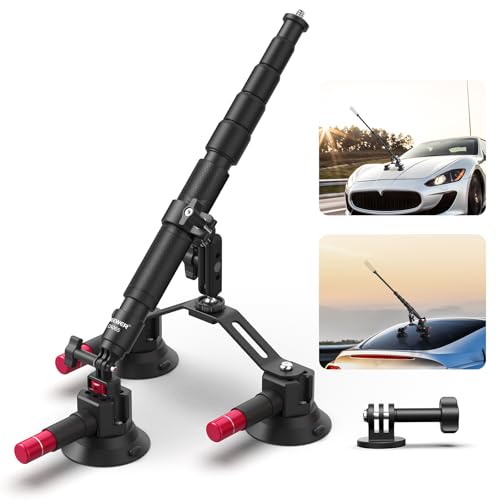
When using your iPhone as an action camera, selecting the right mount is crucial to ensure stability and optimal footage. Here are some key factors to consider when choosing a mount:
1. Compatibility
Make sure the mount you choose is compatible with your specific iPhone model. Different models may have variations in size and shape, so it’s important to select a mount that fits your device securely.
2. Versatility
Look for a mount that offers versatility in terms of mounting options. Whether you want to attach your iPhone to a helmet, bike, or chest strap, a mount with multiple attachment points will give you the flexibility to capture footage from various angles.
Consider factors like adjustability, durability, and ease of use when selecting a mount for your iPhone. A reliable mount will help you capture smooth and stable footage while engaging in action-packed activities.
Setting Up Your iPhone for Action Shots
Before you start using your iPhone as an action camera, there are a few settings and accessories you should consider to make sure you capture the best footage possible.
- Turn on Gridlines: Go to Settings > Camera and toggle on the Grid option. This will help you frame your shots more accurately.
- Use Airplane Mode: To prevent interruptions during recording, switch your iPhone to Airplane Mode. This will also help conserve battery life.
- Adjust Exposure and Focus: Tap on the screen to set the exposure and focus on your subject. This will ensure your footage is clear and well-lit.
- Consider a Mount: Invest in a quality mount or rig to securely attach your iPhone to your gear or helmet for stable shots.
- Use a Waterproof Case: If you plan on capturing action shots in wet or challenging conditions, protect your iPhone with a waterproof case.
By following these tips and setting up your iPhone properly, you’ll be ready to capture amazing action shots with your device.
Adjusting Camera Settings for Action Videos
When using your iPhone as an action camera, it’s important to adjust the camera settings to ensure you capture the best footage possible. Here are some tips on how to optimize your iPhone settings for action videos:
1. Frame Rate and Resolution
- Set the frame rate to 60fps or higher for smooth action shots.
- Choose a higher resolution setting for clearer and more detailed videos.
2. Exposure and Focus
- Adjust the exposure to prevent overexposed or underexposed footage.
- Tap on the screen to adjust the focus and ensure your subject is sharp.
By tweaking these camera settings on your iPhone, you can capture stunning action videos with ease.
Ensuring Stability and Durability of Your iPhone
Using your iPhone as an action camera can expose it to various hazards such as drops, impacts, or water damage. To ensure the stability and durability of your device, consider the following tips:
1. Use a Sturdy Mount
Invest in a high-quality mount specifically designed for action cameras. This will secure your iPhone in place and prevent it from shaking or falling off during intense activities.
2. Protective Case
Equip your iPhone with a durable and shockproof case to shield it from accidental drops and impacts. Look for a waterproof case if you plan to use your device in wet or unpredictable conditions.
- Choose a case that provides easy access to the camera and controls.
- Opt for a case with a built-in screen protector to safeguard the display.
By taking these precautions, you can enjoy using your iPhone as an action camera without compromising its stability and durability.
Utilizing Accessories for Enhanced Action Camera Experience
Enhance your action camera experience by using accessories that can help you capture stunning footage and improve the overall quality of your videos. Here are some accessories you can consider:
1. Mounts and Stands
Invest in a variety of mounts and stands to attach your iPhone to different surfaces or objects, allowing you to capture unique angles and perspectives. Whether you’re biking, skiing, or hiking, mounts can help you secure your iPhone for hands-free recording.
2. Waterproof Housing
For underwater adventures or rainy weather conditions, a waterproof housing case is essential to protect your iPhone from water damage and ensure clear footage. Make sure to choose a high-quality waterproof case that fits your iPhone model for optimal protection.
- 3. External Microphone
- 4. Tripod
- 5. Portable Lighting
By utilizing these accessories, you can elevate your action camera experience and capture professional-quality videos with your iPhone.
Editing and Enhancing Action Footage on Your iPhone
Once you have captured some amazing action footage on your iPhone, you may want to edit and enhance it to make it look even better before sharing it with others. Luckily, there are several apps available on the App Store that can help you with this task.
iMovie: iMovie is a powerful video editing app that allows you to easily trim and cut your footage, add music, transitions, and effects, and create a professional-looking video right on your iPhone.
Adobe Premiere Rush: Adobe Premiere Rush is another great option for editing action footage on your iPhone. It offers advanced editing tools, color correction, audio editing, and the ability to sync your projects across multiple devices.
Quik: Quik is a free app developed by GoPro that is specifically designed for editing action footage. It automatically analyzes your footage and creates stunning edits with music and effects in just a few taps.
With these apps, you can easily edit and enhance your action footage on your iPhone to create dynamic and engaging videos that will impress your friends and followers on social media.
Sharing Your Action Camera Videos on Social Media
Once you have captured some amazing footage with your iPhone action camera, you’ll want to share it with the world on social media platforms. Here are some tips on how to share your action camera videos effectively:
| 1. Choose the Right Platform: | Consider the platform where your audience is most active. Whether it’s Instagram, Facebook, YouTube, or TikTok, tailor your content to fit the platform’s style and audience. |
| 2. Edit Your Videos: | Before sharing, edit your videos to make them more engaging. Add music, trim unnecessary footage, and use filters to enhance the visual appeal. |
| 3. Write Compelling Captions: | Captions can make a big difference in how your videos are received. Write engaging captions that provide context or tell a story to captivate your audience. |
| 4. Use Hashtags: | Hashtags help your videos reach a wider audience. Research relevant hashtags and include them in your post to increase visibility. |
| 5. Engage with Your Audience: | Respond to comments, messages, and feedback from your viewers. Building a connection with your audience can help increase engagement and loyalty. |
Tips and Tricks for Capturing Great Action Shots with Your iPhone
When using your iPhone as an action camera, there are several tips and tricks that can help you capture amazing shots. Here are some things to keep in mind:
- Use a sturdy mount or tripod to keep your iPhone stable during fast-paced action.
- Experiment with different camera settings such as burst mode or slow motion to capture dynamic moments.
- Make use of the gridlines on your iPhone’s camera app to compose your shots effectively.
- Consider investing in external lenses to enhance the quality of your action shots.
- Keep your iPhone’s lens clean to ensure clear and sharp images.
- Try shooting from different angles and perspectives to add variety to your action shots.
- Use editing apps to enhance the colors and contrast of your action shots for a more professional look.
- Practice and experiment with different techniques to improve your skills and capture unique action shots.


Does the article suggest any specific waterproof cases for the iPhone? I’m not sure which brands are reliable.
While the article doesn't mention specific brands, look for well-reviewed options like Lifeproof or OtterBox, which are known for their durability and waterproof features.
What are the best accessories to use with an iPhone for action shots? I’m particularly interested in mounts and cases.
Don’t forget to explore editing apps like iMovie and Quik mentioned in the article. They make it easy to enhance your footage before sharing!
I recently used my iPhone while hiking and it worked surprisingly well as an action camera! I followed the tips about using a sturdy mount and turning on Airplane Mode. The footage was smooth, and I was able to capture some beautiful scenery. Just be sure to check the weather before going out, as I had to be cautious about rain.
I don't think an iPhone can really replace a dedicated action camera. The lens and stabilization features just can't compete. Plus, the battery life under heavy use is questionable. It’s nice for casual use, but maybe not for serious adventurers.