
 Carmen J. Moore
Watching a solar eclipse is a breathtaking experience that many people look forward to witnessing. With the advancement of technology, capturing this natural phenomenon has become easier than ever. One question that often arises is whether you can use your iPhone camera to watch and record a solar eclipse.
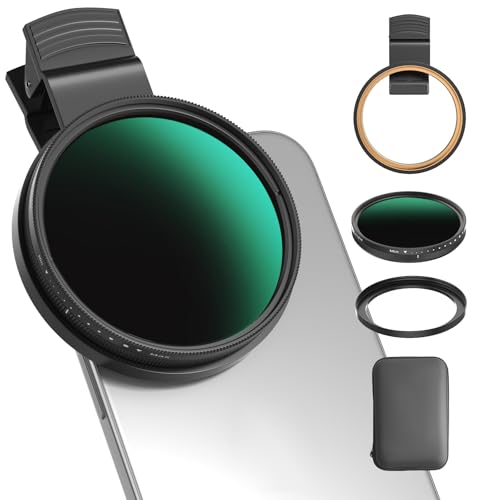
Using your iPhone camera to view a solar eclipse is possible, but it requires certain precautions to protect both your device and your eyes. The camera lens of your iPhone can be damaged by the intense sunlight during an eclipse, so it is important to use a proper solar filter or eclipse glasses to safely capture the event.


Additionally, taking photos or videos of a solar eclipse with your iPhone may not provide the best quality compared to using a specialized camera with a solar filter. However, with the right settings and techniques, you can still capture stunning images of this celestial event using your iPhone camera.
Can iPhone Camera Capture Solar Eclipse?
Yes, you can use your iPhone camera to capture a solar eclipse. However, it is important to take certain precautions to protect your phone from the intense light and heat of the sun during the eclipse. Using a solar filter or specialized eclipse glasses on your phone’s camera lens can help prevent damage to both your phone and your eyes. Additionally, adjusting the exposure settings on your phone’s camera can help capture the eclipse more effectively. Remember to never look directly at the sun or the eclipse without proper eye protection.
Solar Eclipse?
A solar eclipse occurs when the moon passes between the sun and the earth, blocking the sun’s rays and casting a shadow on the earth. It is a rare and fascinating astronomical event that captivates people around the world.
Watching a Solar Eclipse with Your iPhone Camera
Using your iPhone camera to watch a solar eclipse can be a convenient and fun way to capture this celestial event. However, it is important to take precautions to protect your eyes and your device. Make sure to use proper solar filters or eclipse glasses when looking directly at the sun and avoid pointing your camera at the sun for extended periods to prevent damage to the camera sensor.
Photographing Solar Eclipse
Photographing a solar eclipse can be a challenging but rewarding experience. With the advancement of smartphone cameras, it is possible to capture stunning images of this celestial event using your iPhone camera.
Preparation
Before attempting to photograph a solar eclipse with your iPhone, make sure to research the best techniques and equipment needed for the job. It is crucial to protect your eyes and your phone’s camera from the intense sunlight during the eclipse.
Tips for iPhone Photography
When using your iPhone camera to photograph a solar eclipse, consider using a solar filter or eclipse glasses to protect your device and your eyes. Experiment with different exposure settings and angles to capture the beauty of this rare event.
Remember: Never look directly at the sun or the eclipse without proper eye protection. Enjoy the eclipse safely and capture the moment with your iPhone camera!
Using iPhone Camera
When watching a solar eclipse, you can use your iPhone camera to capture this amazing phenomenon. However, it is important to take certain precautions to protect both your eyes and your device. Here are some tips for using your iPhone camera during a solar eclipse:
1. Use a Solar Filter
Make sure to use a solar filter on your iPhone camera lens to protect it from the intense light of the sun. This will prevent any damage to your camera sensor and ensure that you get clear and safe images of the eclipse.
2. Avoid Direct Viewing
Do not look directly at the sun or the solar eclipse through your iPhone camera. Use the camera’s screen to frame and focus your shots instead. This will prevent any potential harm to your eyes from the sun’s harmful rays.
By following these guidelines, you can safely use your iPhone camera to document and enjoy the beauty of a solar eclipse.
Camera Settings for Eclipse
When using your iPhone camera to watch a solar eclipse, it’s important to adjust the settings for optimal results. Here are some recommended camera settings:
1. Exposure: Set the exposure to a lower level to prevent overexposure and capture the details of the eclipse.
2. Focus: Manually adjust the focus to ensure a clear and sharp image of the eclipse.
3. ISO: Keep the ISO low to reduce noise and maintain image quality.
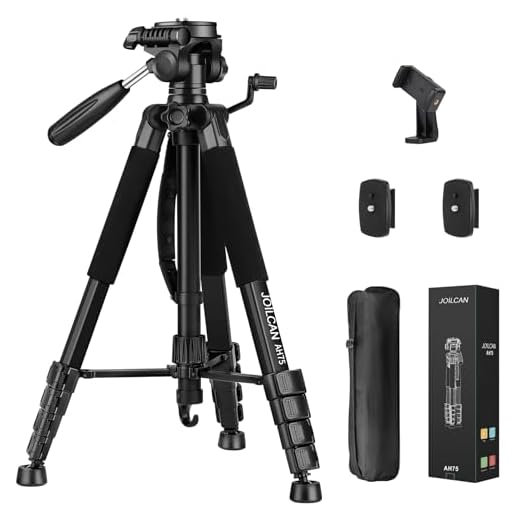
4. Use a tripod: To avoid camera shake and ensure stability during the eclipse, use a tripod or a stable surface.
By adjusting these camera settings, you can capture stunning images of the solar eclipse using your iPhone camera.
Safety Precautions for Photography
When photographing a solar eclipse with your iPhone camera, it is essential to take the necessary safety precautions to avoid damaging your device and protecting your eyes. Here are some key safety tips to keep in mind:
1. Use a Solar Filter
Always use a solar filter when photographing the sun during a solar eclipse. This filter will protect both your camera sensor and your eyes from the intense sunlight. Make sure the filter is specifically designed for solar viewing and photography.
2. Don’t Look Directly at the Sun
Avoid looking directly at the sun through your iPhone camera’s viewfinder or screen. This can cause eye damage, especially during an eclipse when the sun’s rays are more intense. Use the camera’s screen to frame your shot instead.
| Important: | Never point your iPhone camera directly at the sun without a solar filter. |
Quality of iPhone Images
When using your iPhone camera to watch a solar eclipse, it’s important to consider the quality of the images you’ll capture. iPhones are known for their high-quality cameras, capable of capturing stunning photos and videos. However, when it comes to capturing a solar eclipse, there are some factors to keep in mind.
Resolution
The resolution of iPhone cameras varies depending on the model. Newer models tend to have higher resolutions, resulting in sharper images. When capturing a solar eclipse, a higher resolution camera can help you capture more detail of the event.
Zoom
iPhones typically have digital zoom capabilities, but they may not have optical zoom. When zooming in to capture the solar eclipse, be mindful of the quality loss that can occur with digital zoom. It’s recommended to use additional optical zoom accessories for better results.
Alternative Camera Options
If you don’t have access to a solar filter for your iPhone camera, there are alternative options you can consider:
- Use a pair of eclipse glasses over your iPhone camera lens to safely capture the eclipse.
- Attach a solar filter to a DSLR camera or a point-and-shoot camera for better image quality.
- Consider using a telescope with a solar filter and a smartphone adapter for a more detailed view of the eclipse.
- Explore the option of using a pinhole camera or a DIY eclipse viewer to indirectly observe the eclipse.
Remember to always prioritize safety when observing or photographing a solar eclipse to protect your eyes and your camera equipment.
Professional Photography Equipment
When it comes to capturing high-quality images, professional photographers rely on a range of specialized equipment to achieve stunning results. Here are some essential tools that are commonly used in professional photography:
1. DSLR Cameras
DSLR cameras are the standard choice for professional photographers due to their versatility, image quality, and performance. These cameras offer manual controls, interchangeable lenses, and high-resolution sensors, allowing photographers to capture detailed and sharp images.
2. Tripods
A sturdy tripod is essential for achieving stable shots, especially in low-light conditions or when using slow shutter speeds. This tool helps photographers maintain sharpness and composition, resulting in professional-looking images.
Tips for Eclipse Photography
1. Use a solar filter to protect your camera and eyes from the intense sunlight during a solar eclipse.
2. Adjust your camera settings to capture the unique lighting conditions of the eclipse. Experiment with exposure settings to get the best shot.
3. Consider using a tripod to keep your camera steady and avoid blurry photos, especially during longer exposures.
4. Practice taking photos of the sun prior to the eclipse to familiarize yourself with the process and settings.
5. Look for interesting foreground elements to include in your eclipse photos for a more dynamic composition.
6. Be patient and prepared for changing lighting conditions during the eclipse. Stay alert and ready to capture the perfect moment.



Can you really use just any solar filter, or do they need to be specially designed for iPhone cameras?
It's best to use solar filters specifically designed for camera use, as they ensure adequate protection from intense sunlight. Regular solar filters may not fit properly on the smaller lens of an iPhone.
I tried capturing an eclipse last year with my iPhone, and while it was fun, I found the images weren’t as clear as I hoped. I used a solar filter, but the digital zoom made the photos grainy. I think next time I might borrow a DSLR.
I disagree that iPhones can’t capture good eclipse photos. With the right settings and some patience, I got some decent shots during the last eclipse!
I’m a bit confused about eye safety. If I'm using the camera screen to frame my shots, does that still mean I shouldn't be looking directly at the sun? I don't want to risk damaging my eyes.
Great question! Even when using the camera screen, it’s still crucial not to look directly at the sun. Rely solely on the screen to frame your shots to protect your eyes from harmful rays.
Thanks for clarifying that! I’ll make sure to keep my sunglasses on and only use the screen.