
 Carmen J. Moore

Digital cameras have revolutionized the way we capture and store memories. With the click of a button, a moment frozen in time is saved onto a memory card or internal storage.
Gone are the days of film rolls and waiting for prints. Today, we can instantly view our photos on the camera’s screen or transfer them to a computer or mobile device for safekeeping.
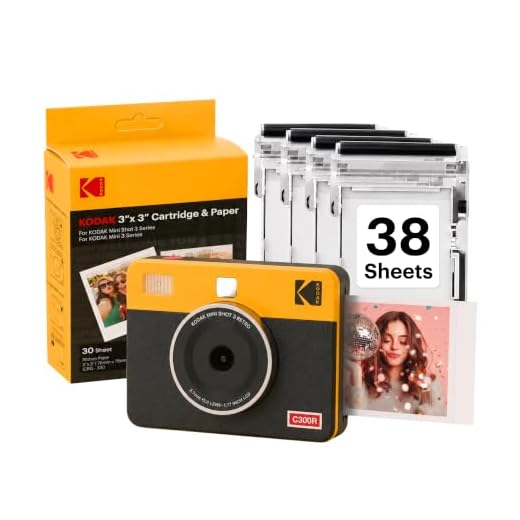


Whether it’s a scenic landscape, a candid portrait, or a fun selfie, each photo taken with a digital camera becomes a digital file that can be easily shared, edited, and cherished for years to come.
Understanding Digital Camera Storage
When you take a photo with a digital camera, the image is stored in the camera’s memory or on a memory card. Understanding how digital camera storage works can help you manage your photos effectively and ensure you don’t run out of storage space.
Types of Digital Camera Storage
There are two main types of digital camera storage: internal memory and memory cards. Internal memory is built-in storage that comes with the camera, while memory cards are removable storage devices that can be used to expand storage capacity.
- Internal Memory: Internal memory is limited in capacity and may not be sufficient for storing a large number of photos. It is important to regularly transfer photos from the internal memory to a computer or external storage device to free up space.
- Memory Cards: Memory cards come in various formats such as SD, microSD, and CompactFlash. They offer additional storage capacity and can be easily swapped out when full. It is recommended to use high-quality memory cards to ensure reliable storage of your photos.
Managing Digital Camera Storage
To effectively manage your digital camera storage, consider the following tips:
- Regularly back up your photos to a computer or external hard drive to prevent data loss.
- Organize your photos into folders or albums to easily locate and access them when needed.
- Delete unwanted or duplicate photos to free up storage space and keep your photo collection organized.
- Consider using cloud storage services to store and access your photos from anywhere, providing an additional backup solution.
How Digital Cameras Store Images
When you take a photo with a digital camera, the image is stored electronically on a memory card. Digital cameras use a sensor to capture the image, which is then processed and saved as a digital file.

The image data is typically stored in a compressed format such as JPEG or RAW. JPEG is a common file format that reduces the file size by compressing the image data, while RAW files contain uncompressed data for higher quality images.
Memory Cards
Memory cards are small, portable storage devices that are used to save digital photos. Common types of memory cards include SD (Secure Digital), CF (CompactFlash), and microSD cards. The size of the memory card determines how many photos can be stored on it.
Internal Memory
Some digital cameras also have internal memory where photos can be stored. The internal memory capacity varies depending on the camera model, but it is usually limited compared to using a memory card.
Types of Digital Camera Storage
When you take a photo with a digital camera, the image is stored in various types of storage media. Here are some common types of digital camera storage:
1. Secure Digital (SD) Cards
SD cards are one of the most popular types of storage media for digital cameras. They come in various capacities and can be easily inserted and removed from the camera.

2. Compact Flash (CF) Cards
CF cards are another popular choice for digital camera storage. They are larger in size compared to SD cards but offer higher capacity and faster read/write speeds.
These are just a few examples of digital camera storage options available on the market. Each type of storage media has its own advantages and disadvantages, so it’s important to choose the one that best suits your needs.
Importance of Photo Backup
Backing up your photos is essential to ensure that your precious memories are safe and secure. In the digital age, it is easy to accumulate a large collection of photos, but without proper backup, they can be lost in an instant due to hardware failure, accidental deletion, or other unforeseen circumstances.
The Value of Memories
Photos capture special moments in time that can never be recreated. From family gatherings to travel adventures, each photo holds a story and a memory that is worth preserving. By backing up your photos, you can ensure that these memories will be cherished for years to come.
Don’t Wait, Backup Today

Don’t wait until it’s too late to backup your photos. Take the time to set up a reliable backup system, whether it’s using cloud storage, external hard drives, or other backup solutions. By taking this simple step, you can safeguard your photos and enjoy peace of mind knowing that your memories are protected.
Choosing the Right Storage Solution
When it comes to storing your digital photos, choosing the right storage solution is crucial to ensure your memories are safe and easily accessible. There are several options available, each with its own benefits and drawbacks.
External Hard Drive
One popular option is to store your photos on an external hard drive. This provides a large amount of storage space at a relatively low cost. However, external hard drives can be prone to failure, so it’s important to regularly back up your photos to avoid losing them.
Cloud Storage
Another option is to store your photos in the cloud. This allows you to access your photos from any device with an internet connection and provides an extra layer of security in case your physical storage device fails. However, cloud storage services often come with a subscription fee and may have limitations on storage space.
| Storage Solution | Pros | Cons |
|---|---|---|
| External Hard Drive | Large storage capacity, low cost | Prone to failure, requires regular backups |
| Cloud Storage | Access from any device, extra security | Subscription fee, limited storage space |
Managing Your Photo Storage
When you use a digital camera, your photos are stored on the camera’s memory card. It’s important to manage your photo storage effectively to ensure that you don’t run out of space and lose any precious memories. Here are some tips for managing your photo storage:

| 1. Delete Unwanted Photos: | Regularly go through your photos and delete any that are blurry, duplicates, or simply not worth keeping. This will free up space for new photos. |
| 2. Transfer Photos to Your Computer: | Once you have taken a significant number of photos, transfer them to your computer for safekeeping. You can then delete them from your camera to free up space. |
| 3. Use Cloud Storage: | Consider using cloud storage services like Google Photos or Dropbox to store your photos. This will free up space on your camera and ensure that your photos are backed up. |
| 4. Organize Your Photos: | Create folders on your computer or in the cloud to organize your photos by date, event, or location. This will make it easier to find specific photos when you need them. |
| 5. Print Your Favorite Photos: | Consider printing your favorite photos and creating physical albums or frames. This will not only free up digital storage but also allow you to enjoy your photos in a tangible form. |
Cloud Storage Options
Cloud storage offers a convenient way to store your digital photos securely and access them from anywhere with an internet connection. There are several popular cloud storage options available, each with its own features and pricing plans:
- Google Photos: Offers unlimited free storage for high-quality photos and videos. It also provides automatic organization and editing features.
- iCloud: Apple’s cloud storage service that seamlessly integrates with iOS devices. It offers 5 GB of free storage and paid plans for additional space.
- Amazon Photos: Provides unlimited full-resolution photo storage for Amazon Prime members. Non-Prime members can opt for a paid plan.
- Dropbox: A popular cloud storage service that offers file syncing, sharing, and collaboration features. It provides a limited amount of free storage with paid plans for more space.
Consider the features, pricing, and compatibility with your devices when choosing a cloud storage option for your digital photos.
Security Measures for Photo Storage
When storing photos digitally, it is important to take security measures to protect your precious memories. Here are some tips to ensure the safety of your photos:
1. Use strong passwords to encrypt your photo storage devices or cloud services.
2. Regularly back up your photos to multiple locations to prevent data loss in case of hardware failure or cyber attacks.
3. Enable two-factor authentication for added security when accessing your photo storage accounts.
4. Be cautious when sharing your photos online and consider using privacy settings to control who can view them.
5. Keep your photo storage devices updated with the latest security patches to protect against vulnerabilities.
By following these security measures, you can ensure that your photos remain safe and secure for years to come.
Future of Digital Camera Storage
As technology continues to advance, the future of digital camera storage is becoming more exciting and innovative. With the increasing demand for higher resolution images and videos, the need for larger storage capacities is also growing.

New storage technologies such as solid-state drives (SSDs) and cloud storage are revolutionizing the way we store our precious memories captured with digital cameras. SSDs offer faster read and write speeds, making it easier to transfer large files quickly. Cloud storage, on the other hand, allows users to access their photos and videos from anywhere with an internet connection, providing a convenient and secure way to store and share content.
Potential Developments in Digital Camera Storage:
- Increased storage capacities
- Faster transfer speeds
- Enhanced security features
The future of digital camera storage is bright, with advancements in technology paving the way for more efficient and reliable storage solutions. Whether you prefer the convenience of cloud storage or the speed of SSDs, there are plenty of options to suit every photographer’s needs.
FAQ
How does a digital camera store photos?
When you use a digital camera, your photo is stored on a memory card inside the camera. The memory card acts as the storage device and stores the digital image file until you transfer it to a computer or another storage device.
Can I store my photos directly on the camera without a memory card?
Most digital cameras require a memory card to store photos. Some cameras may have built-in storage, but it is usually limited and not sufficient for storing a large number of photos. It is recommended to use a memory card for convenient and extended storage capacity.
What are the different types of memory cards used in digital cameras?
There are several types of memory cards used in digital cameras, including SD (Secure Digital), microSD, CF (CompactFlash), and more. The type of memory card your camera uses depends on the camera model and specifications. It is important to check the compatibility of the memory card with your camera before purchasing.

How can I ensure the safety of my photos stored on a digital camera?
To ensure the safety of your photos stored on a digital camera, it is recommended to regularly back up your photos to a computer or external storage device. You can also consider using cloud storage services for added security and accessibility. Additionally, handling the memory card with care and storing it in a safe place can help prevent data loss.




What are the main differences between JPEG and RAW formats in terms of storage and quality?
JPEG files are compressed, which saves space but reduces image quality. RAW files retain all image data, offering higher quality but taking up more storage. It's important to choose based on your editing needs.
I’ve been using SD cards for my camera for a while now, and I find them really convenient. However, I once lost some photos because I didn’t back them up regularly. Now I use both an external hard drive and cloud storage to keep my memories safe. It's such a relief!