
 Carmen J. Moore

Olympus cameras have long been renowned for their exceptional quality and innovative features. Whether you’re a seasoned photographer or just starting out, Olympus digital cameras offer a range of options to suit your needs. From compact point-and-shoot models to advanced mirrorless cameras, there’s a perfect Olympus camera for every skill level.
With cutting-edge technology and superior optics, Olympus cameras deliver stunning image quality and performance. Whether you’re capturing landscapes, portraits, or action shots, you can trust Olympus to deliver exceptional results. Plus, with user-friendly interfaces and intuitive controls, Olympus cameras make it easy to take your photography to the next level.
Are you ready to unleash your creativity and capture unforgettable moments? Dive into the world of Olympus digital cameras and discover the power of precision engineering, unmatched performance, and stunning image quality. Elevate your photography with Olympus – the choice of professionals and enthusiasts alike.
Choosing the Right Olympus Camera
When selecting an Olympus camera, it’s important to consider your photography needs and budget. Here are some key factors to keep in mind:


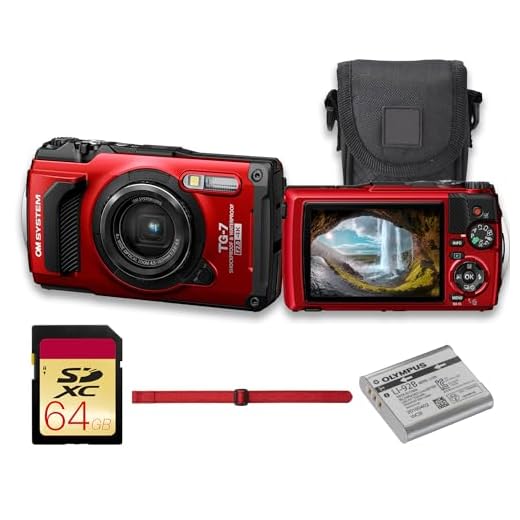
1. Camera Type: Decide if you want a compact point-and-shoot camera or a mirrorless interchangeable lens camera.
2. Resolution: Consider the megapixels for the image quality you desire.
3. Lens Options: Look at the available lenses for the camera and choose based on your photography style.
4. Features: Think about the specific features you need, such as image stabilization, 4K video recording, or Wi-Fi connectivity.
5. Budget: Set a budget and find a camera that meets your requirements within that price range.

By considering these factors, you can choose the right Olympus camera that suits your shooting preferences and budget.
Understanding Camera Settings and Features
When using Olympus digital cameras, it’s essential to understand the various settings and features available to make the most out of your photography experience. Here are some key settings and features to pay attention to:
1. Shooting Modes
Olympus cameras offer a variety of shooting modes to suit different photography scenarios. These include Auto, Program, Aperture Priority, Shutter Priority, and Manual modes. Each mode provides control over different aspects of the camera settings, allowing you to achieve the desired effect in your photos.
2. Image Quality and Resolution
Make sure to set the image quality and resolution according to your needs. Olympus cameras offer options for JPEG and RAW image formats, as well as various resolution settings. RAW format provides more flexibility in post-processing, while JPEG is more convenient for everyday use.
| Setting | Description |
|---|---|
| Image Stabilization | Olympus cameras are equipped with in-body image stabilization (IBIS) to reduce camera shake and blur in photos. Make sure to enable this feature for sharper images, especially in low-light conditions. |
| Focus Modes | Experiment with different focus modes such as Single Autofocus (S-AF), Continuous Autofocus (C-AF), and Manual Focus (MF) to achieve precise focus on your subjects. |
| White Balance | Adjust the white balance settings to ensure accurate color reproduction in different lighting conditions. You can choose from presets like Daylight, Cloudy, Fluorescent, and Custom white balance. |
By familiarizing yourself with these settings and features, you can take full advantage of your Olympus digital camera and capture stunning photos in various situations.
Tips for Capturing Great Photos with Olympus Cameras
1. Understand your camera settings: Familiarize yourself with the various settings on your Olympus camera, such as aperture, shutter speed, and ISO. Experiment with different settings to see how they affect your photos.
2. Use natural light: Olympus cameras perform well in natural light, so try to shoot outdoors or near a window to take advantage of natural lighting. Avoid using the camera flash whenever possible.
3. Explore different angles: Get creative with your composition by trying different angles and perspectives. Don’t be afraid to get low to the ground or shoot from above to capture unique shots.
4. Utilize the camera’s features: Olympus cameras come with a range of features like image stabilization, scene modes, and creative filters. Experiment with these features to enhance your photos.
5. Practice good composition: Pay attention to the rule of thirds, leading lines, and framing when composing your shots. Keep your subject in focus and eliminate distractions in the background.

Editing and Enhancing Images from Olympus Cameras
Once you have taken photos with your Olympus camera, you may want to edit and enhance them to make them even more stunning. Here are some tips on how to do so:
- Use Olympus Viewer software: Olympus provides software called Olympus Viewer that allows you to easily import, organize, and edit your photos. It offers a range of editing tools such as cropping, resizing, and adjusting colors.
- Experiment with filters: Olympus cameras often come with built-in filters that can add creative effects to your photos. Experiment with different filters to give your images a unique look.
- Adjust exposure and white balance: Use editing software to adjust the exposure and white balance of your photos to ensure they look their best. This can help correct any lighting issues and make your photos more vibrant.
- Retouch images: If needed, you can use editing tools to retouch your images by removing blemishes, adjusting skin tones, or removing unwanted objects from the background.
- Save your edits: Once you are happy with the edits you have made, be sure to save your images in a high-quality format to preserve the changes you have made.
Sharing Your Olympus Camera Photos Online
If you want to share your amazing photos captured with your Olympus camera online, there are several ways to do so. Here are some tips to help you get started:
1. Social Media Platforms: One of the easiest ways to share your photos is by uploading them to popular social media platforms such as Instagram, Facebook, or Twitter. You can create an account, upload your photos, and share them with your friends and followers.
2. Photography Websites: There are numerous photography websites where you can showcase your work and connect with other photographers. Websites like Flickr, 500px, and SmugMug are great platforms to share your Olympus camera photos and receive feedback from the photography community.
3. Online Photo Galleries: Consider creating an online photo gallery on platforms like Google Photos or Adobe Portfolio. This will allow you to organize your photos in albums and share them with a wider audience.
4. Blogging Platforms: If you enjoy writing about your photography experiences, you can create a blog using platforms like WordPress or Blogger. You can share your photos along with stories, tips, and techniques behind each shot.
5. Olympus Image Share App: If you own a Wi-Fi-enabled Olympus camera, you can use the Olympus Image Share app to transfer photos wirelessly to your smartphone or tablet. From there, you can easily share your photos on social media or via email.
By utilizing these platforms and tools, you can easily share your Olympus camera photos online and showcase your photography skills to a larger audience.
Accessories and Add-Ons for Olympus Cameras
When using Olympus digital cameras, there are a variety of accessories and add-ons available to enhance your photography experience. Here are some popular options:
Lenses:
- Olympus offers a range of high-quality lenses that can help you achieve different effects and capture stunning images. Consider investing in a prime lens for sharp portraits or a zoom lens for versatile shooting.
- Macro lenses are great for close-up photography, while wide-angle lenses can capture expansive landscapes.
External Flashes:
- An external flash can provide additional lighting when shooting in low light conditions or when you need to fill in shadows. Olympus offers compatible flashes that can be easily attached to your camera.
Other accessories to consider include camera bags for protection and organization, tripods for steady shots, and remote shutter releases for hands-free shooting. Explore the range of accessories available for Olympus cameras to take your photography to the next level.
Final Thoughts on Using Olympus Cameras Digital
Using Olympus digital cameras can significantly enhance your photography experience. These cameras offer a wide range of features and settings that allow you to capture stunning images in various lighting conditions.
Advantages of Olympus Cameras Digital
One of the main advantages of Olympus digital cameras is their compact size and lightweight design, making them perfect for travel and on-the-go photography. Additionally, Olympus cameras are known for their excellent image quality, sharpness, and color reproduction.
Tips for Getting the Most Out of Your Olympus Camera
To maximize your Olympus camera’s capabilities, make sure to familiarize yourself with its settings and functions. Experiment with different shooting modes, such as aperture priority and shutter priority, to achieve different creative effects. Additionally, consider investing in high-quality lenses to further enhance your photography.
| Remember to regularly clean your camera’s sensor and lens to ensure optimal performance. |
Overall, Olympus digital cameras are a great choice for both beginners and experienced photographers looking to elevate their photography skills. With the right techniques and practice, you can capture stunning images that will last a lifetime.
FAQ
What are the key features of Olympus digital cameras?
Olympus digital cameras are known for their compact size, lightweight design, and powerful image quality. They often have advanced image stabilization technology, high-resolution sensors, and a range of shooting modes to cater to different photography needs.

How do you transfer photos from an Olympus digital camera to a computer?
To transfer photos from an Olympus digital camera to a computer, you can use a USB cable to connect the camera to the computer and then access the camera’s storage like a removable drive. Alternatively, you can remove the memory card from the camera and use a card reader to transfer the photos.
What are some tips for capturing great photos with an Olympus digital camera?
Some tips for capturing great photos with an Olympus digital camera include using the camera’s manual settings to control exposure, experimenting with different angles and compositions, utilizing the camera’s autofocus features, and taking advantage of the camera’s image stabilization to reduce blur.
Can I use Olympus digital cameras for professional photography?
While Olympus digital cameras are often used by enthusiasts and hobbyists, they can also be suitable for professional photography depending on the specific requirements of the project. Professional photographers may appreciate the compact size, portability, and image quality of Olympus cameras for certain types of work.
Are Olympus digital cameras compatible with different lenses?
Yes, Olympus digital cameras are compatible with a range of interchangeable lenses, allowing photographers to customize their setup for different shooting situations. The Micro Four Thirds system used by Olympus offers a variety of lens options from wide-angle to telephoto, giving users flexibility in their photography.



I've been using an Olympus mirrorless camera for a year now, and the image quality is fantastic! I love the in-body image stabilization feature.
Thanks for sharing your experience! The in-body stabilization does help a lot, especially in low light.
I've heard good things about Olympus cameras, but how do they compare to Canon or Nikon? Are they really worth the investment for a beginner?
Olympus cameras are great for their compact design and features. While Canon and Nikon have more lens options, Olympus excels in portability and unique features like in-body stabilization.
Using natural light really makes a difference with Olympus cameras. Definitely recommend trying it out!
Can anyone explain the difference between JPEG and RAW formats? I’m confused about which one I should use with my camera.
I’m not sure I agree that Olympus cameras are the best choice for beginners. I think they can be a bit complex with all the settings and features.
It's true that Olympus cameras have a range of advanced features, which might seem overwhelming at first. However, once you get the hang of it, they can be very rewarding.
What are the major differences between the point-and-shoot models and mirrorless cameras from Olympus? I'm considering which one to invest in.