
 Carmen J. Moore

Bokeh is a popular photography technique that adds a beautiful and dreamy aesthetic to your images. It refers to the out-of-focus areas in a photo, creating a soft and blurred background while keeping the main subject sharp and in focus. While bokeh is often associated with high-end lenses and professional photography equipment, you can actually achieve this effect with a digital camera.
Creating bokeh with your digital camera requires understanding the relationship between aperture, focal length, and distance from the subject. By adjusting these settings and experimenting with different compositions, you can capture stunning bokeh-filled images that will impress your viewers.


In this article, we will guide you through the process of creating bokeh effect with your digital camera, from understanding the basics of bokeh to practical tips and techniques for achieving the best results. Get ready to elevate your photography skills and capture mesmerizing bokeh-filled images!
“`html
What is Bokeh Effect
The bokeh effect refers to the aesthetic quality of the out-of-focus areas in a photograph. It is characterized by soft, blurred backgrounds that enhance the visual impact of the main subject in focus. Bokeh is often used to create a sense of depth and draw attention to the subject by isolating it from distracting elements in the background.
The word “bokeh” comes from the Japanese term “boke,” which means “blur” or “haze.” Achieving a pleasing bokeh effect involves using a shallow depth of field, which results in a gradual transition from sharpness to blur in the image. This effect is highly sought after in portrait, macro, and nature photography to create visually appealing and impactful images.
Importance of Bokeh Effect
Bokeh effect plays a crucial role in photography by enhancing the visual appeal of images. It helps in creating a sense of depth and separation between the subject and the background, leading to a more dynamic and engaging composition.

The soft, blurred background achieved through bokeh can draw attention to the main subject, making it stand out and creating a more immersive and captivating image. This effect is especially effective in portrait photography, where it can help to isolate the subject and create a beautiful, dreamy atmosphere.
Additionally, bokeh can add a touch of creativity and artistry to photos, allowing photographers to experiment with different shapes and qualities of the out-of-focus areas. By controlling the aperture and focal length, photographers can customize the bokeh effect to suit their artistic vision and create unique and stunning images.
Steps to Create Bokeh Effect
To create a beautiful bokeh effect with your digital camera, follow these simple steps:
1. Choose the Right Lens
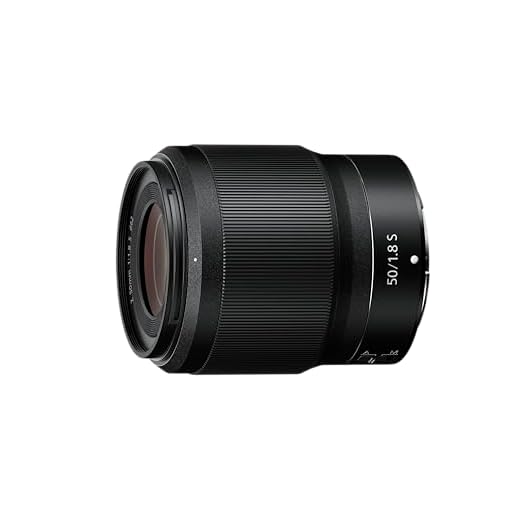
Start by selecting a lens with a wide aperture, such as f/1.8 or f/2.8. A lens with a wide aperture will help you achieve a shallow depth of field, which is essential for creating bokeh.
2. Find a Strong Light Source
Next, look for a strong light source, such as sunlight filtering through leaves or city lights at night. The light source should be out of focus and create bright, blurry spots in the background.

3. Position Your Subject
Place your subject in the foreground, making sure there is enough distance between your subject and the background to create separation. This distance will help the background blur and create the bokeh effect.
Selecting the Right Lens
When creating a bokeh effect with your digital camera, choosing the right lens is crucial. The ideal lens for achieving beautiful bokeh typically has a wide aperture, such as f/1.4 or f/1.8. These wide apertures allow more light to enter the lens, resulting in a shallow depth of field and creamy, blurred backgrounds.
Prime lenses are often preferred for creating bokeh, as they tend to have wider apertures compared to zoom lenses. Additionally, lenses with longer focal lengths, such as 50mm or 85mm, can produce more pronounced bokeh effects.
Consider experimenting with different lenses to find the one that best suits your bokeh photography style. Remember, the lens you choose can significantly impact the quality and look of your bokeh shots.
Adjusting Aperture Settings
One of the key factors in creating a bokeh effect is adjusting the aperture settings on your digital camera. The aperture controls the amount of light that enters the camera and also affects the depth of field in your images.

Wide Aperture
To achieve a pronounced bokeh effect, set your aperture to a wide opening (small f-stop number like f/1.8 or f/2.8). A wide aperture creates a shallow depth of field, which helps to blur the background and create those beautiful out-of-focus highlights.
Narrow Aperture
If you want more of the scene to be in focus while still achieving some bokeh, you can try using a narrower aperture (larger f-stop number like f/8 or f/11). This will increase the depth of field and make more of the image sharp, but you may still get some pleasing bokeh in the background.
Focusing on the Subject
When creating a bokeh effect, it’s crucial to focus on your subject properly. The bokeh effect is achieved by having the subject in sharp focus while the background is beautifully blurred. To do this, set your camera to a wide aperture (low f-stop number) to create a shallow depth of field. This will help isolate your subject and make the background blur more prominent.
Use your camera’s autofocus system to lock the focus on your subject, or switch to manual focus for more control. Make sure the subject is well-lit and positioned in a way that enhances the bokeh effect. Experiment with different angles and compositions to find the best bokeh results.
Tips for Achieving Bokeh Effect
To achieve a beautiful bokeh effect with your digital camera, consider the following tips:

| 1. Use a fast lens: | Choose a lens with a wide aperture (e.g., f/1.8 or f/2.8) to create a shallower depth of field and enhance the bokeh effect. |
| 2. Get close to your subject: | Position your subject close to the camera and ensure that there is enough distance between the subject and the background to blur it out. |
| 3. Choose the right background: | Select a background with interesting textures or colors to create a more visually appealing bokeh effect. |
| 4. Use manual focus: | Manually focus on your subject to control which parts of the image are in focus and which are blurred, enhancing the bokeh effect. |
| 5. Experiment with different light sources: | Play with natural and artificial light sources to create unique bokeh patterns in your images. |
Using a Prime Lens
One of the best ways to achieve a beautiful bokeh effect is by using a prime lens. Prime lenses have a fixed focal length, which allows for wider apertures compared to zoom lenses, making them ideal for creating stunning bokeh.
Advantages of Using a Prime Lens for Bokeh Effect:
1. Wider Aperture: Prime lenses typically have wider maximum apertures, such as f/1.8 or even f/1.4, allowing more light to enter the lens and creating a shallower depth of field for a creamy bokeh effect.
2. Crisp Image Quality: Prime lenses are known for their sharpness and image quality, resulting in a more defined and pleasing bokeh effect compared to zoom lenses.
Tips for Using a Prime Lens for Bokeh Effect:
| 1. | Choose a focal length that suits your composition and desired bokeh effect. |
| 2. | Shoot at wider apertures (e.g., f/1.8 or wider) to create a more pronounced bokeh effect. |
| 3. | Position your subject against a distant background to enhance the bokeh effect. |
Choosing a Wide Aperture
One of the key factors in creating a beautiful bokeh effect is choosing the right aperture setting on your digital camera. A wide aperture, represented by a small f-stop number (e.g., f/1.8 or f/2.8), allows more light to enter the camera lens, creating a shallow depth of field. This shallow depth of field helps to separate your subject from the background, making the bokeh effect more pronounced.
Factors to Consider when Choosing Aperture:
- Aperture Priority Mode: Set your camera to aperture priority mode (A or Av mode) to have control over the aperture setting while the camera adjusts the other settings accordingly.
- Focal Length: The longer the focal length of your lens, the easier it is to achieve a stronger bokeh effect with a wide aperture.
- Lens Quality: Higher-quality lenses tend to produce smoother and more pleasing bokeh, so consider investing in a good lens for better results.
Experiment with different aperture settings to find the right balance between a blurred background and a sharp subject, and don’t be afraid to play around with different compositions to make the most of your bokeh shots.

FAQ
What is bokeh effect in photography?
Bokeh is a term used to describe the aesthetic quality of the out-of-focus areas in a photograph. It refers to the way the lens renders the out-of-focus points of light, creating a soft and pleasing background blur.
How can I create a bokeh effect with a digital camera?
To create a bokeh effect with a digital camera, you can use a lens with a wide aperture (like f/1.8 or wider) to achieve a shallow depth of field. This will help you blur the background while keeping your subject in focus, resulting in the bokeh effect.
Do I need a special lens to create bokeh effect?
While a lens with a wide aperture can help you achieve a stronger bokeh effect, you can still create bokeh with a kit lens by getting close to your subject, using a wide aperture, and ensuring there is enough distance between the subject and the background.
Can I create bokeh effect in post-processing?
While it is possible to enhance the bokeh effect in post-processing using tools like Photoshop or Lightroom, it is generally better to capture the bokeh effect in-camera for a more natural and authentic look.
What are some tips for creating a beautiful bokeh effect?
Some tips for creating a beautiful bokeh effect include using a lens with a wide aperture, getting close to your subject, ensuring there is enough distance between the subject and the background, and choosing a background with interesting lights or shapes to enhance the bokeh effect.




Make sure to try different light sources! I found that shooting in the evening with city lights created stunning bokeh patterns.
What’s the importance of background choice for bokeh? Can it really make a difference in how the bokeh effect looks?
Can you achieve a bokeh effect with a kit lens, or do you really need a prime lens?
While a prime lens is preferred for the best bokeh due to wider apertures, you can still create a bokeh effect with a kit lens. Just use the widest aperture settings and get close to your subject.
I disagree with the idea that you need a prime lens exclusively to get good bokeh. I’ve had great success using my 24-70mm f/2.8 zoom lens too.
You can achieve decent bokeh with a zoom lens like the 24-70mm f/2.8, especially at its widest aperture. However, prime lenses typically offer more pronounced bokeh due to their wider maximum apertures.
I tried using my 50mm f/1.8 for bokeh, and the results were amazing! The blur looks so creamy compared to my zoom lens.
I’ve noticed that shooting at f/2.8 gives decent bokeh, but f/1.8 really stands out. Is it worth investing in a faster lens for better results?