
 Carmen J. Moore

Security cameras are essential tools for monitoring and protecting properties. They provide a sense of security and peace of mind to homeowners and business owners alike. When it comes to installing security cameras, one common question that arises is whether they can be attached to a junction box.
A junction box is a standard electrical enclosure that houses electrical connections. It is commonly used to protect and organize electrical wires and connections. Attaching a security camera to a junction box can be a convenient and practical solution for ensuring a secure and stable mounting location.
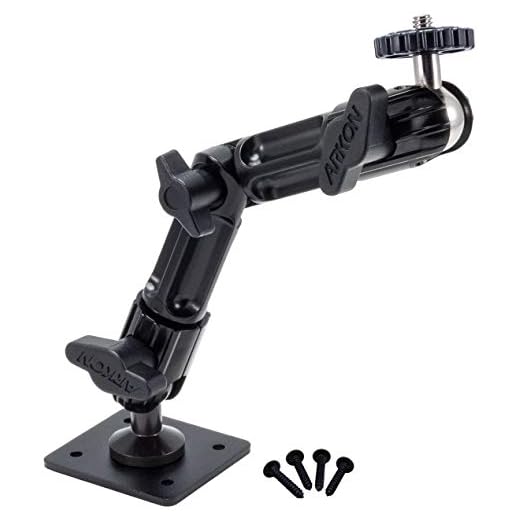


By attaching a security camera to a junction box, you can easily integrate the camera into your existing electrical system. This can help streamline the installation process and ensure a clean and professional-looking setup. However, it is important to ensure that the junction box is compatible with the camera and can support its weight and power requirements.
Understanding the concept
When it comes to installing security cameras, it is important to understand the concept of how they can be attached to a junction box. A junction box is a common electrical enclosure that is used to protect and connect electrical wires. It provides a safe and secure housing for the wiring connections.
Security cameras can be attached to a junction box using mounting brackets or adapters specifically designed for this purpose. These accessories allow the camera to be securely mounted to the junction box, providing a stable and reliable installation. By attaching the camera to a junction box, you can ensure that the wiring connections are protected and the camera is securely mounted in place.
Benefits of using a junction box
Using a junction box offers several advantages when installing security cameras:
| 1. Protection: | Junction boxes provide a protective enclosure for the camera’s connections, shielding them from weather elements and potential damage. |
| 2. Cable management: | Junction boxes help organize and secure the cables, preventing tangling and making maintenance easier. |
| 3. Ease of installation: | With a junction box, it’s easier to mount and position the camera securely, ensuring proper alignment and coverage. |
| 4. Durability: | Junction boxes add an extra layer of protection to the camera, increasing its longevity and resistance to environmental factors. |
| 5. Professional appearance: | Using a junction box gives the installation a neater and more professional look, enhancing the overall aesthetics of the security system. |
Steps to Attach a Security Camera to a Junction Box
Step 1: Ensure that the power to the junction box is turned off before starting the installation process.
Step 2: Mount the security camera bracket onto the junction box using the provided screws and a screwdriver.
Step 3: Connect the camera’s power cable to the junction box’s power supply, following the manufacturer’s instructions.
Step 4: Secure the camera to the bracket and adjust its position as needed for optimal viewing angle.
Step 5: Test the camera to ensure it is working properly before finalizing the installation.
Step 6: Seal any gaps between the camera and the junction box to protect it from weather elements.
Step 7: Reconnect the power to the junction box and monitor the camera to ensure continuous operation.
Types of security cameras compatible with junction boxes
When it comes to security cameras that can be attached to junction boxes, there are several types to consider. Some popular options include:
- Bullet cameras: These cameras are compact and easy to install on a junction box. They are often weatherproof and suitable for outdoor use.
- Dome cameras: Dome cameras can also be mounted on junction boxes and offer a discreet surveillance solution.
- PTZ cameras: Pan-tilt-zoom cameras provide flexibility in monitoring and can be mounted on junction boxes for enhanced security coverage.
- Box cameras: These cameras are a traditional choice and can be attached to junction boxes for a customizable surveillance setup.
Before purchasing a security camera for your junction box, make sure to check the compatibility and mounting options to ensure a secure and reliable installation.
Factors to consider when attaching a security camera to a junction box
When attaching a security camera to a junction box, there are several factors to consider to ensure proper installation and functionality:
- Compatibility: Ensure that the security camera is compatible with the junction box in terms of size and mounting options.
- Weatherproofing: Make sure both the security camera and the junction box are weatherproof to withstand outdoor conditions.
- Mounting options: Consider the mounting options available on the junction box and how they align with the camera’s mounting requirements.
- Cable management: Ensure that there is enough space in the junction box to accommodate the camera’s cables and connectors.
- Power supply: Check if the junction box has a power supply option that can be used to power the security camera.
- Accessibility: Ensure that the junction box is easily accessible for maintenance and adjustments to the security camera.
Importance of Proper Installation for Security Camera and Junction Box
Proper installation of security cameras and junction boxes is crucial to ensure the effectiveness and reliability of your surveillance system. When installing security cameras, it is important to mount them securely to prevent tampering or theft. Additionally, positioning the cameras correctly is essential for capturing clear and useful footage.
Similarly, junction boxes play a vital role in providing a safe and secure connection point for the cameras and other electrical components. Proper installation of junction boxes ensures that the wiring is organized and protected, reducing the risk of electrical hazards and malfunctions.
By following manufacturer guidelines and best practices for installation, you can maximize the performance and longevity of your security cameras and junction boxes. Investing time and effort in proper installation will ultimately lead to a more effective and reliable surveillance system for your home or business.
Common mistakes to avoid when attaching a security camera to a junction box
When attaching a security camera to a junction box, it’s important to avoid common mistakes that could compromise the effectiveness of the camera and the overall security system. Here are some key mistakes to watch out for:
1. Incorrect positioning
One of the most common mistakes is positioning the camera incorrectly. Make sure the camera is angled properly to capture the desired area and avoid obstructions.
2. Poor cable management
Improper cable management can lead to tangled or damaged wires, affecting the camera’s functionality. Use cable clips or ties to secure cables neatly.
| Mistake | Impact |
|---|---|
| Using the wrong mounting hardware | Camera may not be securely attached |
| Forgetting to weatherproof the connections | Risk of water damage |
| Not testing the camera after installation | Potential issues may go unnoticed |



I recently installed a dome camera to a junction box at my front porch. It was pretty straightforward, but I missed sealing some gaps which let in moisture. Now I’m planning to redo that part. Definitely recommend double-checking that weatherproofing step!
Thanks for sharing your experience! It's great to hear you found the installation straightforward. Sealing gaps is indeed crucial, especially for outdoor setups. If you need any tips on weatherproofing methods, feel free to ask!
Good article! Can you explain if all types of junction boxes can be used for security cameras, or do I need a specific type?