
 Carmen J. Moore

Is your iPhone camera shaking and causing blurry photos and videos? If so, you’re not alone. Many iPhone users experience this issue, which can be frustrating and impact the quality of their photos and videos.
Fortunately, there are options available to fix the shaking camera on your iPhone. However, the cost of fixing this issue can vary depending on the extent of the problem and the model of your iPhone. In this article, we’ll explore the factors that can affect the cost of fixing an iPhone camera that is shaking and provide some guidance on what you can expect to pay for repairs.
How to Fix iPhone Camera Shaking: Cost and Options
If your iPhone camera is shaking, there are several options available to fix the issue. The cost of fixing a shaking iPhone camera can vary depending on the cause of the problem and the chosen solution. Here are some common options:


1. Software Update: Sometimes, a simple software update can resolve camera shaking issues on your iPhone. Make sure your device is running the latest iOS version.
2. Restart Your iPhone: Restarting your iPhone can also help fix minor glitches that may be causing the camera to shake. Turn off your device and then turn it back on after a few seconds.
3. Check for Physical Damage: Inspect your iPhone’s camera lens and surrounding areas for any physical damage. If you notice any cracks or debris, it may be necessary to get it repaired by a professional.
4. Visit an Apple Store: If your iPhone camera continues to shake despite trying the above steps, consider visiting an Apple Store or authorized service provider. They can diagnose the issue and provide a repair quote.
5. DIY Repair: For those comfortable with DIY repairs, there are online tutorials and replacement parts available to fix a shaking iPhone camera. Be cautious and follow instructions carefully.
Overall, the cost of fixing an iPhone camera shaking issue can range from a simple software update (free) to a professional repair service (cost varies). Choose the option that best fits your situation and budget.
Professional Repair Services
When it comes to fixing a shaking iPhone camera, it’s crucial to consider professional repair services. While DIY methods may seem like a cost-effective solution, they can often lead to further damage if not done correctly. Professional repair services ensure that the issue is correctly diagnosed and resolved by experienced technicians.
By opting for professional repair services, you can rest assured that your iPhone camera shaking problem will be addressed with precision and expertise. Additionally, reputable repair shops offer warranties on their services, providing you with peace of mind in case the issue reoccurs.
DIY Solutions for Camera Issues
If you are experiencing camera shaking on your iPhone, there are a few DIY solutions you can try before seeking professional help. Here are some tips to help you troubleshoot and potentially fix the issue:
1. Restart Your iPhone
Often, a simple restart can resolve minor software glitches that may be causing the camera to shake. Press and hold the power button until the “slide to power off” slider appears, then slide to turn off your iPhone. Wait a few seconds, then press and hold the power button again to turn it back on.
2. Check for Updates
Make sure your iPhone’s operating system and camera app are up to date. Go to Settings > General > Software Update to check for any available updates. Updating your software can sometimes fix bugs that may be affecting the camera.
These DIY solutions can help you troubleshoot and potentially resolve camera shaking issues on your iPhone without incurring any additional costs.
Cost of Repairing iPhone Camera Shaking
When your iPhone camera starts shaking, it can be quite frustrating and impact the quality of your photos and videos. The cost of repairing an iPhone camera shaking issue can vary depending on the cause of the problem and whether you choose to repair it yourself or take it to a professional.
If the shaking is due to a software issue, you may be able to resolve it by updating your iPhone’s operating system or resetting the camera settings. This would not incur any additional cost.
However, if the shaking is caused by a hardware problem such as a loose connection or damaged camera module, you may need to replace the camera component. The cost of replacing an iPhone camera module can range from $50 to $150, depending on the model of your iPhone and where you get it repaired.
If you decide to take your iPhone to an Apple Store or authorized service provider for repair, the cost may be higher but you can be assured of quality service and genuine parts. On the other hand, if you choose to repair the camera yourself by purchasing a replacement part online, you may save some money but run the risk of damaging your device further if not done correctly.
Ultimately, the cost of repairing an iPhone camera shaking issue will depend on the specific circumstances of your device and the repair option you choose.
Factors Affecting Repair Costs
Several factors can influence the cost of repairing an iPhone camera that is shaking. Some of the key factors include:
- Extent of Damage: The severity of the issue with the camera, whether it is a minor glitch or a major hardware problem, can impact the repair costs.
- Model of iPhone: The model of the iPhone can also affect the repair costs, with newer models typically requiring more expensive parts and specialized expertise.
- Warranty Status: If the iPhone is still under warranty, the repair costs may be covered by the manufacturer, reducing the out-of-pocket expenses for the owner.
- Repair Method: The method used to repair the camera, whether it involves replacing parts or simply adjusting settings, can affect the overall cost of the repair.
- Service Provider: The repair costs can vary depending on the service provider chosen to fix the iPhone camera, with authorized Apple service centers often charging premium prices.
Comparison of Repair Options
When it comes to fixing your iPhone camera shaking issue, you have a few options to consider:
1. Apple Store
One option is to take your iPhone to an Apple Store for repair. They offer official repairs, but these can be quite expensive, especially if your device is out of warranty.
2. Authorized Service Provider
Another option is to visit an authorized service provider. They may offer more affordable repair options compared to the Apple Store, but still provide quality service using genuine Apple parts.
It is important to compare prices and reviews of different repair options before making a decision on where to fix your iPhone camera shaking problem.
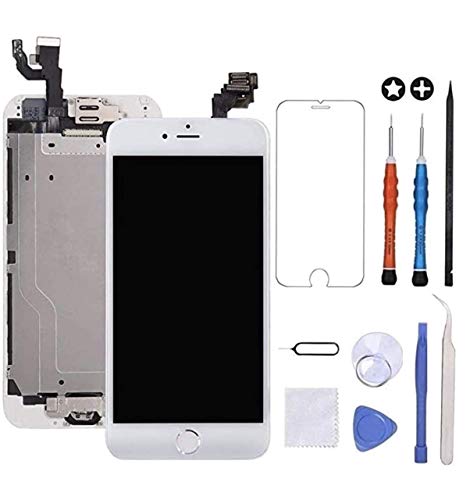


Just a heads up, DIY repairs can be tricky! Make sure to follow tutorials closely or you might end up causing more damage.
Does the warranty cover camera issues if it’s still active?
I had a shaking camera on my iPhone 11. A simple software update fixed it! I was relieved it didn't need a costly repair.
I’m torn between going to an Apple Store or an authorized service provider. It seems like the Apple Store is more reliable, but the costs are so high. Has anyone had good experiences with authorized providers?
What are some common causes for the iPhone camera shaking?