
 Carmen J. Moore

Wireless security cameras have become increasingly popular for home and business surveillance due to their convenience and flexibility. One of the key considerations when setting up a wireless security camera system is how to provide power to the cameras. Unlike wired cameras that require a direct power source, wireless cameras rely on batteries or alternative power sources to function effectively.
There are several options available for supplying power to wireless security cameras, each with its own advantages and limitations. Understanding these options can help you choose the best power source for your specific needs and ensure that your cameras are always operating optimally.
Importance of Power Supply for Wireless Security Cameras
Power supply is a critical aspect when it comes to ensuring the proper functioning of wireless security cameras. These cameras rely on a stable power source to operate effectively and provide continuous surveillance.
Without a reliable power supply, wireless security cameras may fail to capture important footage or even stop working altogether, leaving your property vulnerable to security threats. It is essential to choose the right power source and ensure that it can sustain the cameras’ power requirements for extended periods.
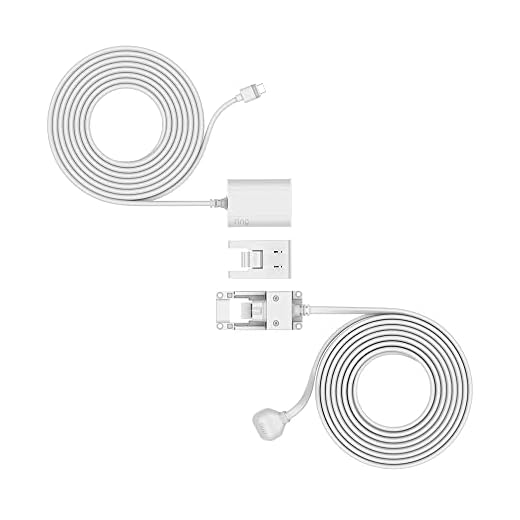

Proper power supply not only ensures the continuous operation of wireless security cameras but also contributes to their longevity and performance. By investing in a quality power source and periodically checking and maintaining the power supply, you can maximize the effectiveness of your security camera system and protect your property effectively.
Types of Power Sources for Wireless Security Cameras
Wireless security cameras can be powered by various types of power sources to ensure uninterrupted surveillance. Here are some common power options:
Battery: Many wireless security cameras come with rechargeable batteries that can provide power for a certain period. This is a convenient option for locations without access to electrical outlets.
Solar: Solar-powered security cameras use solar panels to generate electricity, making them eco-friendly and suitable for outdoor installations where sunlight is abundant.
Hardwired: Some wireless cameras can be hardwired to a power source using a power adapter or Ethernet cable, ensuring constant power supply without the need for frequent battery changes.
Power over Ethernet (PoE): PoE cameras receive power and data through a single Ethernet cable, simplifying installation and reducing the need for additional power sources.
External Power Supply: In some cases, wireless security cameras may require an external power supply connected to a power outlet or a dedicated power source to ensure continuous operation.
Choosing the right power source for your wireless security camera depends on the location, installation requirements, and desired level of convenience and reliability.
Choosing the Right Power Supply for Your Wireless Security Camera
When it comes to powering your wireless security camera, choosing the right power supply is crucial to ensure consistent performance and reliability. Here are some key factors to consider:
| 1. Voltage: | Make sure to match the voltage requirements of your camera. Most wireless security cameras operate on either 12V or 24V DC power. |
| 2. Current Capacity: | Check the current rating of the power supply to ensure it can deliver enough power to your camera without overload. |
| 3. Connection Type: | Determine whether your camera requires a plug-in power supply or a hardwired connection for power. |
| 4. Backup Power: | Consider using a UPS (Uninterruptible Power Supply) or a backup battery system to ensure continuous power supply in case of outages. |
| 5. Weatherproofing: | If your camera is installed outdoors, make sure the power supply is weatherproof and suitable for outdoor use. |
By carefully considering these factors and choosing the right power supply for your wireless security camera, you can ensure optimal performance and peace of mind knowing that your camera is powered reliably.
Installation Steps for Powering Wireless Security Cameras
Powering wireless security cameras is essential to ensure continuous surveillance of your property. Follow these steps to effectively supply power to your wireless security cameras:
Step 1: Choose the Power Source
Determine the power source for your wireless security cameras. You can use a power outlet, batteries, or solar panels depending on your setup and location.
Step 2: Connect the Power Supply
Connect the power supply to the camera by following the manufacturer’s instructions. Make sure to use the appropriate connectors and cables for a secure connection.
Pro Tip: Consider using a UPS (Uninterruptible Power Supply) for backup power in case of outages.
Tips for Ensuring Stable Power Supply to Your Wireless Security Camera
Wireless security cameras are a convenient and effective way to monitor your property. However, ensuring a stable power supply is essential for their reliable operation. Here are some tips to help you achieve this:
- Choose a Camera with Low Power Consumption: Select a wireless security camera with low power consumption to prolong battery life or reduce energy usage.
- Use Rechargeable Batteries: Invest in high-quality rechargeable batteries to power your wireless security camera. This will save you money in the long run and ensure continuous operation.
- Install Solar Panels: Consider installing solar panels to charge your wireless security camera’s batteries. This eco-friendly solution can provide a constant power supply, especially in outdoor installations.
- Utilize Power Banks: Use power banks as a backup power source for your wireless security camera. This can help maintain power during outages or when batteries need recharging.
- Regularly Check Battery Levels: Monitor the battery levels of your wireless security camera and recharge or replace them as needed to prevent unexpected downtime.
- Protect Power Sources: Ensure that power sources, such as batteries or solar panels, are protected from harsh weather conditions or tampering to maintain a stable power supply.
Common Issues with Power Supply for Wireless Security Cameras
When it comes to powering wireless security cameras, there are some common issues that users may encounter. One of the main problems is insufficient power supply, which can lead to cameras not functioning properly or not recording footage. It is important to ensure that the power source is compatible with the camera’s requirements to avoid such issues.
Another issue that can arise is power loss due to weather conditions or electrical problems. In such cases, it is recommended to have a backup power source, such as a battery or a generator, to keep the cameras running even during power outages.
Additionally, poor wiring or connections can also cause power supply issues for wireless security cameras. It is crucial to regularly inspect and maintain the wiring to ensure a stable power supply to the cameras.
By addressing these common issues with power supply, users can ensure that their wireless security cameras operate smoothly and effectively for continuous monitoring and surveillance.


I'm trying to decide between using solar and hardwired options for my cameras. Does one have a clear advantage over the other in terms of reliability and cost?
I think hardwired is more reliable, especially in bad weather, but solar is cheaper in the long run if you can manage the sunlight issue.
I recently installed solar-powered cameras and it's been great! No need for frequent battery changes. Just make sure they're placed where they get enough sunlight.
What type of battery life should I expect from these wireless cameras?
I’ve had issues with battery-operated cameras dying too quickly in cold weather. Definitely something to keep in mind if you're in a colder climate!
Could you explain what a UPS is and how it helps with power supply?