
 Carmen J. Moore

Capturing fireworks with a DSLR camera can result in stunning and memorable photographs. However, setting up your camera properly is crucial to getting the best shots. Here are some tips on how to set your DSLR camera for fireworks photography:
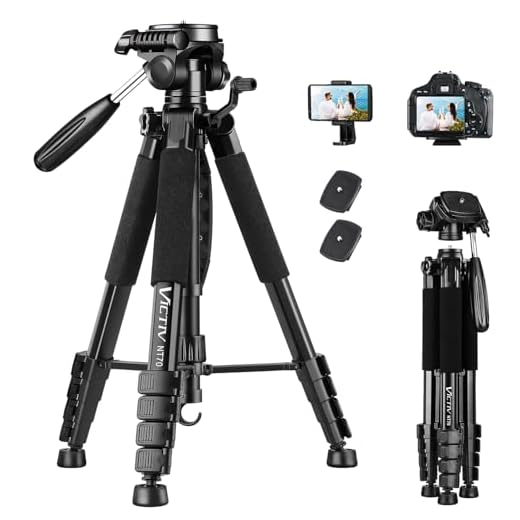
1. Use a tripod: Stability is key when shooting fireworks. Make sure to use a tripod to avoid camera shake and ensure sharp images.
2. Manual mode: Switch your camera to manual mode to have full control over the settings. This way, you can adjust the aperture, shutter speed, and ISO according to the lighting conditions.
3. Low ISO: Start with a low ISO setting (such as 100 or 200) to reduce noise in your images. Fireworks produce their own light, so a low ISO is usually sufficient.

Prepare your DSLR camera
Before heading out to capture fireworks with your DSLR camera, make sure to prepare it properly for the task. Here are a few steps to get your camera ready:
1. Check the battery
Ensure that your camera’s battery is fully charged before you head out to shoot fireworks. You don’t want to miss capturing stunning shots because your camera ran out of battery.
2. Clean the lens
Make sure to clean the lens of your DSLR camera to avoid any smudges or dirt that could affect the quality of your photos. Use a lens cleaning cloth to gently wipe the lens surface.
Tip: Consider using a lens hood to protect your lens from any stray debris or sparks during the fireworks show.
By following these simple steps, you’ll be well-prepared to capture breathtaking fireworks photos with your DSLR camera.
Choose the right settings
When setting up your DSLR camera for fireworks photography, it is crucial to choose the right settings to ensure you capture stunning images. Here are some recommended settings:
- Manual mode: Set your camera to manual mode to have full control over the exposure settings.
- Low ISO: Use a low ISO setting (ISO 100-200) to reduce noise in your images.
- Wide aperture: Choose a wide aperture (f/8-f/16) to let in more light and create sharp, detailed images.
- Slow shutter speed: Set a slow shutter speed (around 2-4 seconds) to capture the trails of the fireworks.
- Tripod: Use a tripod to keep your camera steady during long exposures.
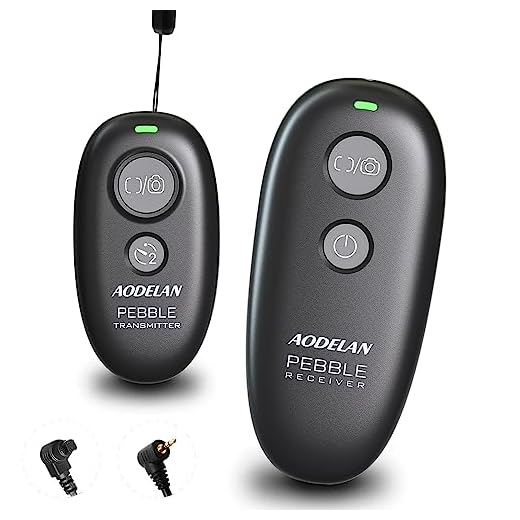
- Remote shutter release: Use a remote shutter release or the camera’s self-timer to avoid camera shake.
By selecting the right settings, you can capture beautiful fireworks photos that will impress everyone!
Set your camera to manual mode
When shooting fireworks, it’s best to set your camera to manual mode to have full control over the settings. This allows you to adjust the aperture, shutter speed, and ISO to get the best results.
Here are the recommended settings for shooting fireworks:
- Set the aperture to around f/8 to f/16 to capture the fireworks in sharp detail.
- Set the shutter speed to a few seconds (2-4 seconds) to capture the light trails and explosions of the fireworks.
- Keep the ISO low (around 100-200) to reduce noise in the images.
- Use a tripod to keep your camera steady during long exposures.
- Consider using a remote shutter release to avoid camera shake when pressing the shutter button.
By setting your camera to manual mode and adjusting these settings, you’ll be able to capture stunning fireworks photos with your DSLR camera.
Adjust the ISO
ISO setting on your DSLR camera controls its sensitivity to light. For fireworks photography, it is recommended to set the ISO to a lower value, such as 100 or 200, to reduce noise and maintain image quality.
Steps to adjust the ISO:
- Locate the ISO button on your camera or access it through the menu.
- Select the desired ISO value (100 or 200) for capturing fireworks.
- Ensure that the ISO setting is appropriate for the lighting conditions to avoid overexposure or underexposure.
Select the appropriate aperture
When photographing fireworks, it is important to choose the right aperture setting on your DSLR camera. A wide aperture (small f-stop number) like f/2.8 or f/4 allows more light to enter the lens, which is great for capturing bright fireworks against a dark sky. This setting will also create a shallow depth of field, making the fireworks stand out in focus while blurring the background.
On the other hand, a smaller aperture (higher f-stop number) like f/8 or f/11 will result in a deeper depth of field, keeping more of the scene in focus. However, this setting may require longer exposure times to capture enough light, potentially causing the fireworks to appear dimmer or less vibrant.
Experiment with different aperture settings to find the balance between capturing the fireworks in sharp detail and maintaining the desired background effect.
Set the shutter speed
To capture clear and vibrant fireworks photos, you need to set the right shutter speed on your DSLR camera. A slow shutter speed allows more light to enter the camera, resulting in brighter photos with longer light trails from the fireworks. Start with a shutter speed of around 2-4 seconds for a good balance between capturing the fireworks’ movement and keeping the image sharp. Experiment with different shutter speeds to find the best setting for the specific fireworks display you are photographing.
Focus on the fireworks
When capturing fireworks with your DSLR camera, it’s crucial to focus on the fireworks themselves to ensure sharp and clear images. Follow these steps to set your camera focus:
| 1. Manual Focus: | Switch your camera to manual focus mode to have full control over the focus. Set the focus to infinity (∞) to capture distant fireworks. |
| 2. Live View: | Use the Live View mode on your camera to see a preview of the scene and adjust the focus manually until the fireworks appear sharp. |
| 3. Test Shots: | Take a few test shots and review them to ensure the fireworks are in focus. Make necessary adjustments if needed. |
By focusing on the fireworks, you can capture stunning images that showcase the beauty and intensity of the display.
FAQ
What settings should I use on my DSLR camera for photographing fireworks?
When photographing fireworks, it’s best to set your camera to manual mode. Start by setting your aperture to around f/8 to f/11 to capture the bursts of light. Set your ISO to around 100 to 200 for optimal image quality. Use a slow shutter speed, typically between 2 to 10 seconds, to capture the trails of light. Make sure to use a tripod to keep your camera steady during the long exposure. Experiment with different settings to find the best combination for the fireworks display.
Do I need any special equipment to photograph fireworks with a DSLR camera?
While you don’t necessarily need special equipment to photograph fireworks with a DSLR camera, there are a few accessories that can help improve your results. A tripod is essential to keep your camera steady during long exposures. A remote shutter release can also come in handy to minimize camera shake when triggering the shutter. Additionally, consider using a lens with a focal length that allows you to frame the fireworks display the way you want. By using these accessories, you can enhance the quality of your fireworks photos.





I've tried shooting fireworks with my DSLR a few times, and using a tripod made a huge difference. I learned the hard way when my first shots were all blurry! Also, setting my ISO to 100 really cut down on noise, which was great for the final images. Definitely recommend practicing manual focus if you can, since it gives you more control over what you want to highlight in the shot.
Thanks for sharing your experience! Using a tripod and low ISO are key for capturing clear fireworks photos. Manual focus does help to ensure sharp images, especially with fast-moving subjects like fireworks.
What’s the ideal lens to use for fireworks photography? Should I stick to a wide-angle lens, or would a telephoto work better?
Don’t forget to check the weather before heading out! Clouds can really affect visibility during a fireworks show.
Can you explain why a low ISO is recommended for fireworks photography? I thought higher ISO is always better for low light?
I disagree about the shutter speed. I think using a faster shutter speed can also capture some unique effects of the fireworks. It really depends on what you're aiming for, like the sharpness of the bursts, rather than just the trails.