
 Carmen J. Moore

Do you ever get the feeling that someone is watching you? With the prevalence of security cameras in public spaces, it’s not uncommon to be under surveillance without even realizing it. Whether you’re in a store, walking down the street, or even at home, there’s a chance that a security camera could be recording your every move.
But how can you tell if a security camera is watching you? It’s important to be aware of your surroundings and recognize the signs that you may be on camera. In this article, we’ll explore some of the telltale signs that a security camera is watching you, so you can better protect your privacy and security.
Signs of Being Watched by a Security Camera
When you suspect that a security camera may be watching you, there are several signs to look out for:
- Red or Green Lights: Security cameras often have indicator lights that show when they are recording or live. Look for these lights around the camera lens.
- Camera Placement: If you notice cameras mounted in strategic locations like entrances, exits, or high-traffic areas, you may be under surveillance.
- Visible Cameras: Some security cameras are easily visible, while others are more discreet. Keep an eye out for dome-shaped cameras or cameras with visible lenses.
- Wires and Cables: Look for wires or cables running from the camera to a recording device or power source. These may indicate the presence of a security camera.
- Unusual Behaviors: If you notice individuals monitoring screens or acting suspiciously near camera installations, it could be a sign that you are being watched.
Being aware of these signs can help you determine if a security camera is watching you and take appropriate steps to protect your privacy.
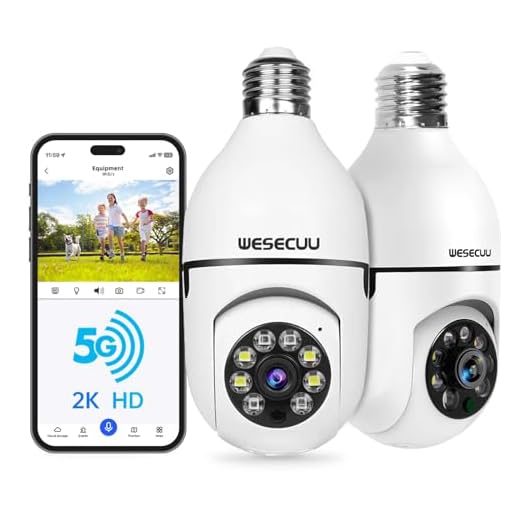


Unusual Glare or Reflection
Another sign that a security camera may be watching you is if you notice an unusual glare or reflection coming from a specific spot. Security cameras often have lenses that reflect light, especially at night or in well-lit areas. If you see a glint of light or a reflection that seems out of place, it could be a sign that a camera is nearby.
Suspicious Placement
Security cameras are often strategically placed in locations where they can capture a wide field of view and monitor high-traffic areas. If you notice a camera positioned in an unusual or hidden spot, such as behind a plant, in a corner of the room, or inside an air vent, it may be a cause for concern. These hidden cameras could be used for covert surveillance without your knowledge.
Check for Reflective Surfaces
Another way to identify if a security camera is watching you is to look for reflective surfaces. Many cameras have lenses that reflect light, so if you see a small, glinting light coming from an object in the room, it could be a camera lens. Be mindful of mirrors, glass, or shiny objects that could potentially hide a camera.
Red or Green Indicator Light
One common way to determine if a security camera is actively recording or monitoring is to look for an indicator light on the camera itself. Many security cameras have a small LED light that changes color to indicate its current status. A red light typically indicates that the camera is actively recording or monitoring, while a green light may indicate that the camera is idle or not recording. However, it’s important to note that not all security cameras have indicator lights, so this method may not always be reliable.
Pan-Tilt-Zoom Movement
Some security cameras have the ability to pan, tilt, and zoom (PTZ) to provide a wider range of coverage. If you notice a camera moving in different directions or zooming in and out, it is likely a PTZ camera. These cameras can be controlled remotely by an operator, so if you see sudden movements or changes in the camera’s angle, it could indicate that someone is actively monitoring the feed. Keep an eye out for PTZ cameras as they offer more flexibility and surveillance capabilities.
Fixed Gaze
One way to determine if a security camera is watching you is to look for a fixed gaze. Security cameras are typically stationary and have a fixed field of view. If you notice a camera that seems to be pointed directly at you and does not move, it is likely monitoring your activities. Additionally, security cameras with a fixed gaze are often mounted in high places, such as ceilings or corners, to provide a wide coverage area.
Identifying Fixed Cameras
To identify fixed cameras, look for cameras that do not pan, tilt, or zoom. These cameras are usually positioned to capture a specific area and do not have the ability to change their direction of view. Fixed cameras are common in indoor spaces, parking lots, and building entrances.
Observing Behavior
If you suspect a security camera is watching you, try changing your behavior and see if the camera adjusts its focus to follow you. Fixed cameras will not track your movements, while PTZ (pan-tilt-zoom) cameras can rotate and zoom in on specific targets. By observing how the camera responds to your actions, you can determine if it is fixed or capable of movement.
| Fixed Gaze | Identifying Fixed Cameras | Observing Behavior |
|---|---|---|
| Look for a stationary camera with a fixed field of view. | Search for cameras that do not pan, tilt, or zoom. | Change your behavior to see if the camera follows you. |
| Check for cameras mounted in high places. | Identify cameras positioned to capture specific areas. | Observe how the camera reacts to your movements. |
Infrared Illumination
One way to determine if a security camera is watching you is to look for infrared illumination. Many security cameras use infrared technology to capture images in low-light or nighttime conditions. Infrared light is invisible to the human eye but can be detected by the camera’s sensor.
If you suspect a security camera is present, you can use your smartphone’s camera to check for infrared light coming from the camera. Simply point your smartphone camera at the area where you suspect the camera is located and look for any glowing red or purple lights. These lights indicate the presence of infrared illumination, confirming that the camera is active and monitoring the area.
Visible Lens or Dome
One of the most obvious signs that a security camera is watching you is the presence of a visible lens or dome. Most security cameras have a lens that is easily identifiable, either as a small circular lens or a larger dome shape. If you see a camera with a lens pointed in your direction, it’s likely that you’re being watched.
Some cameras are designed to be more discreet, with the lens hidden behind a one-way mirror or disguised as a light fixture. However, if you look closely, you may still be able to spot the lens if you know what to look for.
Camera Housing or Cables
Another way to determine if a security camera is watching you is by looking for the camera housing or cables. Security cameras are typically placed in conspicuous locations and are often mounted in camera housings. These housings can vary in size and shape but are usually easily recognizable once you know what to look for. Look for a small, discreet box or dome-shaped structure that may contain the camera.
In addition to the camera housing, you can also look for visible cables that connect the camera to a power source or recording device. These cables may be visible running along walls, ceilings, or floors. If you spot cables running to a particular location, there is a good chance that a security camera is located nearby.
Remote Monitoring Software
One way to determine if a security camera is watching you is to check if it is connected to remote monitoring software. This software allows the camera feed to be accessed and viewed remotely, often through a mobile app or a web browser. If you suspect a camera is watching you, look for signs of remote monitoring software being used.
Signs of Remote Monitoring Software:
- Online Access: If the camera feed can be viewed online, it is likely connected to remote monitoring software.
- Mobile App: Check if there is a mobile app associated with the camera system for remote viewing.
By identifying the presence of remote monitoring software, you can assess the likelihood of someone monitoring the camera in real-time.



This is really interesting! How can you tell if the indicator lights are on a camera if it’s mounted high up? I’ve seen some cameras placed in hard-to-see spots.
Good point! I think the best way is to be aware of the camera angles and look for reflections in nearby surfaces. Sometimes you can spot glimmers if the light hits just right.