
 Carmen J. Moore

Installing a security camera at your home or office is a crucial step to enhance safety and security. However, drilling holes in walls or ceilings to mount the camera can be a daunting task, especially if you are renting or want to avoid damaging your property.
Fortunately, there are alternative methods to mount a security camera without drilling. By using innovative mounting solutions and adhesive mounts, you can securely install your camera without the need for drilling holes.

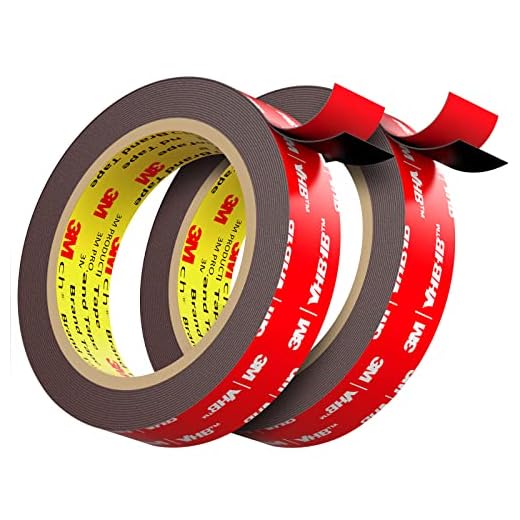

Whether you have a wireless security camera or a wired one, there are ways to mount it without drilling. In this article, we’ll explore some creative techniques and products that allow you to install your security camera easily and without causing any damage to your walls or ceilings.
Step-by-step guide on mounting security camera without drilling
Mounting a security camera without drilling can be a convenient and easy process. Follow these steps to securely install your camera without damaging your walls:
1. Choose the right mounting option
Look for mounting options that don’t require drilling, such as adhesive mounts or magnetic mounts. Make sure the mounting option is compatible with your camera model.
2. Clean the mounting surface
Before attaching the mount, clean the surface where you plan to install the camera. Use a damp cloth to remove any dust or dirt that could prevent the adhesive from sticking properly.
3. Attach the mount
Follow the manufacturer’s instructions to attach the mount to the chosen surface. Make sure it is securely attached and can hold the weight of the camera.
4. Install the camera
Once the mount is in place, attach the camera to the mount according to the manufacturer’s instructions. Ensure the camera is positioned correctly for optimal surveillance.
Determine the ideal mounting location
Before installing your security camera without drilling, it is crucial to determine the ideal mounting location. Consider the following factors:
| Visibility: | Ensure that the camera has a clear view of the area you want to monitor without any obstructions. |
| Power source: | Choose a location close to a power outlet or consider using a battery-powered camera for flexibility. |
| Wi-Fi signal: | Verify that the chosen spot has a strong Wi-Fi signal to ensure a reliable connection for remote monitoring. |
| Weather protection: | Select a location that provides adequate protection from harsh weather conditions to prolong the camera’s lifespan. |
By carefully selecting the mounting location, you can optimize the performance and effectiveness of your security camera installation without the need for drilling.
Select the right mounting hardware
When mounting a security camera without drilling, it is crucial to select the right mounting hardware. Look for mounting solutions that are specifically designed for no-drill installation, such as adhesive mounts or magnetic mounts. These types of mounts are easy to install and remove without causing damage to your walls or surfaces.
Make sure to choose hardware that is compatible with your security camera model and weight requirements. Check the manufacturer’s guidelines to ensure that you are using the appropriate mounting hardware for your specific camera. Additionally, consider the location where you will be mounting the camera and choose hardware that is suitable for that environment, such as weatherproof mounts for outdoor installations.
Clean the mounting surface thoroughly
Before mounting your security camera without drilling, it is important to clean the mounting surface thoroughly. Dirt, dust, and other debris can affect the adhesion of the mounting adhesive, leading to a less secure installation.
Here’s how to clean the mounting surface:
- Use a clean cloth or paper towel to wipe down the surface where you will be mounting the camera.
- If there are any stubborn stains or residues, use a mild cleaning solution and water to gently clean the area.
- Make sure the surface is completely dry before proceeding with the mounting process to ensure the adhesive sticks properly.
Use adhesive tape for temporary mounting
Another option for mounting a security camera without drilling is to use adhesive tape. There are various strong adhesive tapes available on the market that can securely hold your camera in place without the need for screws or drilling. Make sure to clean the surface where you plan to mount the camera with rubbing alcohol to ensure proper adhesion. Place the adhesive tape on the back of the camera and firmly press it against the wall or ceiling. This method is ideal for temporary setups or if you want to easily move the camera to a different location in the future.
Position the camera at the desired angle
Once you have found the perfect spot for your security camera, adjust its angle to ensure it captures the desired area. Most wireless security cameras come with adjustable mounts or brackets that allow you to change the camera’s position easily.
Make sure the camera is facing the right direction and is angled correctly to cover the area you want to monitor. You may need to test different angles to find the best position for optimal coverage.
After positioning the camera, secure it in place according to the manufacturer’s instructions. Double-check the angle and make any necessary adjustments before finalizing the installation.
Secure the camera in place with additional support
If you want to ensure that your security camera stays in place without drilling, consider using additional support to secure it. Here are some options:
Mounting brackets:
You can use mounting brackets that are designed to attach to various surfaces without the need for drilling. These brackets typically come with adhesive backing or clamps that can hold the camera securely in place.
Adjustable mounts:
Look for adjustable mounts that can be attached to existing fixtures or furniture near the desired camera location. These mounts can provide a stable base for your camera without the need for drilling.
- Use heavy-duty adhesive strips or tapes to secure the camera in place.
- Consider using magnetic mounts if your camera is compatible.
- Explore alternative mounting options such as suction cups or clamps.
Test the camera’s view and adjust if necessary
Once you have securely mounted your security camera without drilling, it’s important to test the camera’s view. Make sure the camera is capturing the desired area and that there are no obstructions blocking the view. You may need to adjust the camera’s angle or position to ensure optimal coverage.
Take some time to test the camera’s functionality by monitoring the live feed on your smartphone or computer. Make any necessary adjustments to the camera’s settings to improve the image quality or adjust the motion detection sensitivity.
Regularly check the camera’s view to ensure it remains unobstructed and provides the surveillance coverage you need. By testing and adjusting your security camera as needed, you can ensure that your property is well-protected without the need for drilling.
Conceal the cables for a clean installation
One of the key factors in achieving a professional and clean installation of a security camera without drilling is to conceal the cables effectively. Here are some tips to help you hide the cables:
1. Use cable clips and adhesive strips
Secure the cables along the walls or ceiling using cable clips or adhesive strips. This will help keep the cables organized and out of sight.
2. Use cable covers
Install cable covers that match the color of your walls or ceiling to camouflage the cables. These covers can be easily painted to blend in with the surroundings.
By concealing the cables properly, you can achieve a neat and tidy installation of your security camera without the need for drilling.
Monitor the camera’s performance periodically
Once you have successfully mounted your security camera without drilling, it is important to periodically monitor its performance to ensure it is functioning properly. Check the camera’s feed regularly to ensure there are no blind spots or technical issues that may compromise its effectiveness.
Make sure the camera is capturing clear and crisp footage, and adjust its position if necessary to improve the field of view. Additionally, check the camera’s connectivity to the Wi-Fi network to ensure it is transmitting data effectively.
Troubleshoot any issues that may arise
If you encounter any issues while mounting your security camera without drilling, here are some common problems and solutions:
1. Adhesive not sticking properly
If the adhesive strips or pads are not sticking properly to the surface, make sure to clean the mounting area thoroughly with rubbing alcohol before applying the adhesive. Also, ensure that the surface is flat and smooth for better adhesion.
2. Camera angle not adjustable
If you find that the camera angle is not adjustable after mounting, check if the mount is securely attached to the surface. You may need to readjust the position of the mount to achieve the desired angle.
Remember: Always follow the manufacturer’s instructions and guidelines when troubleshooting any issues with your security camera installation.



Has anyone compared magnetic mounts to adhesive mounts? I’m considering both but unsure which is more secure.
I’ve tried both, and I found magnetic mounts a bit easier to adjust if you need to reposition the camera. However, the adhesive mounts felt more secure overall.
I’m not sure relying on adhesive is a good idea for heavier cameras. I’ve seen some fail after a few months. Wouldn’t drilling be a more secure option in the long run?
While drilling does provide a more permanent solution, many users find that high-quality adhesive mounts can securely hold lighter cameras if installed correctly. It ultimately depends on the weight of the camera and the quality of the adhesive used.
I appreciate the tips on concealing cables! It really helps with the aesthetic of my setup.
What types of adhesive mounts are best for outdoor security cameras? I’m worried they might not hold up in bad weather.
For outdoor security cameras, look for heavy-duty adhesive mounts that are specifically designed for weather resistance. Brands often provide ratings for outdoor use, and opting for mounts with UV protection can help ensure longevity.
Can you explain how to effectively clean the surface before applying the adhesive? I want to make sure it sticks well.