
 Carmen J. Moore

Wifi security cameras have become increasingly popular due to their convenience and ease of installation. These cameras allow you to monitor your home or business remotely through a smartphone or computer, providing peace of mind and added security.

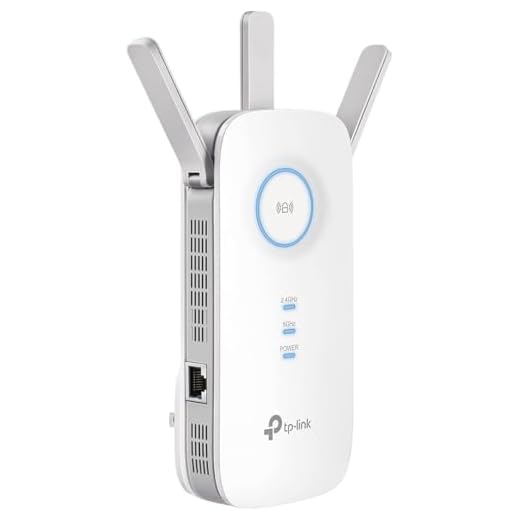

One of the common questions that arise when considering a wifi security camera is how far away it can reach. The range of a wifi security camera depends on various factors, including the strength of the wifi signal, obstacles in the way, and the capabilities of the camera itself.
Typically, most wifi security cameras have a range of around 100 to 300 feet in open spaces with a clear line of sight to the router. However, this range can be significantly reduced if there are walls, doors, or other obstacles between the camera and the router.
Factors influencing wifi security camera range
When considering the range of a WiFi security camera, several factors can influence how far the camera can reach:
- 1. Signal strength: The strength of the WiFi signal from the router to the camera plays a significant role in determining the range. A stronger signal will allow the camera to reach farther distances.
- 2. Obstructions: Physical obstructions such as walls, furniture, and other objects can weaken the WiFi signal and reduce the range of the camera. Clear line of sight between the camera and the router is ideal for optimal range.
- 3. WiFi frequency: The frequency band (2.4GHz or 5GHz) used by the WiFi network can also affect the range of the camera. Generally, 2.4GHz signals have a longer range but are more prone to interference, while 5GHz signals have a shorter range but offer better performance in congested areas.
- 4. Antenna design: The design and quality of the camera’s antenna can impact its range. Cameras with external antennas or high-gain antennas tend to have better range compared to cameras with internal antennas.
- 5. Interference: Other electronic devices operating on the same frequency band can cause interference and reduce the range of the camera. It’s important to minimize interference sources for optimal performance.
Location and obstacles
When determining how far away a Wi-Fi security camera can reach, it’s important to consider the location and any potential obstacles that may impact the signal strength. Here are some factors to keep in mind:
- Distance: The distance between the Wi-Fi camera and the router will directly affect the signal strength and the camera’s ability to connect to the network. Generally, the closer the camera is to the router, the stronger the signal will be.
- Obstacles: Walls, ceilings, and other physical barriers can obstruct the Wi-Fi signal and reduce its range. Thick walls, metal structures, and other electronic devices can all interfere with the signal, limiting the camera’s reach.
By considering these factors and ensuring that the camera is placed in an optimal location with minimal obstacles, you can maximize the Wi-Fi security camera’s range and performance.
Antenna type and positioning
One of the key factors that determine the range of a WiFi security camera is the type of antenna it uses. Different antennas have different capabilities when it comes to transmitting and receiving signals. Some popular types of antennas include omni-directional, directional, and high-gain antennas.
The positioning of the antenna also plays a crucial role in determining the range of the camera. Placing the antenna in a clear line of sight with minimal obstructions can help improve the signal strength and extend the range of the camera. It is important to experiment with different antenna positions to find the optimal placement for maximum coverage.
Wifi frequency and interference
Wifi security cameras typically operate on the 2.4 GHz or 5 GHz frequency bands. The 2.4 GHz band is more common and offers better range, but it is also more prone to interference from other devices like cordless phones, microwaves, and baby monitors. The 5 GHz band, on the other hand, offers faster speeds and less interference, but has a shorter range compared to the 2.4 GHz band.
Interference from other devices can affect the reach of your wifi security camera, especially if there are many competing signals in your area. To ensure optimal performance, it’s important to choose a frequency band with minimal interference and position your camera in a location with good signal strength.
Power source and battery life
Most wifi security cameras are powered by a standard electrical outlet, providing continuous power to the camera. This ensures that the camera can operate 24/7 without any interruptions. However, some wifi security cameras also come with a built-in rechargeable battery, allowing them to function even in the event of a power outage.
Battery life
The battery life of wifi security cameras can vary depending on the model and usage. Some cameras can last up to several months on a single charge, while others may need to be recharged more frequently. It’s important to consider the battery life when choosing a wifi security camera, especially if you plan to use it in a location where access to a power outlet may be limited.
| Camera Model | Battery Life |
|---|---|
| Camera A | Up to 6 months |
| Camera B | Up to 3 months |
| Camera C | Up to 1 month |
Weather conditions and temperature
Weather conditions and temperature can also affect the range and performance of a wifi security camera. Extreme temperatures, such as very cold or very hot weather, can impact the battery life and overall functioning of the camera. Additionally, heavy rain, snow, or fog can obstruct the camera’s view and reduce the signal strength of the wifi connection. It is important to consider the specific weather conditions in your area when choosing a wifi security camera and ensure that it is designed to withstand the climate where it will be installed.
Range extenders and signal boosters
If you find that the wifi security camera’s range is not enough to cover the desired area, you can consider using range extenders or signal boosters. These devices can help amplify the wifi signal and extend the coverage area of your camera.
Range extenders work by receiving the existing wifi signal from your router and then rebroadcasting it, effectively extending the range of the signal. Signal boosters, on the other hand, amplify the wifi signal, making it stronger and able to reach further distances.
Benefits of using range extenders and signal boosters:
- Extend the range of your wifi security camera
- Improve signal strength and stability
- Help eliminate dead spots in your wifi coverage





I’ve heard mixed reviews about using range extenders. Sometimes they can create even more issues with connectivity.
Can anyone clarify if the distance stated includes obstructions like furniture? I'm concerned about my setup being in a large room with lots of stuff in the way.
Yes, the distance typically mentioned is in open spaces. Obstructions like furniture can reduce the effective range significantly.
I installed a wifi security camera in my garage which is about 150 feet from the router. The signal is fine, but I did notice some lag at times when the weather is bad. I have a 2.4 GHz setup, and I think it’s working better than a 5 GHz would have in my case. Just a heads-up for others considering placement!
How do I know if my wifi camera will work well in my house? I’ve got pretty thick walls and multiple floors. Would I need a special type of camera?