
 Carmen J. Moore

When it comes to home security, having a reliable camera system is essential. Nest security cameras are known for their quality and advanced features, but many users wonder if they can integrate these cameras with their Google Home devices.
Fortunately, Nest security cameras are designed to work seamlessly with Google Home. This integration allows you to control your cameras using voice commands through your Google Home device. You can easily access live feeds, check camera statuses, and even set up routines that involve your Nest cameras.
By connecting your Nest security cameras to Google Home, you can enhance your home security system and enjoy the convenience of managing everything from a single platform. Whether you’re at home or away, you can keep an eye on your property and ensure that your loved ones are safe and secure.


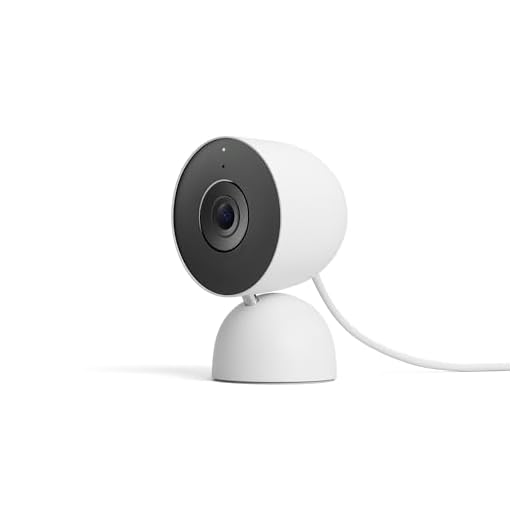
Do Nest Security Cameras Work with Google Home
Nest security cameras are compatible with Google Home, allowing you to control your cameras using voice commands through Google Assistant. This integration makes it convenient to monitor your home’s security using a smart home device.
How to Connect Nest Security Cameras to Google Home
To connect your Nest security cameras to Google Home, you need to link your Nest account to Google Assistant. Once linked, you can use voice commands to view live feeds, play recorded footage, and manage camera settings.
Important Note: Make sure your Nest cameras are set up and connected to your Wi-Fi network before attempting to link them to Google Home.
Overview of Nest Security Cameras
Nest security cameras are cutting-edge devices designed to keep your home safe and secure. These cameras offer high-definition video quality, advanced motion detection, and night vision capabilities to monitor your property day and night.
With Nest security cameras, you can access live video feeds from your smartphone or tablet, allowing you to keep an eye on your home while you’re away. The cameras also feature two-way audio, so you can communicate with visitors or scare off potential intruders.
Furthermore, Nest security cameras can be integrated with Google Home, providing you with a seamless smart home security solution. You can control your cameras using voice commands via Google Assistant or view live video feeds on your Google Home Hub or compatible devices.
Overall, Nest security cameras offer state-of-the-art features and convenience to help you protect your home and loved ones.
Compatibility with Google Home
Nest security cameras are compatible with Google Home, allowing you to easily integrate your security system into your smart home setup. By linking your Nest account to your Google Home app, you can control your cameras using voice commands through Google Assistant.
Key Features:
- View live camera feeds on your Google Home Hub or Nest Hub Max
- Receive alerts and notifications on your Google Home devices
- Arm and disarm your security system using voice commands
Setting up Nest Cameras with Google Home
Integrating your Nest security cameras with Google Home is a seamless process that allows you to monitor your home with ease. Follow these simple steps to set up your Nest cameras with Google Home:
Step 1: Download and install the Google Home app on your mobile device.
Step 2: Open the Google Home app and tap on the “+” icon to add a new device.
Step 3: Select “Set up device” and choose “Have something already set up?”
Step 4: Look for Nest among the list of compatible devices and select it.
Step 5: Sign in to your Nest account and follow the on-screen instructions to link your Nest cameras to Google Home.
Once the setup is complete, you can use voice commands to control your Nest cameras through Google Home. Enjoy the convenience of monitoring your home security system with just a few simple words!
Features of Nest Cameras with Google Home
Nest security cameras offer seamless integration with Google Home, providing users with a comprehensive smart home security solution. Here are some key features of Nest cameras when used with Google Home:
1. Voice Control
Users can easily control their Nest cameras using voice commands through Google Home devices. This hands-free functionality allows users to check camera feeds, adjust settings, and receive alerts without having to lift a finger.
2. Home Automation
With Google Home integration, Nest cameras can be part of a larger smart home ecosystem. Users can create custom routines and automation tasks that involve their cameras, such as turning on lights when motion is detected or setting up alerts for specific events.
Benefits of Integrating Nest Cameras with Google Home
Integrating Nest cameras with Google Home can provide numerous benefits for your home security and convenience.
1. Seamless Control
With Google Home integration, you can easily control your Nest cameras using voice commands. This allows for hands-free operation and quick access to live feeds or recorded footage.
2. Smart Home Automation
By connecting Nest cameras with Google Home, you can create automated routines that trigger camera actions based on other smart devices in your home. For example, you can set your cameras to turn on when you leave the house or when motion is detected by other sensors.
Overall, the integration of Nest cameras with Google Home enhances your home security system and makes monitoring and managing your cameras more convenient and efficient.
Security and Privacy Concerns
While the integration of Nest security cameras with Google Home offers convenience and enhanced functionality, it also raises some security and privacy concerns. As these devices are connected to the internet, there is always a risk of potential hacking or unauthorized access to the camera feed. It is crucial to ensure that your network is secure and that you regularly update the firmware of your devices to protect against security vulnerabilities.
Data Privacy
Another significant concern is data privacy. When you link your Nest security cameras to Google Home, you are essentially sharing your camera footage with Google. This raises questions about how Google handles and stores this data, and whether it could be used for targeted advertising or other purposes. Make sure to review Google’s privacy policy and settings to understand how your data is being used and take appropriate measures to protect your privacy.
Tips for Using Nest Cameras with Google Home
If you are looking to integrate your Nest security cameras with Google Home, here are some tips to help you make the most of this smart home setup:
1. Link Your Nest Account with Google Home:
Make sure to link your Nest account with your Google Home app to enable seamless integration between your cameras and the Google Home ecosystem.
2. Use Voice Commands:
Take advantage of Google Assistant’s voice commands to control your Nest cameras hands-free. You can ask Google Home to show live feeds, play recorded footage, or adjust camera settings with simple voice prompts.
3. Create Routines:
Set up routines in the Google Home app to automate actions for your Nest cameras. For example, you can create a routine to turn on your cameras when you leave home or to receive alerts when motion is detected.
4. Explore Integration with Other Smart Devices:
Consider integrating your Nest cameras with other smart devices in your home for enhanced automation and security. You can link your cameras to smart lights, door locks, or alarms to create a comprehensive smart home security system.
5. Keep Your Firmware Updated:
Regularly check for firmware updates for your Nest cameras to ensure they are running smoothly and securely with Google Home. Updated firmware can also provide new features and improvements to enhance your camera experience.
By following these tips, you can effectively use your Nest cameras in conjunction with Google Home to create a smart and secure home environment.
Customer Reviews and Feedback
Customer reviews and feedback are essential when considering the compatibility of Nest security cameras with Google Home. Many users have shared their experiences with these devices, highlighting the seamless integration and convenient features that come with using both products together.
| User | Review |
|---|---|
| John123 | “I love how I can easily control my Nest security cameras using Google Home. The setup was straightforward, and the video quality is excellent.” |
| Sara87 | “Having Google Home connect to my Nest cameras has made monitoring my home a breeze. I can check live footage with simple voice commands, making me feel more secure.” |
| TechieGuy | “The integration between Nest cameras and Google Home is top-notch. I appreciate the notifications and alerts I receive through Google Home, keeping me informed of any activity.” |
Overall, customer reviews indicate a high level of satisfaction with the compatibility and performance of Nest security cameras with Google Home, making it a popular choice for smart home security systems.




I’ve been using Nest cameras with Google Home for a few months now, and while the integration is convenient for voice commands, I do have some concerns about privacy. I often wonder how secure my footage is, and if Google really needs access to it. Has anyone else felt this way?
I totally understand your concern! I opted to limit the data access settings in my Google account. It gave me peace of mind knowing that I’m controlling what information is shared.
It's great that you’re being proactive about privacy! Regularly reviewing your Google account settings can help you better control how your data is managed. Stay secure!
I recently integrated my Nest cameras with Google Home, and it has made monitoring so much easier. I set up routines to automatically turn on the cameras when I leave the house. The video quality is impressive too! Just a heads up, though: make sure your Wi-Fi is strong, or you might experience some lag when accessing the live feeds.
Thanks for sharing your experience! Did you have any issues during the setup process?
The setup is usually straightforward, but if you encounter issues, ensure your Nest cameras are connected to Wi-Fi first. If problems persist, checking the Google Home app’s permissions can help.