
 Carmen J. Moore

Wireless security camera systems have become increasingly popular in recent years due to their convenience and ease of installation. But many people wonder if these systems are truly effective in providing security for their homes or businesses. The answer to this question depends on a variety of factors, including the quality of the cameras, the reliability of the wireless connection, and the level of monitoring and support provided.
One of the key advantages of a wireless security camera system is the flexibility it offers in terms of placement and installation. Unlike traditional wired systems, wireless cameras can be easily moved and repositioned as needed, making it easier to adapt to changing security needs. This can be particularly useful for renters or homeowners who may not want to deal with the hassle of running wires through their walls.
However, the effectiveness of a wireless security camera system also depends on the strength and reliability of the wireless signal. A weak or unstable connection can result in dropped footage or delayed notifications, compromising the system’s ability to provide real-time monitoring and alerts. It’s important to choose a system with a strong signal range and reliable connectivity to ensure that your security cameras are always functioning properly.
Advantages of Wireless Security Cameras
Wireless security cameras offer numerous benefits compared to traditional wired systems. Here are some of the key advantages:


Easy Installation
One of the main advantages of wireless security cameras is their easy installation process. Since they don’t require cables to connect to a central recording device, you can place them virtually anywhere without the need for complex wiring.
Flexibility
Wireless security cameras provide flexibility in terms of placement. You can easily move them around or add more cameras to your system without the hassle of dealing with cables. This flexibility allows you to customize your security setup to meet your specific needs.
Types of Wireless Security Cameras
Wireless security cameras come in various types, each with its own set of features and benefits. Here are some common types of wireless security cameras:
- Indoor Wireless Cameras: These cameras are designed for indoor use and are often smaller and more discreet. They are ideal for monitoring the inside of your home or office.
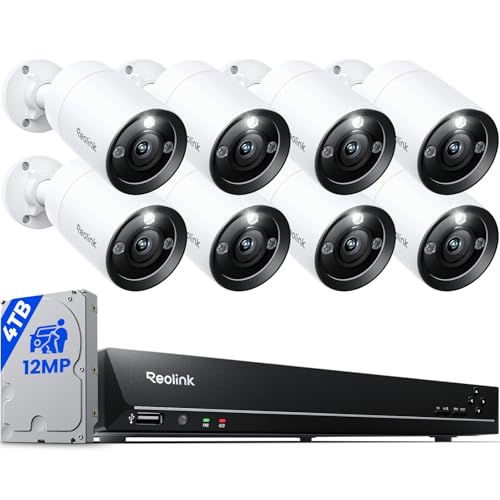
- Outdoor Wireless Cameras: Outdoor cameras are built to withstand the elements and provide surveillance for the exterior of your property. They are weatherproof and can capture footage in various lighting conditions.
- PTZ Wireless Cameras: PTZ (Pan-Tilt-Zoom) cameras can be remotely controlled to pan, tilt, and zoom to get a better view of the area being monitored. They offer flexibility in surveillance coverage.
Other types of wireless security cameras may include:
- Bullet Cameras
- Dome Cameras
- Wire-Free Cameras
Factors to consider when choosing a wireless security camera system
When selecting a wireless security camera system for your home or business, there are several important factors to consider to ensure you get the best solution for your needs:
- Camera Resolution: Choose a system with high resolution cameras for clearer images and better video quality.
- Wireless Range: Consider the distance between the cameras and the receiver to ensure reliable connectivity.
- Weatherproofing: If you plan to install outdoor cameras, make sure they are weatherproof to withstand different weather conditions.
- Field of View: Look for cameras with a wide field of view to cover more area and reduce blind spots.
- Remote Access: Opt for a system that offers remote access so you can view the camera feed from anywhere using a smartphone or computer.
- Storage Options: Decide whether you want local storage on an SD card or cloud storage for your video recordings.
- Motion Detection: Choose a system with motion detection capabilities to receive alerts when movement is detected.
- Night Vision: For around-the-clock surveillance, select cameras with night vision capabilities for clear footage in low light conditions.
Installation of Wireless Security Cameras
Installing a wireless security camera system is a relatively simple process that can be done by most homeowners. Here are some steps to guide you through the installation:
1. Determine Camera Placement
Before you start installing your cameras, decide where you want to place them. Consider areas that need monitoring, such as entry points, driveways, or backyard. Make sure the cameras have a clear view of the area you want to monitor.
2. Mount the Cameras
Once you have determined the camera placement, mount the cameras using the included mounting hardware. Most wireless cameras can be easily attached to walls, ceilings, or other surfaces using screws or adhesive mounts.
- Position the camera at the desired angle for optimal coverage.
- Ensure the camera is securely mounted to prevent it from being easily tampered with.
3. Set Up the Camera System
After mounting the cameras, follow the manufacturer’s instructions to set up the camera system. This typically involves connecting the cameras to a power source and syncing them with the base station or recording device.
- Install any required software or apps on your mobile device or computer to access the camera feeds.
- Configure the camera settings, such as motion detection sensitivity and recording preferences.
By following these steps, you can successfully install a wireless security camera system to protect your home or property.
How to maintain a wireless security camera system
Proper maintenance of your wireless security camera system is crucial to ensure its optimal performance and longevity. Here are some essential tips to help you maintain your system:
- Regularly check camera placement: Ensure all cameras are positioned correctly to cover the desired areas without any obstructions.
- Keep cameras clean: Regularly clean the lenses of your cameras to maintain clear image quality.
- Check for signal interference: Monitor for any signal interference that may affect the performance of your wireless cameras.
- Update firmware: Stay up to date with firmware updates provided by the camera manufacturer to improve security and performance.
- Test motion detection: Periodically test the motion detection feature of your cameras to ensure they are functioning properly.
- Secure your network: Ensure your wireless network is secure to prevent unauthorized access to your camera system.
- Inspect cables and power source: Regularly check the cables and power source of your cameras to prevent any potential issues.
Benefits of using a wireless security camera system
Wireless security camera systems offer numerous advantages over traditional wired systems. Here are some key benefits:
1. Easy installation
One of the main advantages of wireless security camera systems is the ease of installation. Since there are no wires to run, the setup process is much simpler and can be completed quickly without the need for professional help.
2. Flexibility
Wireless security cameras can be placed virtually anywhere within range of the wireless signal, providing flexibility in positioning and coverage. This allows you to easily adjust the camera placement as needed to optimize your security monitoring.
- Remote access
- Integration with smart home devices
- Expandability
Overall, a wireless security camera system offers convenience, flexibility, and advanced features that make it a popular choice for home and business security.



I disagree with the article saying that wireless cameras are generally more reliable. I've had issues with mine dropping connection during important times, and it makes me question their effectiveness.
Thanks for sharing your thoughts! Reliability can vary based on many factors, including the brand of the camera, your home's layout, and the strength of your Wi-Fi. It's best to research specific models and user reviews.
How reliable is the wireless connection for these cameras? Do they drop out often?
Just wanted to note that I love how easily I can relocate my wireless cameras when I change the layout of my home!