
 Carmen J. Moore

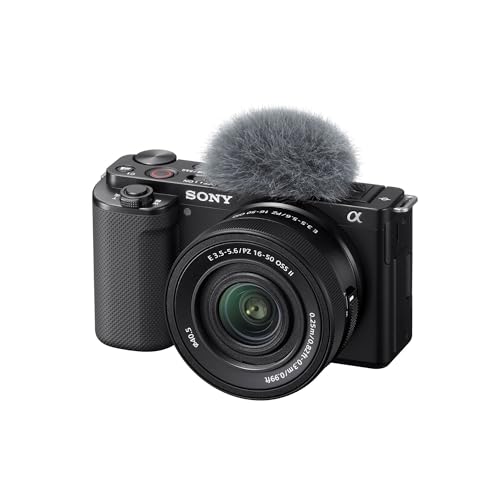
Live streaming has become increasingly popular in recent years, allowing content creators, businesses, and individuals to connect with audiences in real-time. One key component of a successful live stream is the camera used to capture the action. Mirrorless cameras have gained popularity for their compact size, quality image capture, and versatility, making them an excellent choice for live streaming.
So, how can you harness the power of a mirrorless camera for your live streams? In this guide, we’ll explore the steps and tips to help you set up and live stream with a mirrorless camera effectively. From choosing the right camera model to configuring settings and selecting the appropriate accessories, we’ll cover everything you need to know to elevate your live streaming experience.


Choosing the right camera
When it comes to live streaming with a mirrorless camera, choosing the right camera is crucial for achieving high-quality video and audio. Here are some factors to consider when selecting a camera for live streaming:
1. Sensor size
The sensor size of the camera plays a significant role in determining the image quality. Larger sensors typically perform better in low-light conditions and offer better depth of field, resulting in a more professional-looking image.
2. Resolution and frame rate
For live streaming, it’s essential to choose a camera with a resolution and frame rate that suits your needs. Higher resolution and frame rate options allow for crisper, smoother video output, but keep in mind that they may require more processing power and bandwidth.
| Camera Model | Sensor Size | Resolution | Frame Rate |
|---|---|---|---|
| Sony Alpha a7 III | Full-frame | 4K | 30fps |
| Canon EOS R | Full-frame | 4K | 30fps |
| Panasonic Lumix GH5 | Micro Four Thirds | 4K | 60fps |
Setting up your camera
Before you start live streaming with your mirrorless camera, it’s essential to set it up correctly. Follow these steps to ensure you have everything in place:
- Charge your camera fully to avoid any interruptions during the live stream.
- Insert a fully formatted memory card into the camera to store the video footage.
- Adjust the settings on your camera for the best video quality and performance. Make sure to set the resolution, frame rate, and exposure settings accordingly.
- Mount your camera on a stable tripod or a secure mount to avoid shaky footage.
- Connect your camera to a power source if needed to ensure it stays powered throughout the live stream.
Connecting to a computer
To live stream with a mirrorless camera, you will need to connect it to your computer. Most mirrorless cameras have a USB port that allows you to connect them directly to your computer. Once connected, you can use software like OBS Studio or Zoom to stream your content. Make sure to set up the camera as a video input source in your streaming software and adjust the settings for resolution and frame rate to ensure high-quality streaming. Additionally, you may need to install drivers or software provided by the camera manufacturer to properly connect and control the camera from your computer.
Choosing the right streaming platform
When it comes to live streaming with a mirrorless camera, choosing the right platform is crucial for reaching your audience effectively. Here are some factors to consider when selecting a streaming platform:
1. Audience size and demographics
Consider the size and demographics of your target audience. Some platforms may cater to specific niche audiences, while others have a broader reach.
2. Features and customization options
Look for platforms that offer the features and customization options you need, such as the ability to schedule streams, add overlays, and interact with viewers in real-time.
By carefully considering these factors, you can choose a streaming platform that aligns with your goals and helps you connect with your audience in a meaningful way.
Configuring your streaming settings
Once you have connected your mirrorless camera to your computer and chosen your streaming platform, it’s time to configure your streaming settings to ensure a smooth and high-quality broadcast. Here are some key settings to consider:
1. Video resolution and frame rate
Choose a video resolution and frame rate that is supported by your camera and streaming platform. Typically, 1080p at 30fps is a good starting point for most streaming scenarios.
2. Bitrate and encoding
Set your bitrate and encoding settings based on your internet connection speed and the requirements of your streaming platform. Higher bitrates will result in better video quality but require more bandwidth.
By adjusting these settings, you can optimize your live stream for the best quality and performance.
Engaging your audience
When live streaming with a mirrorless camera, it’s important to engage your audience to keep them interested and coming back for more. Here are some tips to help you engage your viewers:
Interact with your audience: Respond to comments and questions in real-time to create a sense of community and connection.
Use visual aids: Incorporate graphics, overlays, and other visual elements to enhance your stream and keep viewers engaged.
Plan interactive segments: Consider incorporating Q&A sessions, polls, or giveaways to keep your audience involved and excited.
Be authentic: Show your personality and be genuine with your audience to build trust and loyalty.
Promote engagement: Encourage viewers to like, share, and subscribe to your channel to grow your audience and increase interaction.
By implementing these strategies, you can create a more engaging live stream experience with your mirrorless camera.
Monitoring your stream
It’s important to monitor your live stream to ensure everything is running smoothly and that your audience is getting the best viewing experience. Here are some tips for monitoring your stream:
| 1. Use a dedicated monitor: | Set up a separate monitor or device to view your live stream while you are streaming. This will allow you to keep an eye on the quality of the stream and make adjustments as needed. |
| 2. Check audio levels: | Make sure the audio levels are balanced and clear. Monitor the audio input to ensure there are no issues with sound quality. |
| 3. Monitor video quality: | Keep an eye on the video quality throughout the stream. Check for any lag or pixelation that could affect the viewing experience. |
| 4. Engage with your audience: | Monitor the chat or comments section to engage with your audience and address any questions or feedback they may have during the stream. |




Do you really need a high bitrate for streaming? I'm on a limited internet plan. What’s the minimum I should aim for to get decent quality?
I'm considering using a mirrorless camera for live streaming, but I'm a bit confused about which model to choose. Is it really worth investing in a full-frame camera like the Sony Alpha a7 III compared to something like the Panasonic Lumix GH5?