
 Carmen J. Moore

Noise in photography can be a common issue, especially when using a mirrorless camera like Sony. Noise, also known as grain, can detract from the overall quality of your images and affect their sharpness and clarity. Fortunately, there are several ways to reduce noise on your Sony mirrorless camera and improve the overall look of your photos.
One of the first steps to reducing noise on your Sony mirrorless camera is to adjust the ISO settings. ISO controls the sensitivity of your camera’s sensor to light, and higher ISO settings can result in more noise. Try to keep your ISO as low as possible while still achieving the desired exposure.


Another way to reduce noise is to use noise reduction software or features built into your camera. Many Sony mirrorless cameras have noise reduction settings that can help reduce grain in your images. Additionally, you can use post-processing software like Adobe Lightroom to further reduce noise in your photos.
Tips for Minimizing Noise on Your Sony Mirrorless Camera
1. Use a lower ISO setting: Noise often becomes more noticeable at higher ISO settings. Try to keep your ISO as low as possible while still achieving the desired exposure.
2. Shoot in well-lit conditions: Shooting in ample light can help reduce the need for high ISO settings, which in turn can minimize noise in your photos.
3. Use noise reduction settings: Many Sony mirrorless cameras offer in-camera noise reduction settings. Experiment with these settings to find the right balance between noise reduction and image quality.
4. Post-processing software: Consider using post-processing software to further reduce noise in your images. Programs like Adobe Lightroom or DxO PhotoLab offer noise reduction tools that can help improve the overall quality of your photos.
5. Avoid extreme temperature conditions: Extreme temperatures can sometimes amplify noise in your camera sensor. Try to keep your camera within its recommended operating temperature range to minimize noise.
Adjusting ISO Settings
One way to reduce noise on a Sony mirrorless camera is to adjust the ISO settings. ISO determines the camera’s sensitivity to light, with higher ISO settings making the camera more sensitive but also introducing more noise. Here are some tips for adjusting ISO settings:
1. Use the lowest ISO possible
Start by setting the ISO to the lowest possible value, usually around ISO 100 or 200. This will help minimize noise in your images.
2. Increase ISO only when necessary
Only increase the ISO when you need to maintain a fast shutter speed in low light conditions. Be mindful of the trade-off between noise and image quality.
Remember: Experiment with different ISO settings in various lighting conditions to find the optimal balance between noise and image quality.
Using Noise Reduction Function
One effective way to reduce noise on a Sony mirrorless camera is to utilize the built-in noise reduction function. This feature can help minimize the appearance of noise in your photos, especially in low-light conditions or when using higher ISO settings.
You can typically find the noise reduction function in the camera settings menu. Depending on the camera model, you may have different levels of noise reduction to choose from, such as low, medium, or high. Experiment with these settings to find the level that works best for your shooting conditions.
Keep in mind that using higher levels of noise reduction can sometimes result in loss of detail in your photos, so it’s important to strike a balance between reducing noise and maintaining image quality.
Proper Exposure Settings
One way to reduce noise on a Sony mirrorless camera is to ensure proper exposure settings. When the camera sensor is underexposed, it tends to amplify the noise in the image. Here are some tips to set the exposure correctly:
Use the lowest ISO possible
Keep the ISO as low as possible to minimize noise. Start with the base ISO (usually ISO 100) and increase it only when necessary.
Adjust the aperture and shutter speed
Set the aperture and shutter speed to achieve the correct exposure. Use a wider aperture for low-light situations and a faster shutter speed to prevent motion blur.
| ISO | Aperture | Shutter Speed |
|---|---|---|
| 100 | f/4 | 1/125 |
| 200 | f/5.6 | 1/250 |
| 400 | f/8 | 1/500 |
By setting the exposure correctly, you can capture cleaner images with less noise on your Sony mirrorless camera.
Cleaning the Camera Sensor
One common cause of noise on mirrorless cameras like Sony is a dirty sensor. Dust particles can accumulate on the sensor over time, leading to unwanted artifacts in your images. Here are steps to clean your camera sensor:
- Turn off the camera and remove the lens.
- Set the camera to sensor cleaning mode, if available, to lock up the mirror and expose the sensor.
- Use a blower to gently blow off any loose dust particles on the sensor. Be careful not to touch the sensor with the blower tip.
- If the dust persists, you may need to use a sensor cleaning kit with swabs and cleaning solution. Follow the manufacturer’s instructions carefully.
- After cleaning, turn off the camera and reattach the lens. Take a test shot to check if the sensor is now clean and noise-free.
Choosing the Right Lens
When it comes to reducing noise on a Sony mirrorless camera, selecting the right lens can make a big difference. Here are some factors to consider:
- Aperture: A lens with a wider aperture (lower f-stop number) allows more light to enter the camera, which can help reduce noise in low-light conditions.
- Prime vs. Zoom: Prime lenses typically have larger apertures and produce sharper images, making them a good choice for low-light situations. Zoom lenses, while versatile, may have smaller apertures that could result in more noise.
- Image Stabilization: Optical image stabilization can help reduce camera shake, resulting in sharper images and potentially less noise, especially when shooting handheld in low light.
- Quality: Investing in a high-quality lens can improve the overall image quality and reduce the amount of noise in your photos.
By considering these factors and choosing the right lens for your Sony mirrorless camera, you can help minimize noise and capture stunning images even in challenging lighting conditions.


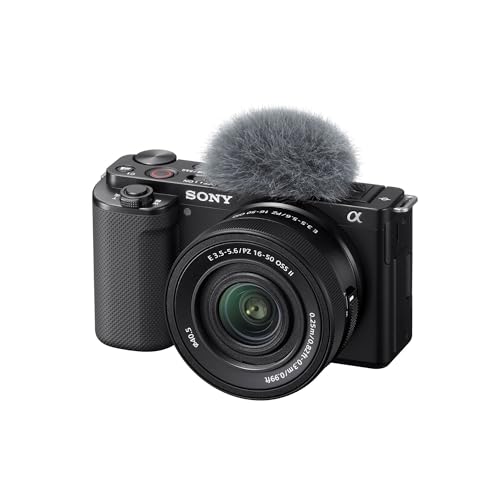


I recently switched to a Sony mirrorless camera, and I noticed a significant reduction in noise when I kept the ISO below 400. Additionally, using the in-camera noise reduction feature worked wonders. However, I found that at higher settings, it often blurred fine details. It’s all about finding that sweet spot!
Just a tip: using a solid tripod can also help reduce noise by allowing you to use lower ISO settings in low-light conditions. Wishing I had used one during my last shoot!
What ISO settings do you recommend for night photography with a Sony mirrorless camera? I often get a lot of noise even at higher settings.
For night photography, try starting with ISO 800 and adjust as necessary. Keeping it lower will help minimize noise, but you'll need to balance it with shutter speed for exposure.
I don't completely agree with the suggestion to keep the ISO low at all times. Sometimes you just need to bump it up for a shot, and using noise reduction in post-processing can save the day. I don't think it's always practical to avoid higher ISO settings.
True, sometimes you have to use higher ISO, especially in fast-moving situations. But I guess it’s all about finding a balance between noise and the shot you want.
I disagree with the idea that shooting in extreme temperature always increases noise. I’ve taken photos in cold weather without any noticeable noise increase; it really depends more on the camera settings.
When you say to avoid extreme temperatures, does that really affect the sensor noise? How much of a difference does it make?
Yes, extreme temperatures can affect the camera sensor's performance. Heat can increase noise levels, while cold can cause other issues. It's best to keep your camera within the recommended operating temperatures for optimal performance.
Great tips! I always forget to use noise reduction software after the shoot. Definitely going to start using Lightroom more.
How does using a prime lens compare to a zoom lens in terms of noise? I’ve heard primes are better for low-light settings, but is that true?
I've been using a Sony A7 III for a while now, and I definitely notice the noise issue when shooting above ISO 1600. Reducing the ISO helps, but sometimes you need it for low light. I’ve had good results with Adobe Lightroom's noise reduction feature, but it's a bit hit or miss with detail retention.
I've had similar experiences! The noise reduction in Lightroom can be powerful, but I often have to tweak the settings to find the sweet spot without losing too much detail.
What are the best ISO settings for shooting in low-light conditions with a Sony mirrorless camera? I want to minimize noise but still get decent exposure.
I'm new to using Sony mirrorless cameras. Can you explain how to access the noise reduction settings? I can't seem to find them in the menu.
I don't think using the lowest ISO is always the best solution. Sometimes it can lead to longer exposure times, which can cause motion blur. It really depends on the situation.