
 Carmen J. Moore

Have you ever experienced the frustration of trying to use your iPhone 6 camera, only to find that it won’t load? This common issue can be quite annoying, especially when you’re trying to capture a special moment or take a quick snapshot. There are several reasons why your camera may not be loading on your iPhone 6, ranging from software glitches to hardware issues.
One possible reason why your camera is not loading on your iPhone 6 could be due to a software problem. This could be caused by a bug in the operating system or a conflict with other apps running on your device. In some cases, simply restarting your iPhone or updating to the latest version of iOS can resolve the issue and get your camera working again.
Common issues with camera on iPhone 6
Having trouble with your iPhone 6 camera? Here are some common issues that users face:

1. Camera not loading: If your camera is not loading, try restarting your phone or updating the software to the latest version.
2. Blurry photos: Blurry photos can be caused by a dirty lens or shaky hands. Make sure the lens is clean and try using a tripod or stabilizing your hands.
3. Camera app crashing: If the camera app keeps crashing, try force quitting the app and reopening it. If the issue persists, consider resetting the app or restarting your phone.
4. Flash not working: If the flash is not working, check the flash settings in the camera app and make sure it is not disabled. If the issue continues, it may be a hardware problem that requires professional help.
5. Overheating: If your iPhone 6 camera is overheating, try closing any unnecessary apps running in the background or letting the phone cool down before using the camera again.
Hardware problems causing camera not to load
When your camera fails to load on your iPhone 6, it could be due to hardware issues. Here are some common hardware problems that may be causing the camera not to load:
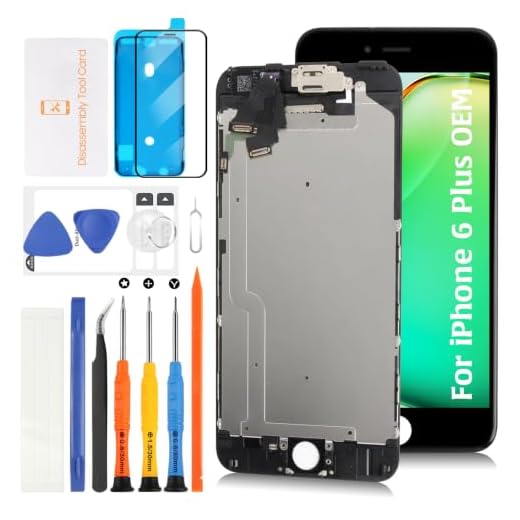
1. Faulty Camera Module
The camera module itself may be faulty, causing it to fail to load or function properly. This could be due to physical damage or a manufacturing defect.
2. Loose Connection
A loose connection between the camera module and the iPhone’s motherboard can prevent the camera from loading. This can happen if the phone has been dropped or subjected to physical stress.
| Issue | Solution |
|---|---|
| Faulty Camera Module | Replace the camera module with a new one. |
| Loose Connection | Check and reseat the camera module connector to ensure it is properly connected. |
Software glitches affecting camera functionality
Software glitches can often cause issues with your iPhone camera not loading properly. These glitches can be caused by a variety of factors, such as outdated software, conflicts with other apps, or corrupted data. Here are a few common software-related issues that may be affecting your camera:
- Outdated software: Make sure your iPhone’s operating system is up to date, as outdated software can cause compatibility issues with the camera app.
- App conflicts: Sometimes, other apps running in the background can interfere with the camera app, causing it to malfunction. Try closing all other apps and then reopening the camera app.
- Corrupted data: If the camera app’s data becomes corrupted, it may not load properly. You can try resetting the app or reinstalling it to see if that resolves the issue.
If you continue to experience problems with your camera not loading, it may be helpful to contact Apple Support for further assistance.
Outdated iOS version and camera compatibility
If your camera is not loading on your iPhone 6, it could be due to an outdated iOS version. Make sure that your iPhone 6 is running the latest version of iOS to ensure compatibility with the camera app. Updating your iOS can often resolve issues with camera functionality.
Additionally, check if the camera app is compatible with your iPhone model. Some older camera apps may not be fully compatible with newer iPhone models like the iPhone 6. Consider using a different camera app that is optimized for your device to ensure smooth operation.
Insufficient storage leading to camera errors
If your camera is not loading on your iPhone 6, one possible reason could be insufficient storage on your device. When your iPhone’s storage is full, it can lead to various errors and issues, including problems with the camera app.
To resolve this issue:
1. Check your iPhone’s storage capacity in the Settings app to see if it is nearly full.
2. Delete any unnecessary photos, videos, apps, or other files to free up space on your device.
3. Consider transferring files to iCloud or a computer to further free up storage on your iPhone.
4. Restart your iPhone after freeing up space to see if the camera app now loads properly.
By ensuring you have sufficient storage on your iPhone, you can help prevent camera errors and other performance issues on your device.
Camera app settings and permissions troubleshooting
If your camera is not loading on your iPhone 6, it could be due to incorrect settings or permissions. Here are some troubleshooting steps you can take:
- Make sure the camera app has permission to access the camera. Go to Settings > Privacy > Camera and ensure the camera app is enabled.
- Restart your iPhone. Sometimes a simple restart can resolve software glitches that may be affecting the camera app.
- Check for any app updates. An outdated camera app may not be compatible with your iPhone’s software version.
- Reset your camera settings. Go to Settings > General > Reset > Reset All Settings. This will reset all settings on your iPhone, including camera settings, so proceed with caution.
- If none of the above steps work, consider contacting Apple Support for further assistance.
Third-party apps interfering with camera operation
If your iPhone camera is not loading, it could be due to third-party apps interfering with its operation. Some apps may access the camera in the background, causing conflicts and preventing the camera from functioning properly. To troubleshoot this issue, follow these steps:
- Check for recently installed apps that may be using the camera.
- Close all apps running in the background by double-clicking the Home button and swiping up on the app windows.
- Restart your iPhone to refresh the system and close any background processes.
- If the issue persists, try deleting recently installed apps one by one to see if the camera starts working.
- Contact the app developers for assistance or check for app updates that may resolve the camera loading issue.
By following these steps, you can identify and resolve any conflicts caused by third-party apps that may be affecting your iPhone camera’s operation.
Professional repair options for camera malfunctions
If your iPhone 6 camera is not loading or functioning properly, you may need to consider professional repair options to fix the issue. Here are some recommended steps:
Apple Authorized Service Provider
One of the best options for repairing your iPhone 6 camera is to visit an Apple Authorized Service Provider. These experts are trained and certified by Apple to repair and service their products. They will diagnose the issue with your camera and provide you with a solution.
Third-Party Repair Shops
Another option is to seek help from third-party repair shops that specialize in iPhone repairs. Make sure to choose a reputable and experienced repair shop to ensure quality service. They can often offer more affordable repair options compared to official Apple service providers.
| Pros | Cons |
| Expertise in iPhone repairs | Potential voiding of warranty |
| Quick turnaround time | Quality of parts may vary |
| Possible cost savings | No official Apple certification |
Before choosing a repair option, consider the pros and cons of each to ensure you make an informed decision. Remember to back up your data before handing over your device for repairs to prevent any potential loss of information.


I experienced similar issues with my iPhone 6. At first, I thought it was a hardware problem because I had dropped it a few times. After some research, I found out that doing a hard reset helped a lot. Just holding the home and power button worked wonders for me. Now the camera is back to normal!
Has anyone else experienced the camera not loading on their iPhone 6? I tried restarting and updating, but it still won’t work. What else can I do?
I faced this camera issue too, and it was pretty frustrating. None of the usual fixes worked—restarting and updating didn’t help. Finally, I discovered that it was a loose connection because I had dropped my phone recently. After reseating the camera module, it started working again! Just a heads up for anyone who's dropped their phone recently!
Does clearing the camera app’s data really help? I heard that could fix loading issues, but I'm hesitant to try it.