
 Carmen J. Moore

Are you looking to elevate your photography game to the next level? One way to achieve this is by using a 35mm lens on your digital camera. While digital cameras often come with versatile zoom lenses, a fixed 35mm lens can offer unique advantages in terms of image quality, depth of field, and overall creativity.


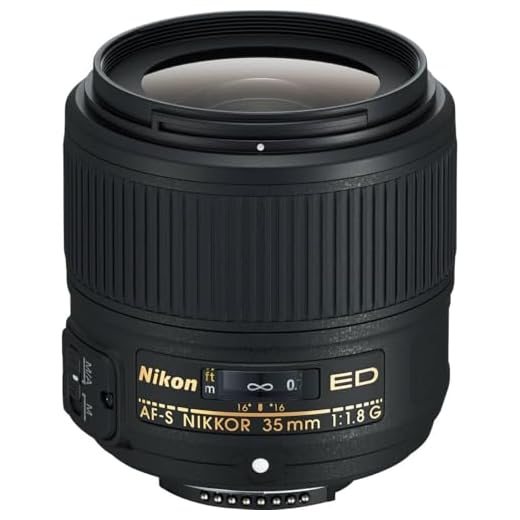
But how do you go about using a 35mm lens on a digital camera? In this guide, we will explore the benefits of using a 35mm lens, how to choose the right one for your camera, and essential tips for getting the most out of this classic focal length. Whether you are a beginner or a seasoned photographer, incorporating a 35mm lens into your kit can unlock a world of artistic possibilities.
How to Use a 35mm Lens on a Digital Camera
Using a 35mm lens on a digital camera can give you a unique perspective and high-quality images. Here are some steps to help you make the most of this combination:
Step 1: Check Compatibility
Make sure your digital camera is compatible with the 35mm lens. Some cameras may require an adapter to use this type of lens.
Step 2: Adjust Settings
Set your camera to manual mode and adjust the settings such as aperture, shutter speed, and ISO to get the desired exposure and depth of field.
Pro tip: Use a wide aperture for a shallow depth of field and a blurred background, or a narrow aperture for a sharper image with more in focus.
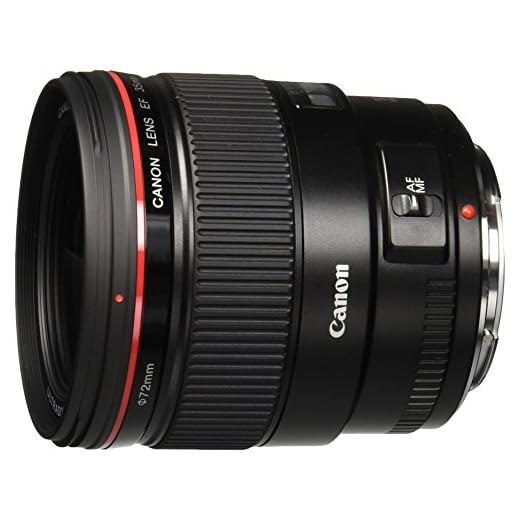
Experiment with different settings to find the best combination for your creative vision.
By following these steps, you can effectively use a 35mm lens on your digital camera and capture stunning images with a unique perspective.
Selecting the Right Adapter
When using a 35mm lens on a digital camera, it is important to choose the right adapter to ensure compatibility. The adapter you select will depend on the specific make and model of your camera as well as the type of lens mount on your 35mm lens.
Before purchasing an adapter, be sure to research which adapter is compatible with both your camera and lens. Some adapters may allow for manual focus only, while others may retain autofocus functionality. Consider your shooting style and needs when selecting an adapter.
Additionally, pay attention to the quality of the adapter. Opt for a high-quality adapter made from durable materials to ensure a secure fit and optimal performance. Cheaper adapters may compromise the stability of your lens-camera connection, leading to potential issues while shooting.

Mounting the Lens on Your Camera
Before mounting the 35mm lens on your digital camera, make sure to turn off your camera to avoid any potential damage.
1. Remove the lens cap from the 35mm lens and the camera body cap from your digital camera.
2. Align the white dot on the lens with the white dot on the camera mount.
3. Gently twist the lens clockwise until you hear a click, indicating that the lens is securely attached to the camera.
4. Once the lens is mounted, turn on your camera and you’re ready to start shooting with your 35mm lens!
Adjusting the Aperture Settings
One of the key features of a 35mm lens is its aperture settings, which allow you to control the amount of light entering the camera. This is crucial for achieving the desired depth of field in your photos.
Step 1: Understand Aperture
Aperture is measured in f-stops, such as f/1.8, f/2.8, f/4, and so on. A lower f-stop (e.g., f/1.8) lets in more light, creating a shallow depth of field with a blurred background. On the other hand, a higher f-stop (e.g., f/8) reduces the amount of light, resulting in a sharper background.
Step 2: Adjusting the Aperture
To adjust the aperture settings on your digital camera with a 35mm lens, use the camera’s manual or aperture priority mode. Dial in the desired f-stop value to control the depth of field and achieve the desired exposure.
Understanding the Focal Length
Focal length is a crucial concept in photography that determines the angle of view and magnification of the lens. It is measured in millimeters and indicates how much the lens can magnify a scene. A 35mm lens, for example, has a focal length of 35mm.
Shorter focal lengths (e.g., 24mm) capture a wider angle of view, making them ideal for landscapes and architectural photography. On the other hand, longer focal lengths (e.g., 85mm) provide a narrower angle of view and are great for portraits and close-up shots.

When using a 35mm lens on a digital camera, keep in mind that the crop factor of the camera sensor affects the effective focal length. For example, if your camera has a crop factor of 1.5x, a 35mm lens will behave like a 52.5mm lens (35mm x 1.5).
Understanding the focal length of your lens is essential for composing your shots and achieving the desired visual impact. Experiment with different focal lengths to discover the unique perspectives they offer and enhance your photography skills.
Using Manual Focus
When using a 35mm lens on a digital camera, one of the key factors to consider is manual focus. While many modern digital cameras offer autofocus capabilities, using manual focus with a 35mm lens can give you more control over the sharpness and depth of field in your photos.
To use manual focus with a 35mm lens, start by selecting the manual focus mode on your camera. This may involve switching a button on the camera body or selecting a focus mode in the camera menu.
Once you have activated manual focus, use the focus ring on the lens to adjust the focus manually. Turn the focus ring until your subject appears sharp in the viewfinder or on the camera’s LCD screen. You can also use the camera’s focus assist features, such as focus peaking or magnification, to ensure precise focus.

Experiment with different focus settings to achieve the desired effect in your photos. Manual focus may take some practice to master, but it can be a rewarding way to enhance your photography skills and create unique images with a 35mm lens on a digital camera.
Setting the ISO Sensitivity
ISO sensitivity determines how sensitive your camera’s sensor is to light. A higher ISO setting makes your camera more sensitive to light, allowing you to shoot in low-light situations without a flash. However, higher ISO settings can also introduce more digital noise to your images.
When using a 35mm lens on a digital camera, you may need to adjust the ISO sensitivity settings to compensate for the different light conditions. Start by setting your camera to the lowest ISO setting (usually ISO 100 or 200) to capture images with the least amount of noise.
If you are shooting in low-light conditions or need a faster shutter speed, you can increase the ISO setting to a higher value (e.g., ISO 400, 800, or higher). Just be aware that higher ISO settings can result in more digital noise, so it’s important to find a balance between ISO sensitivity and image quality.
Experiment with different ISO settings to see how they affect your images when using a 35mm lens on your digital camera. Practice shooting in various lighting conditions to get a feel for how ISO sensitivity impacts your photos.

Experimenting with Depth of Field
One of the key advantages of using a 35mm lens on a digital camera is the ability to experiment with depth of field. Depth of field refers to the range of distance that appears acceptably sharp in an image. By adjusting the aperture on your camera, you can control the depth of field and create images with different levels of background blur.
Creating a Shallow Depth of Field
To achieve a shallow depth of field with a 35mm lens, you can use a wider aperture (lower f-stop). This will result in a more blurred background while keeping your subject in focus. This technique is often used in portrait photography to isolate the subject from the background and create a pleasing bokeh effect.
Experimenting with a Deep Depth of Field
On the other hand, if you want to capture a scene with a deep depth of field where both the foreground and background are in focus, you can use a narrower aperture (higher f-stop). This is useful for landscape photography or when you want to ensure that everything in the frame is sharp and detailed.
Dealing with Crop Factor
When using a 35mm lens on a digital camera with a crop sensor, you need to take into account the crop factor. The crop factor affects the effective focal length of the lens, making it appear longer than its actual focal length.
For example, if your digital camera has a crop factor of 1.5x, a 35mm lens will effectively behave like a 52.5mm lens (35mm x 1.5 = 52.5mm). This means that the field of view will be narrower, similar to using a longer focal length lens on a full-frame camera.

To compensate for the crop factor, you can adjust your shooting distance or composition to achieve the desired framing. Keep in mind that the depth of field will also change due to the crop factor, so you may need to adjust your aperture settings accordingly.
| Original Focal Length | Effective Focal Length with 1.5x Crop Factor |
|---|---|
| 35mm | 52.5mm |
Capturing Sharp Images
When using a 35mm lens on a digital camera, it’s important to pay attention to your focus. Make sure to set your focus correctly on your subject to ensure sharpness in your images. Additionally, using a tripod can help stabilize your camera and prevent any blurriness caused by camera shake.
Another tip for capturing sharp images is to use a smaller aperture, such as f/8 or higher, to increase the depth of field. This will help ensure that more of your image is in focus, resulting in sharper overall images.
Lastly, be mindful of your shutter speed. A faster shutter speed can help freeze motion and reduce the chances of blurred images. Experiment with different settings to find the optimal combination for sharp and clear images when using a 35mm lens on your digital camera.
Post-Processing Tips and Techniques
After capturing images with a 35mm lens on your digital camera, post-processing is an important step to enhance and refine your photos. Here are some tips and techniques to improve your images:

1. Adjust Exposure and White Balance
Use editing software to fine-tune exposure and white balance settings to ensure accurate colors and brightness levels in your photos. Correct any underexposed or overexposed areas for a well-balanced image.
2. Sharpen and Enhance Details
Apply sharpening techniques to enhance the details and clarity of your photos. Adjust the sharpness settings carefully to avoid introducing noise or artifacts. You can also use tools like clarity and texture to bring out finer details in your images.
- Utilize presets or create your own editing style to maintain consistency across your photos.
- Experiment with different filters and effects to add a creative touch to your images.
- Consider cropping and straightening your photos for better composition.
FAQ
Can I use a 35mm lens on my digital camera?
Yes, you can use a 35mm lens on a digital camera. However, you need to make sure that the lens is compatible with your camera model. Some digital cameras have a crop factor that affects the effective focal length of the lens, so a 35mm lens may behave more like a 50mm lens on certain cameras.
What are the advantages of using a 35mm lens on a digital camera?
Using a 35mm lens on a digital camera can provide you with a classic focal length that is versatile for a wide range of photography genres. The 35mm focal length is great for street photography, portraits, landscapes, and everyday shooting. It also offers a natural perspective that closely resembles what the human eye sees, making it a popular choice among photographers.



I recently tried using a 35mm lens on my digital camera, and I loved the shallow depth of field I could achieve. I mostly focused on portrait shots, and the blurred backgrounds were stunning! I did find it challenging at first to adjust the manual focus, but after a little practice, it became easier. Has anyone else had a similar experience?
How do I know if my digital camera is compatible with a 35mm lens? Is there a specific way to check for that?
I don’t think a 35mm lens is the best choice for every photographer. It really depends on the type of photography you’re into. For landscapes, I prefer something wider. Anyone else feel the same?
It's true that different lenses serve different purposes, and personal preference plays a big role in photography style. A wider lens can definitely be beneficial for landscapes. It's all about finding what works for your specific needs!